
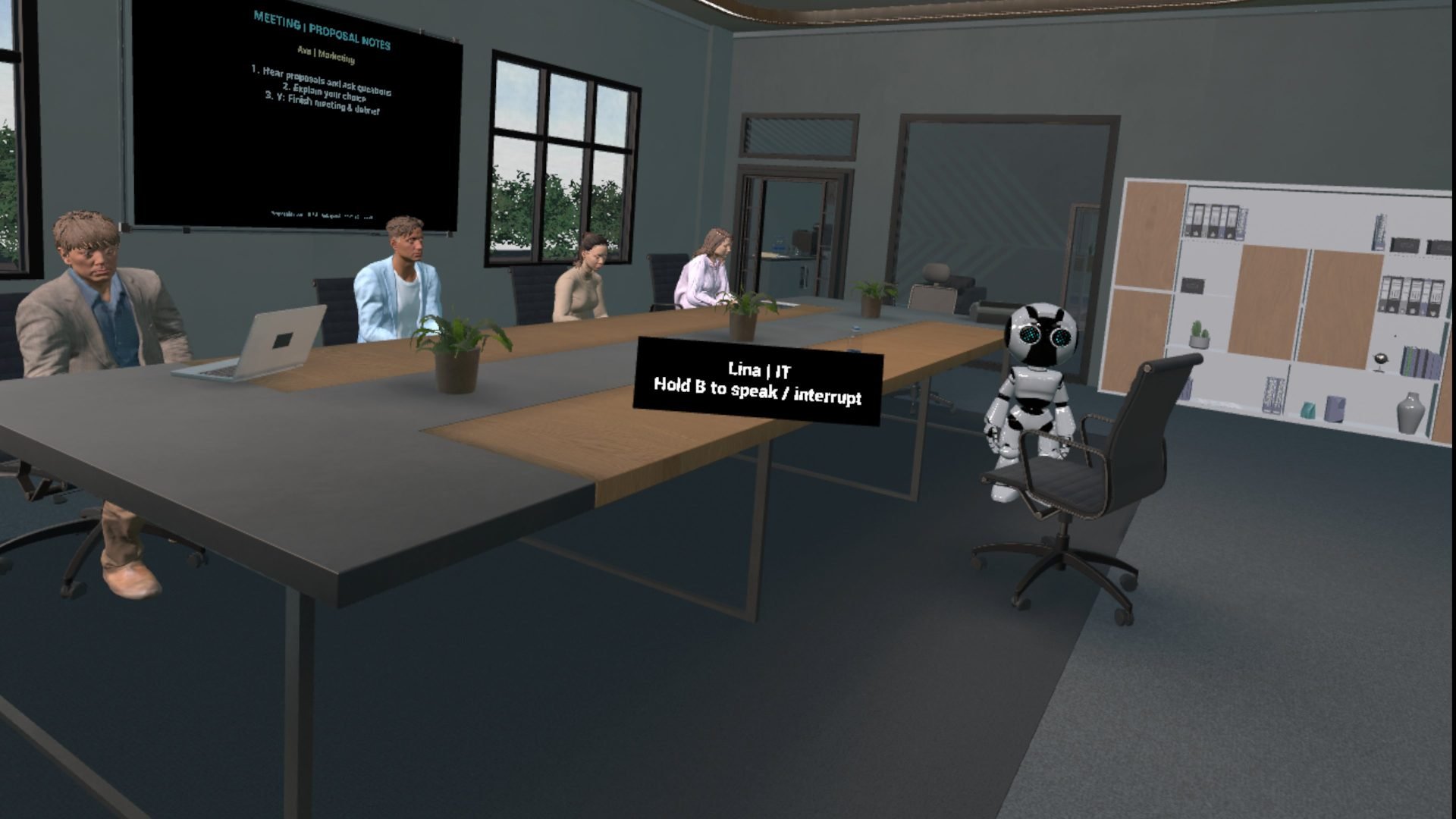
Four department heads. Different priorities. One decision to explain.
AI Adoption Strategy VR puts you in a workplace meeting where you hear AI adoption proposals, question the people presenting them, and decide what deserves priority. Then you move to a separate room to reflect with an AI mentor who has context from the meeting.
I designed and built this experience to explore a practical learning question: how can people rehearse the conversations around adopting AI, as well as learn about the technology?
The standalone Meta Quest 3 version is now in private Alpha. I’m inviting early testers to help assess the experience, find the friction, and challenge the design.
You’ll need a Meta Quest 3, controllers, internet access, and microphone permission. AI voice access currently needs a separate approval after installation; the steps are below.
The design challenge: give the learner something to decide
My starting point was an AI adoption meeting with competing departmental perspectives. I wanted the learner to ask questions, compare proposals, and articulate a choice in their own words.
The conversation needed a purpose. A character could give an impressive answer and still fail the experience if it answered for the wrong department, repeated itself, or left the learner unsure what to do next.
That made the work as much about interaction design as conversational AI: who responds, how the learner redirects the discussion, what carries into reflection, and how the session ends.
What the learner experiences
The experience follows a simple sequence: briefing, proposals and questions, a decision, and a mentor debrief.
You start seated in the meeting room. An AI mentor introduces the activity, and four department heads are available for conversation:
- Sam represents HR.
- Dom represents Operations.
- Lina represents IT.
- Ava represents Marketing.
You hold B to speak and release it to send your request. You can address someone by name or department, ask for their proposal, question an assumption, or compare priorities. A board in the room supports the discussion with proposal notes.
When you are ready, the menu’s finish-meeting action takes you to a separate debrief level. The mentor receives context from the meeting, including the decisions you expressed, so the reflection can build on that conversation. At the end, you can return to Quest Home, start a new experience, or continue reflecting.
My role and the project’s evolution
My role spans learning experience design, scenario and character direction, Unreal Engine implementation, conversation flow, and repeated testing in the headset. The office and character assets provide the setting; my work brings those assets into a playable learning sequence.
This Alpha develops the earlier personal prototype documented in my AI Strategy Lab VR case study. That version used Convai. The current Alpha uses OpenAI through a server relay, with the original project preserved separately.
The current implementation uses Unreal Engine 5.6, standalone Android delivery for Quest, streamed AI speech, and a server that controls voice access and usage. Provider credentials stay on the server rather than inside the distributed app.
Three changes that shaped the Alpha
1. Let the learner choose who speaks
Early testing exposed a mismatch between looking at a character and asking another person to respond. If I looked at Dom but asked for Sam, the experience could answer as Dom instead.
I revised the routing so an explicit name or department can direct the request. I also added interruption controls. The learner needs to be able to redirect a meeting, not simply wait for every generated answer to finish.
2. Make reflection part of the same experience
The debrief became a separate level, with meeting context carried across the transition. Seating, mentor visibility, and the route into that room all needed attention: a good reflection prompt is of little use if the learner arrives facing the wrong direction or cannot leave the chair.
The ending needed the same care. Choosing to continue reflecting now allows the learner to finish again and return to the completion menu, rather than remain in a loop of closing remarks.
3. Test the whole voice interaction
I moved to streamed speech so a character could begin responding before the entire reply was ready. Testing also uncovered incomplete replies caused by the relay’s execution limits. The voice service was revised, then checked again through full spoken replies in the headset.
The lesson was practical: an AI response is only useful when the learner hears it, can interrupt it, and can continue without fighting the interface.
What is working, and what is still being tested
The current Alpha includes the meeting-to-debrief flow, spoken character selection, interruption, seated arrival, and an explicit completion screen. These have been exercised during development and headset testing.
That is evidence of a working prototype, not evidence of improved workplace performance. I have not yet established learning gains, training ROI, or results from an external learner study.
Rendering performance still needs improvement in busy room views. Fresh-install onboarding, longer sessions, conversation quality, and recovery from connection problems also need more testing. This Alpha is intended to reveal those issues before a wider release.
Help test the experience
I’d especially welcome feedback from people working in learning and development, HR, operations, IT, organizational change, or immersive learning. You do not need to be an AI expert.
- Visit the experience page for the current access instructions and Alpha invitation. Use the Meta account on your headset when joining.
- Once admitted, find AI Adoption Strategy VR in your normal Quest library and select Install. Developer mode and sideloading are not required.
- Open the app and press Y if it asks for voice approval. Email the displayed device code to [email protected], along with your availability, so I can enable voice and arrange a test window. Send only the displayed code, never a key file.
- Hear the proposals, ask follow-up questions, explain your choice, and try the mentor debrief. Use fictional workplace examples; your speech is processed by the AI service.
- Tell me where the experience helped you think, where it became confusing, and what failed. Exact error messages and the step that preceded them are particularly useful.
Testing slots are limited and coordinated one at a time. If VR becomes uncomfortable, stop the session. AI access is subject to the pilot’s shared usage budget.
View experience & access · Ask about testing
This project brings together the work I care about: learning design, stakeholder conversations, and technology that gives people a reason to practice. The next step is to see how that design holds up when someone else takes the seat.