
Task batching means grouping work that shares a useful setup and doing it together, rather than returning to it throughout the day. A workable batch also has a waiting limit: you know how long each task can sit before a deadline, a customer, or a colleague needs attention.
That second part matters. Answering messages twice a day may protect your writing time, but it can also leave someone waiting for an approval that takes you five minutes. The aim is to reduce avoidable switching while keeping important work moving.
This guide shows you how to choose your groups, set their frequency, handle exceptions, and test whether the arrangement helps. There is also a free planner with blank pages and a completed fictional workday.
What belongs in a task batch?
A useful batch lets you reuse something: the same reference material, equipment, checklist, location, or conversation. You still complete the tasks one at a time.
For example, reviewing three invoices against the same purchase records can make a sensible batch. Putting every task that involves a keyboard into one group tells you very little about what to do next.
Look for a common action and a clear finish:
- Review expense claims against the reimbursement checklist.
- Resize approved images using the same export settings.
- Answer routine scheduling requests with your calendar open.
- Check a set of draft pages against one editorial checklist.
- Discuss several nonurgent questions during an agreed conversation with the same colleague.
“Email” can be too broad. A routine appointment confirmation and a delicate client disagreement arrive in the same app, but need different preparation. Process the simple replies together; give the difficult conversation its own space.
Task batching and time blocking solve related problems. Batching decides which work belongs together. Time blocking reserves time for doing it. You can use a short batch without redesigning your whole calendar. If you need the wider planning method, the time-blocking guide explains how to fit work, meetings, breaks, and recovery into a realistic week.
What the research supports
There is a reasonable basis for reducing unnecessary task changes. In Rubinstein, Meyer, and Evans’s laboratory experiments, alternating between tasks took additional time compared with repeating a task. Switching costs varied with factors including rule complexity and advance cues. These experiments explain a cost of switching; they do not establish a percentage of your workday that batching will recover.
There is also evidence about email habits. In a two-week experiment by Kushlev and Dunn, participants reported less daily stress during a week when instructed to limit email checking to three times a day than during an unlimited-checking week. The limited condition also involved closing the inbox and turning off alerts. Participants had some control over their email habits, which limits how widely the result can be applied.
Neither study establishes the ideal schedule for every job. Treat the steps below as a practical experiment shaped by your responsibilities.
1. Start with one recurring source of interruption
Choose a category you encounter often enough to test: routine messages, invoice reviews, document checks, or requests for feedback. Begin with one or two groups so you can tell what changed.
For a few representative days, notice what pulls you away from planned work. Write down the task, what you had to open or remember, and whether it genuinely needed attention then. A simple tally is enough. You do not need to monitor every minute.
Choose a batch name that contains an action. “Review submitted expenses” is more useful than “admin.” Add a completion rule, such as “approved or returned with a specific question.” That keeps the batch from becoming a place where you repeatedly reread unfinished items.
2. Set the waiting limit before the frequency
Ask: how long can this work safely wait, given actual promises and consequences?
Check deadlines, service expectations, and the next person’s work. An internal request may have no formal due date but still block a colleague who must finish today. A monthly receipt upload may be able to wait much longer.
Then choose windows that respect those limits. For example, routine replies might fit at 9:00 a.m., 11:30 a.m., and 3:30 p.m. if your team agrees that response pattern works. Time-sensitive approvals might need a separate review before noon. A weekly batch is reasonable only when the items can actually wait that long.
Make the batch small enough to finish without pushing its oldest items beyond their commitments. If the queue grows faster than you can clear it, add capacity, reduce incoming work, delegate within your authority, or renegotiate the promise. Merely checking less often does not solve overload.
3. Define what can interrupt the batch
Write a short exception rule before you silence routine notifications. Examples include an active service incident, a request that will miss a confirmed deadline before your next check, or an approval that prevents an agreed handoff.
Agree on how those exceptions reach you. That might be a phone call, a designated incident channel, or a particular colleague covering urgent requests. Keep any channel your role requires available. A written rule is ineffective if nobody knows which route to use.
An interruption is not automatically urgent because it arrived recently or has an exclamation mark. Check what changes if you wait until the next window. Where the consequence is material, act sooner or route the issue to the right person.
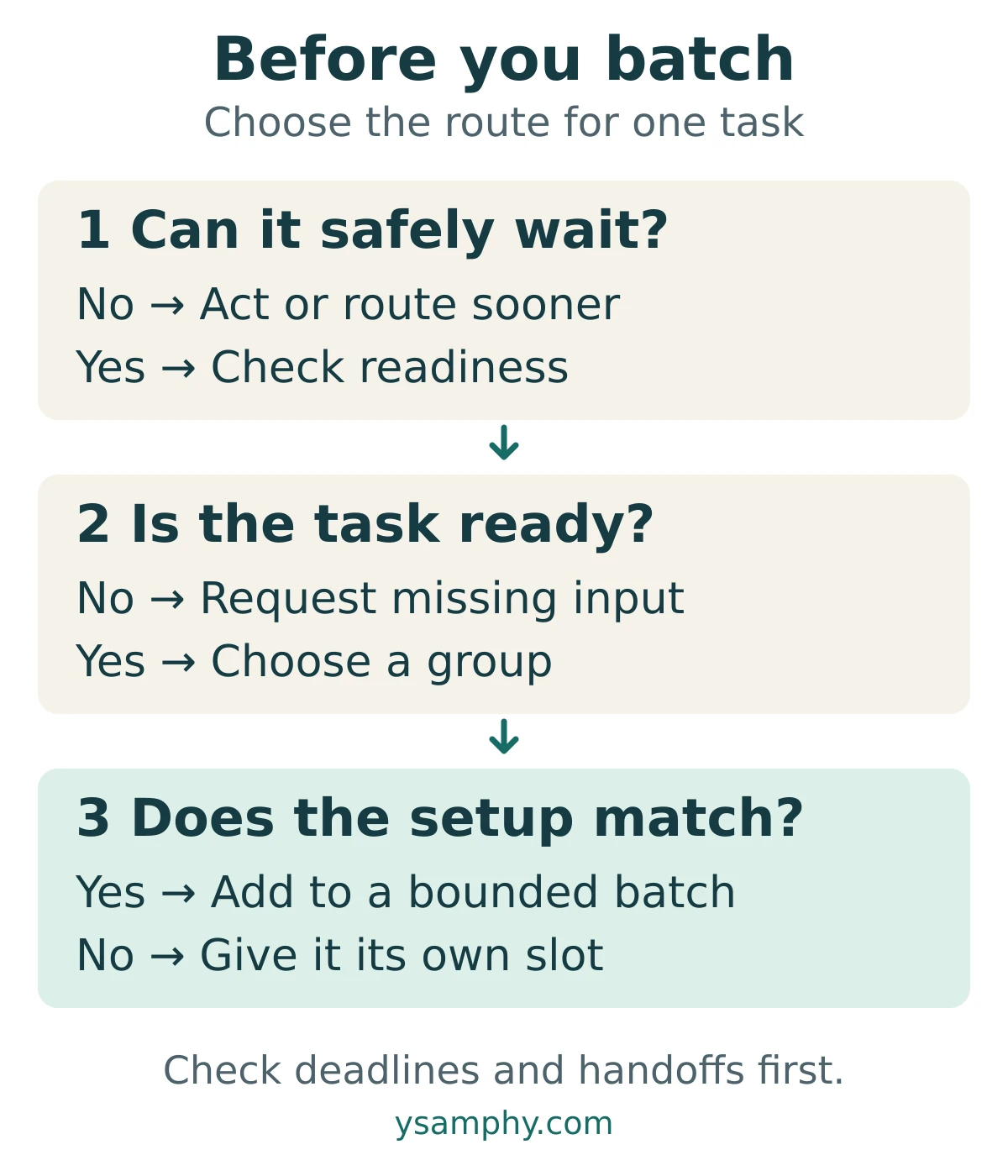
The diagram’s sequence is simple: check the cost of waiting, check whether the task is ready, then place it in a suitable batch. A task with a real deadline risk takes the exception route. A task missing information needs an input request and a follow-up point. Ready tasks with compatible setup can be grouped.
4. Release dependencies early
Batching your own work should not quietly move the waiting time onto somebody else.
Before a focused session, check for a small action that unlocks later work: requesting missing figures, sending a draft for review, or confirming a decision another person needs. Do it early enough for the reply to arrive when you need it.
Separate “request the input” from “complete the task.” Suppose three invoices are ready and a fourth lacks a purchase reference. Ask for the reference, record who owns the reply and when to follow up, then process the three ready invoices. Do not hold the whole group until every item is available.
Release completed work when its recipient needs it. You can review several documents in one session while sending an approved document immediately if a teammate is waiting. Grouping the work does not require one large delivery at the end.
For complex creative work, choose a useful stopping point rather than a huge label like “all writing.” Drafting two related product descriptions may fit together. Producing a strategy report and rewriting a complaint response may not.
5. Give each batch a boundary and a stopping note
Before you start, select the items and define the output. “Review these four submissions” has a clearer boundary than “catch up on everything.” Estimate the session from the actual work, leaving room for checks and handoffs.
Work through the selected items one at a time. If something unrelated appears, capture it for the right place unless it meets your exception rule. If one item turns into a larger investigation, record the next action and give it a separate slot.
At the end, leave a brief record:
- Completed: what is finished and where it was sent.
- Waiting: the missing input, its owner, and the next check.
- Remaining: what still needs work and when it will happen.
End the batch at a sensible boundary instead of extending it indefinitely. Leave transition time before meetings and protect breaks. A batch of correspondence is work; it does not replace a break from work.
A fictional workday with batches and exceptions
Maya is a project coordinator. She needs to prepare a project brief, review four invoices, and respond to routine requests. A designer needs an approval by noon. The team has agreed to use its incident channel for issues that cannot wait for routine message windows.
The table shows selected parts of her day. Meetings, lunch, breaks, and other work occupy the gaps; this is not a template for filling every minute.
| Time | Planned work | Boundary or handoff |
|---|---|---|
| 9:00–9:20 | Routine replies and dependency check | Request a missing purchase reference; identify the designer’s noon deadline. |
| 9:30–10:45 | Draft the project brief | Finish the scope section; leave a note for the next section. |
| 11:30–11:50 | Replies and approvals | Send the designer’s approval before noon. |
| 1:30–2:00 | Review ready invoices | Process the three complete invoices; track the fourth separately. |
| 3:30–3:50 | Routine replies and follow-ups | Check for the purchase reference and update the waiting item. |
| 4:30–4:40 | Daily review | Record unfinished work and choose its next action. |
At 10:05, the incident channel reports a service issue that meets the team’s exception rule. Maya leaves a short note about where she stopped, follows the agreed escalation process, and returns at 10:20. She finishes the scope section by 10:45, but moves optional polishing to another day.
At 3:30, the purchase reference still has not arrived. The fourth invoice stays in the waiting list, with a follow-up owner and next check. It does not become an excuse to reopen all three completed invoices.
The useful result is a visible set of decisions: the designer gets the approval on time, the incident receives attention, and missing information stays tracked. The plan can change without losing those commitments.
6. Check whether batching is helping
Try the arrangement over several representative workdays, then compare it with your earlier observations. A quieter inbox alone is not enough evidence of improvement.
Use a small set of measures:
- Unplanned switches: how often did you leave planned work for this category?
- Timeliness: did anything miss an agreed response or delivery time?
- Completed output: what finished, rather than merely moved between lists?
- Quality and load: did errors, rework, or the oldest waiting item increase?
Add a brief note about how manageable the day felt. You do not need a numerical score unless it helps you compare days consistently.
Interpret the results together. Fewer interruptions alongside late approvals means the batch timing needs adjustment. More completed replies alongside an untouched priority project suggests the batch is taking too much space. A growing queue can signal too much work, unclear ownership, or a batch that mixes ready and blocked items.
Change one feature at a time: the grouping, the frequency, the session size, or the exception rule. Compare similar days where possible. This is a personal workflow test, not a controlled experiment, so avoid claiming that any improvement came entirely from batching.
Use the task batching planner
The free planner turns these choices into a practical plan. It includes a blank batch map, a daily schedule and review page, and Maya’s completed fictional example.
For each batch, you will record the shared setup, waiting limit, planned window, and completion rule. You will also name the urgent route, track dependencies, and review missed commitments or growing queues.
Plan your batches, dependencies, and exceptions. Includes two blank pages and a completed fictional example.
Start with one recurring group tomorrow. Decide what belongs in it, when you will handle it, and what would justify acting sooner. Once that works, use the time-blocking guide to give the batch an appropriate place in the rest of your week.



