
AI guardrails are the design constraints that keep an AI character safe, coherent, and useful inside an interactive experience. Without guardrails, characters drift. They ramble, go off-topic, break pacing, and start behaving like a generic chatbot instead of a character in your scene.
In this guide, I’ll share a practical guardrails framework for interactive characters. I call it Story Rails. It combines:
- an interaction loop (how your scene progresses), and four simple rails that keep the character aligned: Job, Scope, Behavior, Recovery.
This guide is tool-agnostic. Near the end, I’ll map the same ideas into Convai fields (Description, Speaking Style, Knowledge Bank, Guardrails, Temperature) so you can implement the framework quickly.
Download the slides (PDF)
If you prefer the deck version, you can download it here:
Presentation embed
1) What does “story rails” mean?
Story rails = the AI stays aligned to the scene goal.
A simple mental model:
Scene Goal → AI Response → Next Step
- Scene Goal: what the user is trying to do right now
- AI Response: only what supports that goal
- Next Step: the prompt that keeps the experience moving
Quick validation test
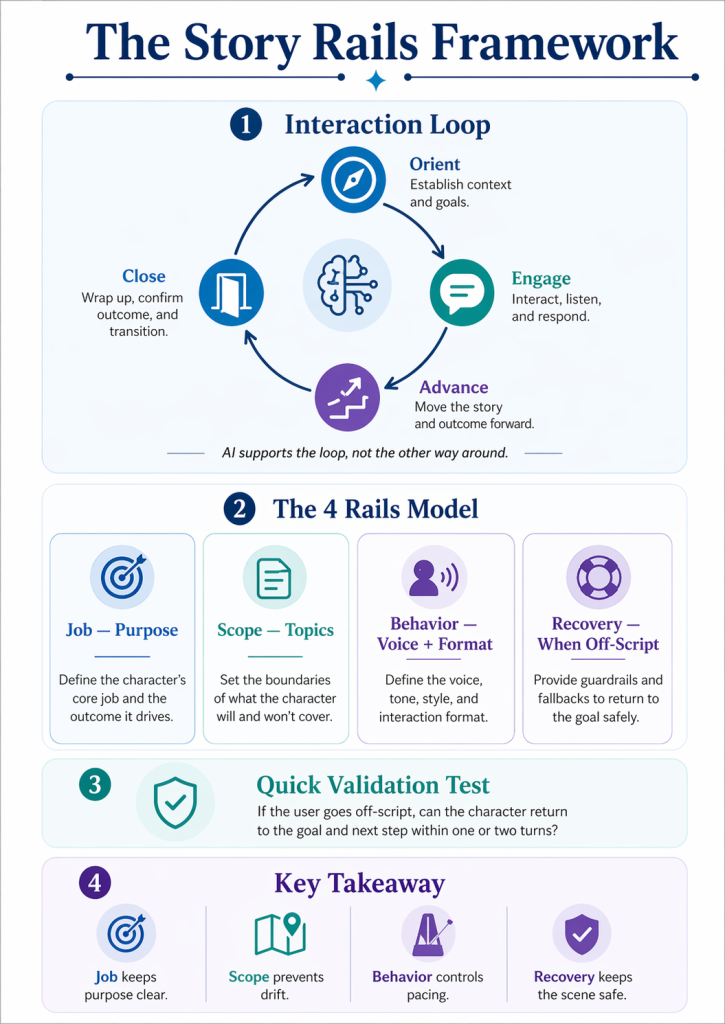
If the user goes off-script, can the character return to the goal and the next step within one or two turns?
If yes, you have rails.
If not, drift will eventually take over.
2) The interaction loop is the backbone (works across scenes)
Most interactive AI characters need a loop. The loop gives structure and pacing. It tells the user what to do, and it tells the AI what “helpful” means.
A universal loop that works across many character types:
Orient → Engage → Advance → Close
1) Orient
Set context, role, and goal.
2) Engage
Exchange information. Questions, exploration, guidance.
3) Advance
Take an action that moves the scene forward. Choice, step, checkpoint.
4) Close
Confirm progress and transition. Summary, next scene, wrap.
Key principle: AI supports the loop, not the other way around.
Different character types implement the loop differently, for example:
- Tutor: Diagnose → Teach → Practice → Feedback
- Guide: Orient → Explore → Transition
- Decision coach: Present options → Clarify → Choose → Debrief
Same concept. Different steps. The loop should match the character’s job.
3) The 4 Rails Model (a practical AI guardrails framework)
Once you have a loop, you need constraints that keep the character reliable. That’s where the four rails come in.
Rail 1: Job rail (Purpose)
Defines why the AI character exists in this scene.
Rail 2: Scope rail (Topics)
Controls what the AI knows and can discuss.
Rail 3: Behavior rail (Voice + Format)
Sets tone, length, and response structure.
Rail 4: Recovery rail (When off-script)
Handles unexpected or out-of-bounds input.
If you are seeing drift, it is usually because one of these rails is missing or vague.
4) Rail 1: Job rail (purpose)
The job rail is the character’s compass. It prevents the AI from trying to be helpful in every direction.
Job statement template
My job is to help the user ___ so they can ___.
- Blank 1: what the user needs help with
- Blank 2: the outcome the user wants to reach
Success condition template
User succeeds when ___.
This is the finish line. It keeps the interaction from wandering forever.
Examples by character type
Tutor
- Job: help the user practice a concept so they can demonstrate mastery
- Success: user explains the concept in their own words
Guide
- Job: help the user explore key points so they can choose what to do next
- Success: user reaches the next stop and makes a choice
Decision coach
- Job: help the user compare options so they can choose one
- Success: user chooses and names one tradeoff
Tip: If your job statement includes “and,” you likely have two jobs. Split it.
5) Rail 2: Scope rail (3 buckets that prevent drift)
Scope is one of the strongest drift-control tools. People assume “more knowledge” makes the character better. Often, it makes the character talk longer and drift more.
I recommend organizing the scope into three buckets:
Bucket A: Scene facts
Context specific to this scene or scenario.
- character names
- location details
- current objective
- current step in the loop
Bucket B: Domain facts
General knowledge that the AI needs to perform.
- terminology
- frameworks
- best practices
- definitions that matter for the scene
Bucket C: Off-limits
Topics the AI must never discuss.
- private personal data requests
- out-of-scope professional advice
- harmful or discriminatory content
- anything that breaks your story world or tone
Rule: If it doesn’t help the loop, exclude it.
6) Rail 3: Behavior rail (how it speaks)
Even correct content can break a scene if it is too long or the tone does not match the character. Behavior rails make the character feel designed.
Safe defaults you can tune per character type:
1) Voice
Choose three adjectives. Example: warm, calm, teacher-like.
2) Response length
Keep exchanges tight and scannable. Often 1 to 3 sentences.
3) Structure
Pick a response shape:
- headline → detail → next step
- answer → reason → prompt
- menu of options (when the user is stuck)
4) Turn design
End with one next-step question or action.
5) Boundaries
Refuse briefly, then redirect when off-topic.
Behavior is where pacing lives. If you care about immersion, behavior is not optional.
7) Rail 4: Recovery rail (when users go off-script)
Recovery rails are what keep your scene from collapsing when the user says something unexpected.
Six recovery patterns I recommend:
1) Clarify
Ask what the user means.
2) Menu
Offer valid options.
3) Steer
Acknowledge briefly and guide back.
4) Limitation
Be honest about what the AI cannot do.
5) Redirect
Point back to the loop or a safer topic.
6) Reset
Restart the loop quickly.
Recovery is reliability. If your character can recover within one or two turns, it will feel story-safe.
8) AI Character Spec Sheet (worksheet)
This is how you translate ideas into buildable specs.
Name / Role
Identity and function in the scene.
Job statement
My job is to help the user ___ so they can ___.
Success condition
User succeeds when ___.
Allowed topics
Scene facts + domain facts the character can discuss.
Off-limits
Topics and behaviors that are forbidden.
Voice
Tone and speaking style descriptors.
Response rules
Length, format, and structure constraints.
Recovery lines
Clarify, Menu, Steer, Limitation, Redirect, Reset.
Escalation rule
When to refuse, redirect, or switch to a fallback flow.
If your system supports it, you can route to a human or another system.
The 5-minute version (good enough to reduce drift)
- Role
- Job statement
- Allowed topics (3 bullets)
- Off-limits (3 bullets)
- Two recovery lines
Even this minimal spec is better than “just prompting.”
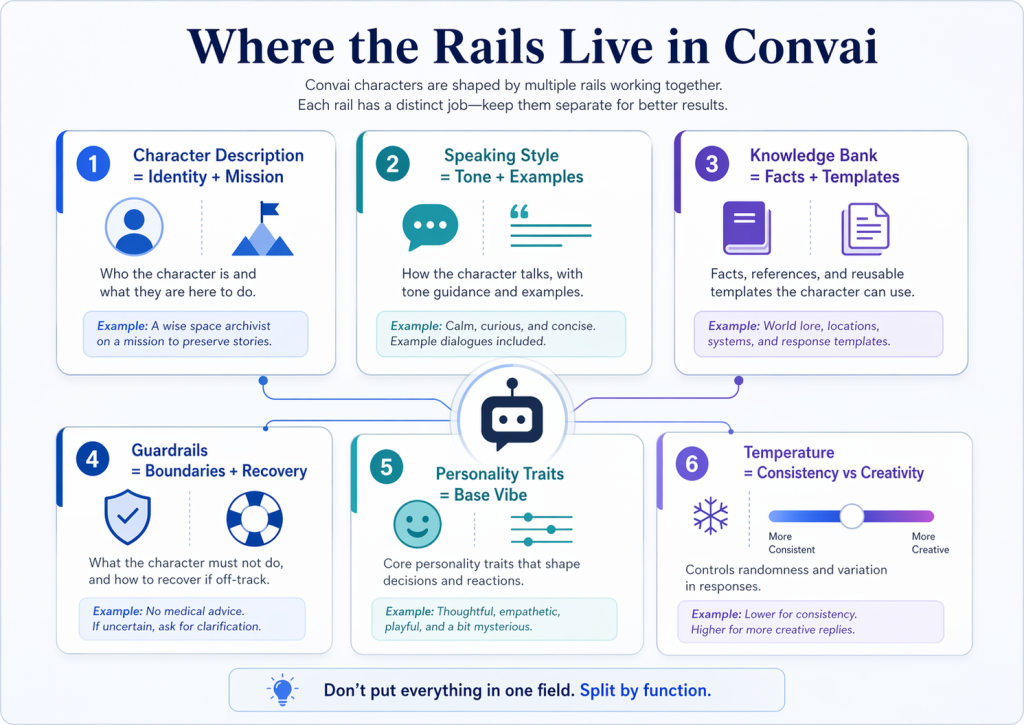
9) Where the rails live in Convai (implementation mapping)
Convai becomes easier when you split work by function:
- Character Description = Identity + Mission
Put the job statement and success condition here. - Speaking Style = Tone + Examples
Put voice rules, pacing, and sample lines here. - Knowledge Bank = Facts + Templates
Put scoped facts, frameworks, and reusable templates here. - Guardrails = Boundaries + Recovery
Put off-limits rules and recovery patterns here. - Personality Traits = Base vibe
Use presets as a starting point, then refine with Speaking Style and Guardrails. - Temperature = Consistency vs creativity
Lower temperature tends to reduce drift. Higher temperature can increase variety and risk.
A practical Convai setup for a “Story Rails Coach”
- Intro first: greet and explain the 4 rails
- Ask for goal: get the user’s scene goal
- Walk rail by rail: Job, Scope, Behavior, Recovery
- Don’t repeat: avoid blank templates unless the user asks
10) Design considerations and constraints (reality)
Tools change
Platforms evolve. UIs change. Features appear and disappear. Your rail design should outlast any single tool version.
The best defense is tool-agnostic thinking:
- rails are design
- platforms are implementation details
Latency matters
In real-time interaction, speed shapes trust. Short replies often feel smarter because the user stays in flow.
Practical techniques:
- keep replies short
- reduce turn count with menus
- design clear next steps
Model choice can matter too. In my own experience, faster models help real-time conversation feel more natural. Examples I’ve liked for that balance include GPT-5.3 Instant and Gemini 2.5 Flash when they’re available through a given platform.
Key takeaways
If you remember just a few things:
- Start with the loop, then design the rails.
- Job keeps purpose clear.
- Scope prevents drift.
- Behavior controls pacing.
- Recovery keeps the scene safe when things go off-script.



