
Most AI projects begin with a tool.
A company buys access to an AI platform. A team builds a chatbot. An employee connects several applications. A pilot produces an impressive demonstration.
But a working tool is not necessarily a working system.
The output may use outdated information. Nobody may know who should review it, what standard it must meet, or what should happen when it is wrong. The technology works, but the work around it has not been designed.
That is the difference between experimenting with AI and building an AI system people can depend on.
What is an AI system? A quick answer
An AI system is a machine-based system that uses inputs to generate outputs such as predictions, content, recommendations, or decisions. The OECD’s updated definition of an AI system also notes that AI systems vary in their levels of autonomy and adaptiveness.
In practical business use, the system is broader than the model or application alone. It combines an AI capability with data, instructions, workflows, integrations, human responsibilities, safeguards, and measurement to produce a useful result.
A chatbot can be an AI system. So can a fraud-detection engine, recommendation service, document-processing workflow, conversational training simulation, or meeting follow-up process.
The key question is not whether the technology looks sophisticated. It is whether the parts work together toward a defined objective.
How an AI system works
At a basic level, an AI system moves through five stages:
- Input: It receives data, a question, an image, a document, a signal, or another form of input.
- Inference: One or more AI models interpret the input and generate a result.
- Output: The system produces content, a prediction, a classification, a recommendation, or a decision.
- Action: A person or another piece of software uses the output.
- Feedback: Corrections, new data, monitoring, or user responses help evaluate or improve the system.
In a real organization, those stages rarely operate alone. The system may also need permissions, source documents, integrations, review checkpoints, escalation rules, and a place where the approved result is recorded.
This is why the model is important but not sufficient.
AI model vs. AI tool vs. AI platform vs. AI system
These terms are often used as though they mean the same thing. They describe different layers.
AI model
An AI model is the computational component that identifies patterns, makes inferences, or generates an output.
A language model, image-recognition model, forecasting model, or recommendation model can provide the intelligence inside a larger system. The model does not by itself define how an organization will use its output.
AI tool
An AI tool is an application through which a person performs a task.
A writing assistant, meeting transcription application, image generator, coding assistant, or document-analysis tool may give users access to one or more AI models. Tools make capabilities accessible, but they do not automatically create a dependable business process.
AI platform
An AI platform provides an environment for using, connecting, building, or managing AI capabilities.
Some platforms provide general-purpose assistance. Others support workflow automation, agent creation, model deployment, data analysis, knowledge retrieval, or enterprise integrations.
A platform may supply many of the parts needed to build a system. It still cannot decide what your organization is trying to accomplish, which information is authoritative, who remains accountable, or how success should be measured.
AI system
An AI system is the complete arrangement that turns a capability into a result.
It may include:
- One or more AI models.
- User-facing tools or interfaces.
- Data and knowledge sources.
- Prompts, rules, and operating instructions.
- Integrations with other applications.
- Workflow steps and handoffs.
- Human review and approval.
- Security and access controls.
- Monitoring, feedback, and measures of quality.
Technical teams sometimes describe these broader arrangements as compound AI systems: systems in which models work with retrieval, tools, databases, code, and other components.
For business leaders, the practical distinction is simpler:
A platform gives you capabilities. An AI system organizes those capabilities around a real objective.
Tweet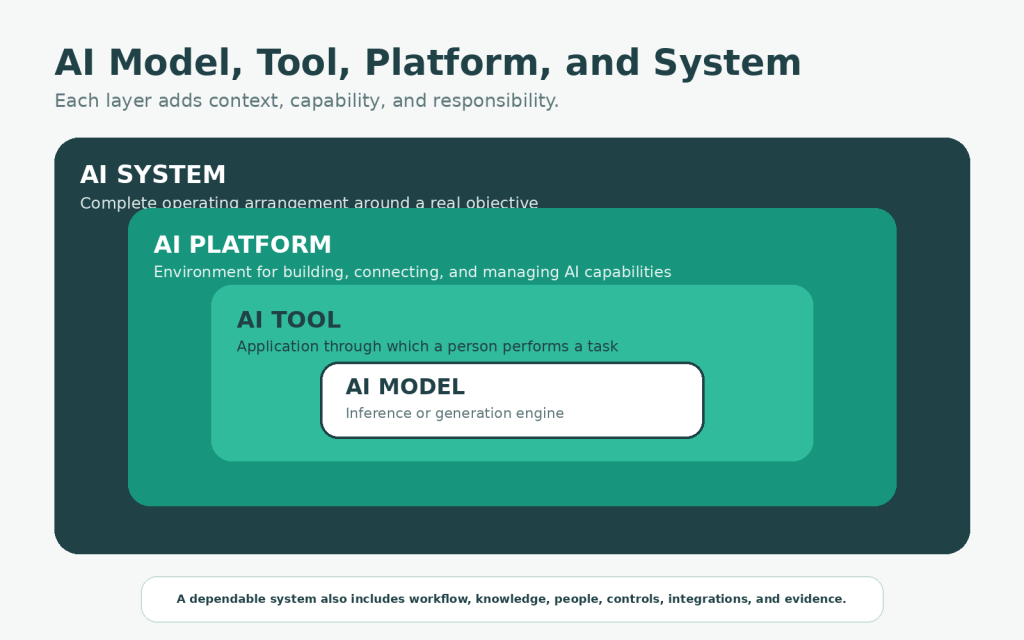
What types of AI systems do businesses use?
AI systems can be grouped by the kind of output or function they provide.
Predictive AI systems
These estimate what is likely to happen. Businesses use them for demand forecasting, risk scoring, maintenance planning, fraud detection, and customer churn prediction.
Generative AI systems
These create new content such as text, images, audio, video, software code, or structured drafts. Their business value depends heavily on the instructions, source material, review process, and quality standard surrounding the model.
Recommendation and decision-support systems
These rank options, identify patterns, or present possible actions. Examples include product recommendations, next-best-action systems, diagnostic support, and resource-allocation tools.
Conversational AI systems
These interact through text or voice. They may answer questions, guide users through a process, retrieve approved information, collect details, or perform bounded actions.
Perception systems
These interpret images, audio, video, sensor data, or physical environments. Examples include visual inspection, speech recognition, object detection, and safety monitoring.
Agentic AI systems
These can pursue a goal across multiple steps, use tools, and make choices with some degree of autonomy. Agentic systems can be useful, but greater autonomy also increases the need for boundaries, monitoring, and recovery mechanisms.
Hybrid systems
Many practical systems combine several types. A customer-support system might classify a request, retrieve information, draft a response, recommend an action, and route an exception to a person.
Why businesses need systems, not collections of AI tools
AI tools are becoming easier to access. Reliable implementation is not.
Without a system, organizations commonly encounter the same problems:
- Outputs vary because each employee uses different prompts, information, and quality standards.
- Important knowledge remains scattered across policies, folders, applications, and people’s memories.
- Human responsibility is vague, so nobody knows what must be checked or who owns the final result.
- The AI output sits outside the real workflow and creates copying, reformatting, or extra handoffs.
- Leaders count licenses and prompts but do not measure whether the work becomes faster, more accurate, more consistent, or less risky.
This is one reason many organizations move from experimentation to repeatable work slowly. My broader guide to AI adoption in organizations examines the management, capability, governance, and scaling conditions around that transition.
At the system level, however, the principle is straightforward:
The goal is not maximum AI use. It is a better outcome from a well-designed workflow.
Eight examples of AI systems in business
The following examples describe complete workflows rather than isolated AI features.
1. Meeting decisions and follow-up system
A meeting transcript enters the system after a call.
The AI identifies decisions, assigned owners, due dates, unresolved questions, risks, and items requiring confirmation. The system checks names and projects against an approved source, formats the result consistently, and routes it to the meeting owner for review.
Once approved, actions are added to the project-management system and a concise summary is sent to participants.
The model performs extraction and drafting. The system includes the transcript, project information, instructions, review step, task integration, notification process, and feedback from corrections.
2. Internal knowledge support system
Employees ask questions through a familiar interface.
Instead of answering only from general model knowledge, the system retrieves information from approved policies, procedures, manuals, and project documents. Responses link to the supporting source. Sensitive or uncertain questions are escalated rather than answered confidently without evidence.
The organization also assigns owners to maintain the underlying knowledge. Without that process, even a technically advanced assistant will become less reliable over time.
3. Customer-support drafting and triage system
An incoming request is classified by topic and urgency.
The system retrieves relevant account information and approved guidance, then prepares a draft response. Routine cases may use a lightweight review. Complaints, legal threats, refund exceptions, vulnerable customers, or high-value accounts may require specialist approval.
The same system can record common questions and reveal where support documentation is incomplete.
4. Document intake and review system
A document-processing system can receive invoices, applications, contracts, forms, or reports.
It may classify the document, extract important fields, identify missing information, compare content with rules or prior versions, flag unusual clauses or values, route the document, and create a structured record in another application.
A dependable design does not silently convert uncertain extraction into accepted fact. Confidence thresholds, verification rules, and exception handling are part of the system.
5. Content research and publishing system
A content system can begin with an approved topic, audience, and search objective.
It may collect relevant sources, organize themes, identify unanswered questions, prepare an outline, and generate a first draft. A human contributor then verifies claims, adds first-hand experience, strengthens the reasoning, removes generic material, and decides what deserves publication.
Performance data can later inform updates, internal links, and supporting content. The objective is not to produce the largest possible number of articles. It is to publish useful work the organization can stand behind.
For an individual version of this idea, see my guide to AI productivity systems for knowledge workers.
6. Sales qualification and follow-up system
A sales system can combine inquiry details, account information, previous interactions, and qualification criteria.
AI may summarize the opportunity, identify missing information, recommend a next step, or draft a personalized follow-up. The salesperson remains responsible for the relationship and for judgments that cannot be reduced to reliable rules.
A strong system helps the salesperson understand and respond. It should not merely generate more messages.
7. Forecasting and decision-support system
AI systems can identify patterns in historical and current data to support forecasting, resource planning, inventory management, fraud detection, or risk assessment.
The output may be a prediction, confidence range, anomaly alert, or set of scenarios. Decision support should not be confused with automatic decision-making. Leaders still need to understand the assumptions, limitations, uncertainty, and consequences surrounding the output.
8. AI-supported learning simulation
An AI learning system can place participants inside a scenario where they question characters, weigh competing interests, make a decision, and reflect on the consequences.
In building my AI Strategy Lab VR prototype, I combined a designed scenario, voice interaction, multiple AI characters, stakeholder positions, decision points, and a debrief loop.
The conversational model made the dialogue possible. The learning system came from the way the model was constrained and connected to an experience with a defined purpose.
That work also led to my Story Rails framework for AI character guardrails, which keeps an interactive character aligned through four rails: Job, Scope, Behavior, and Recovery.
AI becomes useful when its behavior is designed around the experience and outcome it is supposed to support.
The Seven-Layer AI System Framework
When I design an AI system for real work, I examine seven layers. Each answers a different question.
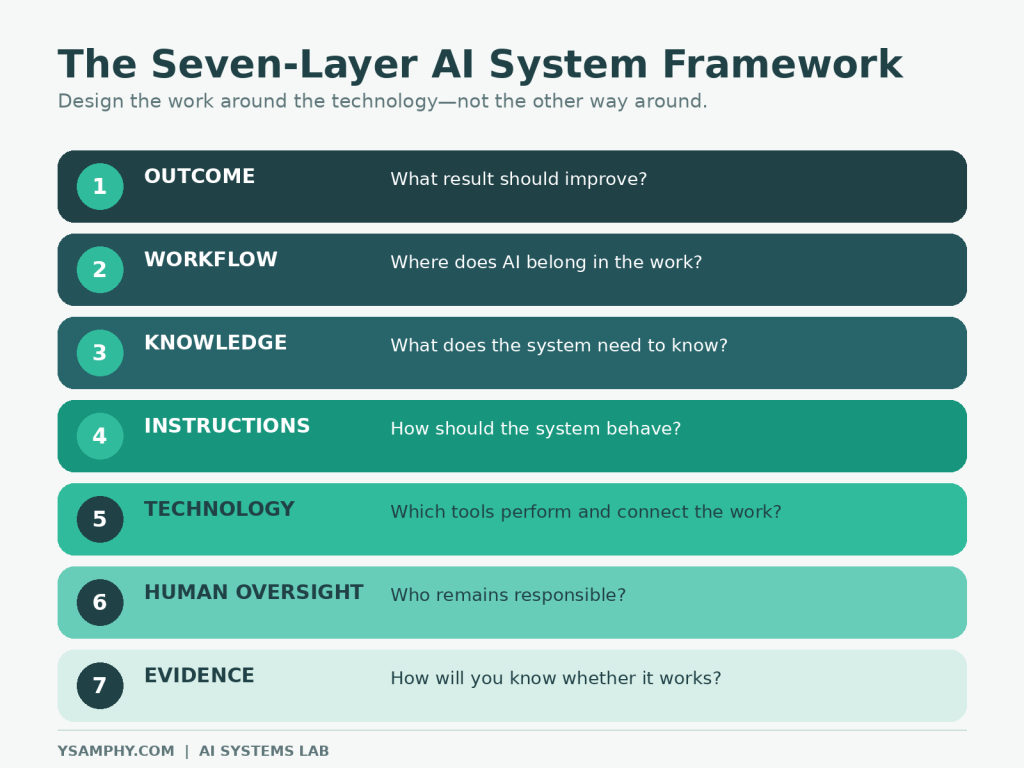
Layer 1: Outcome
What result should improve?
Begin with a specific problem, constraint, or opportunity.
A weak objective is “use AI in customer service.” A stronger objective is “reduce the time required to prepare accurate responses to routine order-status questions while preserving human support for exceptions.”
The outcome determines what the system needs to do and what evidence will matter.
Layer 2: Workflow
Where does AI belong in the work?
Map the current process before designing the future one. Identify what triggers the work, who performs each step, which information is required, where delays occur, which decisions require judgment, where the result is recorded, and what happens when the normal process fails.
Do not assign an entire job to AI. Decide which parts are appropriate for machine assistance and which must remain human.
Layer 3: Knowledge
What does the system need to know?
General model knowledge is rarely sufficient for organization-specific work.
The system may need current policies, product information, approved definitions, customer context, examples of strong work, templates, decision criteria, or previous cases. It also needs rules about information that must not be used.
Knowledge requires ownership. Someone must decide which sources are authoritative, resolve contradictions, update outdated material, and manage access.
Layer 4: Instructions
How should the system behave?
Instructions include more than one clever prompt. They may define the task, required inputs, steps, preferred sources, output structure, quality criteria, prohibited actions, uncertainty handling, escalation rules, and examples of acceptable and unacceptable work.
Test instructions against real variations, not only ideal examples.
Layer 5: Technology
Which tools are needed to perform and connect the work?
Choose technology after clarifying the outcome, workflow, knowledge, and instructions.
The system may need a conversational interface, file analysis, retrieval from internal sources, structured data extraction, automation, API connections, agentic execution, logging, or role-based access.
The best choice is not always the most capable platform. It is the smallest dependable combination that satisfies the requirements.
Layer 6: Human oversight
Who remains responsible?
Human oversight should be designed into the workflow rather than added as a disclaimer.
Define who owns the outcome, who reviews outputs, what must be checked, which decisions cannot be delegated, when the system must stop or escalate, who investigates failures, and who approves changes.
The level of oversight should reflect the possible consequences of error.
Layer 7: Evidence
How will you know whether the system works?
Measure more than activity. Useful evidence may include accuracy, completeness, correction rate, cycle time, cost per case, user trust, customer satisfaction, escalation rate, error severity, rework, adoption, and effects on employee capability.
Evidence should lead to a decision: improve the system, expand it, limit it, redesign it, or stop using it.
Assigning a reviewer is only one part of oversight. Employees also need to practice verifying AI-generated outputs, recognizing uncertainty, and escalating exceptions. My guide to building an AI training program employees will actually use explains how to develop these capabilities through role-specific practice and feedback.
How to build an AI system around a real workflow
The following sequence works for many small and medium-scale business use cases.
Step 1: Choose one recurring problem
Start with work that happens often enough to study and improve.
The problem should matter, but the first version should not carry consequences the organization is unprepared to manage.
Step 2: Observe the current workflow
Talk to the people who actually perform the work.
Document what happens in practice, including informal steps, exceptions, duplicated effort, workarounds, and information that exists only in someone’s memory.
Step 3: Define the output and quality standard
State exactly what the system should produce, then define what makes the output acceptable.
For a meeting follow-up system, the standard might require every confirmed decision to be captured, owners to be matched correctly, dates never to be invented, unresolved items to remain separate from decisions, and a named person to approve the record.
Step 4: Prepare the knowledge
Collect the smallest set of sources needed for the task. Remove outdated, duplicate, irrelevant, or unauthorized information.
A clean and limited knowledge set is often more useful than a large, ungoverned repository.
Step 5: Build the smallest useful version
Avoid beginning with a fully autonomous system.
A first version might generate a structured draft for human review. Once the organization understands recurring errors and exceptions, carefully selected steps may be automated further.
Start with assistance. Earn autonomy through evidence. That is how organizations should build AI systems.
TweetStep 6: Design review and recovery
Test what happens when information is missing, sources conflict, a request is outside scope, the model is uncertain, an integration fails, or no qualified reviewer is available.
A system is not reliable merely because it succeeds under normal conditions. It also needs a safe response to abnormal ones.
Step 7: Pilot with representative cases
Use routine, difficult, ambiguous, and edge cases. Record what the system gets right, what people must correct, and which failures matter most.
Do not hide human setup or review effort when calculating the benefit.
Step 8: Measure and decide
Compare performance with the original process.
A system that saves drafting time but doubles review time has not necessarily improved the work. The evidence may support expansion, a redesign, tighter limits, ordinary automation instead, or discontinuation.
Stopping a weak system is a successful governance decision.
How to choose tools for an AI system
Do not choose a platform solely because it appears on a list of popular AI tools. Evaluate it against the requirements of the system.
Task fit
Can the tool reliably perform the specific kind of work required?
Information access
Can it use the necessary sources while respecting permissions, privacy, and confidentiality?
Output control
Can you define the format, boundaries, source requirements, and escalation behavior?
Integration
Can it connect with the applications where the work begins and ends?
Reviewability
Can a person understand the output, inspect the supporting evidence, and make corrections?
Reliability
How does it perform across normal cases, difficult cases, incomplete inputs, and changing conditions?
Cost and portability
Consider setup, usage, integration, maintenance, review, training, monitoring, and switching costs—not only the subscription price. Tools will change. The workflow, knowledge, instructions, and evaluation logic should be more durable than the vendor.
Do AI systems need AI agents?
No.
An AI agent is a type of system that can pursue a goal, use tools, make choices, and perform multiple steps with some degree of autonomy.
Agents can be valuable when a task requires flexible action across applications or when the exact path cannot be fully specified in advance. They also introduce additional uncertainty.
For many workflows, a simpler design is more appropriate:
- A person initiates the task.
- AI prepares a draft or recommendation.
- A person reviews it.
- Conventional automation moves the approved result.
- Exceptions follow an established process.
Use the lowest level of autonomy that can produce the intended value.
Responsible AI systems require operating controls
The NIST AI Risk Management Framework describes AI systems as socio-technical: their risks and benefits emerge from the interaction of technical components, people, organizations, and the context in which a system is used.
That means responsible implementation cannot be delegated entirely to a model vendor, legal policy, or technology team.
At minimum, an operational AI system should have:
- A named owner and approved purpose.
- Defined users and controlled information access.
- Documented instructions, boundaries, and human decision rights.
- Testing before wider use.
- A method for reporting failures and correcting outputs.
- Monitoring after deployment.
- Periodic review.
- A fallback, pause, or shutdown process.
The controls should be proportionate to the context and consequences. A brainstorming assistant and a system that influences employment, credit, healthcare, education, legal rights, or safety should not operate under the same level of oversight.
Common reasons AI systems fail
The team starts with the platform
People ask where they can use a newly purchased tool instead of which problem deserves attention.
The system automates a broken workflow
AI accelerates unnecessary approvals, weak documentation, duplicated effort, or inconsistent decision-making.
The knowledge is unreliable
The model is blamed for errors caused by outdated, contradictory, incomplete, or inaccessible information.
Prompting is treated as the entire design
The system depends on one long prompt while ignoring permissions, integration, review, maintenance, and measurement.
Responsibility remains vague
Everyone assumes someone else checked the output.
The pilot scales before the team learns
A promising demonstration is expanded before people understand exceptions, failure patterns, true cost, and user behavior.
Activity is mistaken for value
Leaders count prompts, licenses, and generated outputs while ignoring quality, rework, risk, and outcomes.
When you should not build an AI system
AI is not always the best solution.
A checklist, template, search improvement, database change, conventional automation, or clearer division of responsibility may solve the problem more reliably.
Pause before building when:
- The problem has not been clearly defined.
- The process changes every time it is performed.
- The necessary information is unavailable or unreliable.
- A simple rule can produce the same result.
- Nobody can own or review the system.
- The consequences of error are high and adequate controls are missing.
- The expected value does not justify the cost and maintenance.
- Automation would weaken an important human relationship.
- The organization cannot explain how success will be measured.
The purpose of an AI strategy is not to place AI everywhere. It is to make better decisions about where AI belongs.
From one AI system to organizational AI adoption
Building one dependable system is different from achieving organization-wide AI adoption.
The system-level question is:
How do we design this workflow so that AI contributes useful, responsible, and measurable value?
The adoption-level question is:
How does the organization repeatedly identify, introduce, govern, improve, and scale appropriate AI systems?
The first requires sound system design. The second also requires management support, workforce capability, governance, shared learning, investment decisions, and a method for deciding what deserves to scale.
For the broader organizational challenge, read AI Adoption: A Practical Framework for Organizations.
Frequently asked questions about AI systems
What is an AI system in simple terms?
An AI system is a combination of technology and supporting components that uses inputs to generate outputs such as content, predictions, recommendations, or decisions. In business, it may also include the workflow, information, instructions, integrations, human review, and measurement surrounding the AI.
What is an example of an AI system?
A customer-support system that classifies a question, retrieves approved information, drafts a response, routes sensitive cases to a specialist, records the approved answer, and learns from corrections is an AI system.
What is the difference between an AI model and an AI system?
An AI model is the component that performs inference or generates an output. An AI system includes the model plus the data, interface, instructions, software, workflow, controls, people, and other components needed to use it in context.
What is the difference between an AI platform and an AI system?
An AI platform provides capabilities for using, building, connecting, or managing AI. An AI system applies selected capabilities to a defined objective within a complete operating process.
Is ChatGPT an AI system?

ChatGPT is an AI-powered system. However, giving employees access to ChatGPT does not by itself create a reliable organizational system. The business still needs to define the task, information, instructions, review process, ownership, boundaries, and measures of success.
What is the difference between an AI workflow and an AI system?
A workflow is the sequence of steps through which work moves. An AI system includes that workflow plus the AI model or tool, information sources, integrations, controls, human roles, and measurement needed to produce a dependable outcome.
Do I need an AI agent to build an AI system?
No. Many useful systems use AI for one bounded step and rely on people or conventional automation for the rest. Agents are appropriate only when greater autonomy creates enough value to justify the additional uncertainty and control requirements.
How should a small business begin?
Choose one recurring workflow, define one useful outcome, appoint one owner, use an approved tool, document the boundaries, test with real examples, and measure the result before adding complexity.
Build systems, not prompt collections
An AI tool can generate an impressive output within minutes.
A dependable AI system takes more thought.
It connects technology to a purpose. It supplies the right knowledge. It defines the workflow. It keeps people responsible. It anticipates failure. It creates evidence from which the organization can learn.
That surrounding design is where much of the value lives.
The AI Systems Lab publishes two practical playbooks each month for turning real work problems into reliable AI-assisted systems. Each playbook includes a step-by-step workflow, reusable prompts, templates, human-review checkpoints, and ways to measure what improves.
Build the workflow, not just the prompt.



