This free Cornell notes template gives you a narrow cue column, a wider notes column, and a summary area at the bottom. Download the printable PDF or editable Word file in US Letter or A4. Each three-page pack contains a blank page and two worked examples: a course concept and a workplace training exercise.
Use it to turn one lesson, reading, or training session into a page you can review from memory. The important step comes after taking notes: cover the answers, attempt the cues, and check what you missed.
Download the Cornell notes template
Choose the paper size that matches your printer. Both sizes contain the same material: page 1 is the reusable blank, page 2 is the course example, and page 3 is the workplace example. Print page 1 alone when you want a fresh sheet.
Free three-page packs: blank template + two worked examples
The PDFs are static printable pages, not interactive forms. Use the Word versions to type, rename fields, or change the available space. These are original ysamphy.com layouts using the Cornell method, not official Cornell University templates.
What goes in each part of a Cornell notes page?
Cornell University’s Learning Strategies Center credits education professor Walter Pauk with developing the Cornell note-taking system. Its one-page method guide separates the page into cues, notes, and a summary, then pairs note-taking with questioning, recitation, reflection, and review.
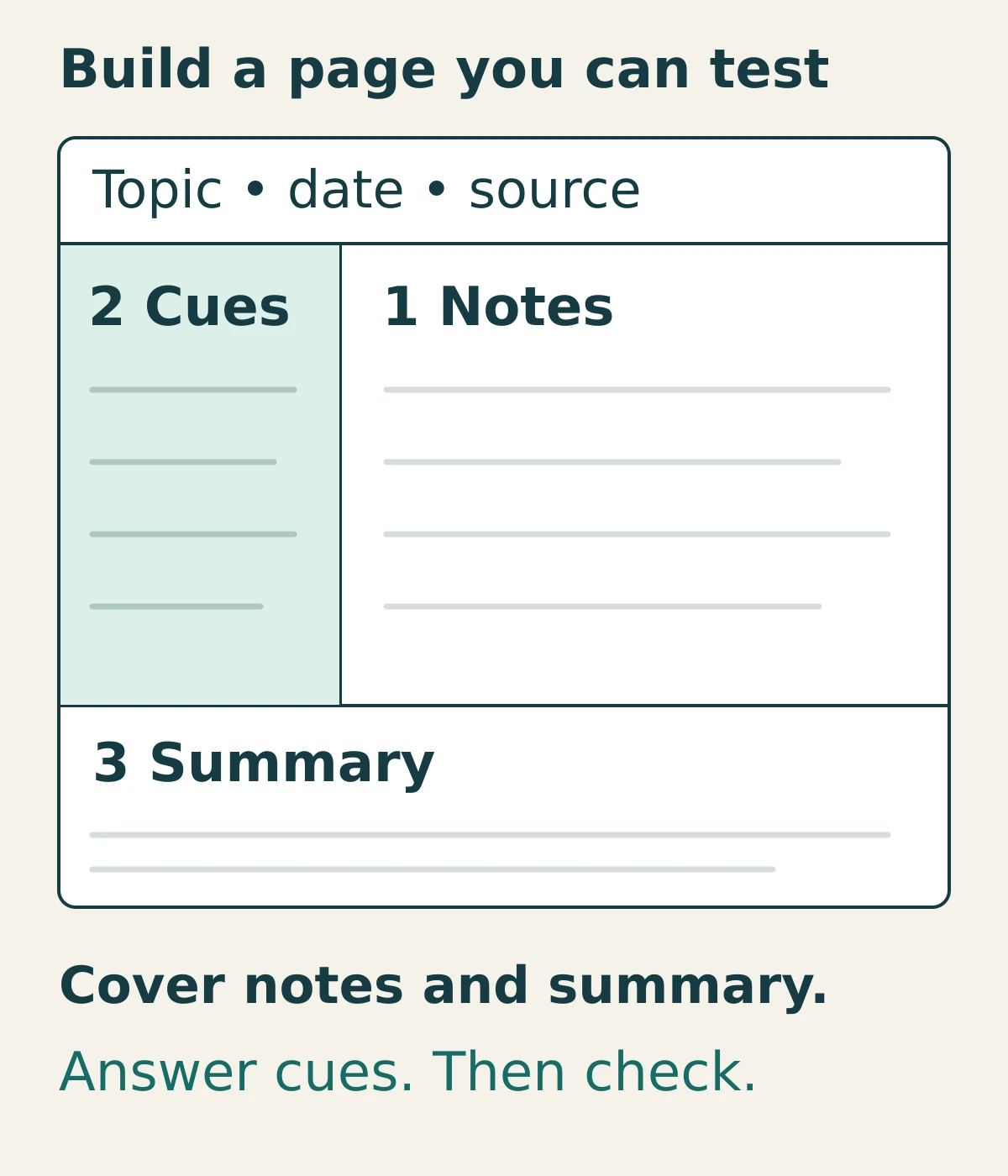
- Notes, on the right: the explanation, supporting details, examples, and any question you could not resolve.
- Cues, on the left: short questions or prompts you can use later without seeing the answers.
- Summary, below: a brief explanation of what the page adds up to, written in your own words.
The heading also matters. Record the topic, date, and source or session so you can find the original explanation. “Economics: opportunity cost, lesson 2” is more useful later than “Tuesday notes.” For workplace learning, include the relevant document version if the procedure changes over time.
You can adjust the proportions. Give a diagram more room, shorten a cue, or continue onto a second page. If a teacher requires a specific format, follow that assignment. The template is a starting workspace, not a rule about exactly how many inches every idea should occupy.
How to use the template during and after a session
1. Capture the explanation before polishing it
Start in the right column. Keep related points together and leave a little space between them. Record a definition when its wording matters, then add an example or distinction that makes it usable. For a process, note the sequence and the conditions that change the next step.
Do not try to finish the cues and summary while a fast explanation is still moving. If you miss something, mark a question or a source location and keep listening. A visible gap is easier to fix than a polished sentence you guessed.
For a reading, work in small sections. Write a few notes after a coherent subsection rather than copying every sentence. For a video, record a timestamp beside a confusing explanation. These are practical ways to keep a route back to the source.
2. Make cues that ask for something specific
Once the session ends, turn the important points into questions. A cue should make clear what a satisfactory answer needs. “Handoff” could mean almost anything; “What information must a handoff contain?” gives you an answer you can check.
- Use what for a definition or set of required elements.
- Use why to test a reason, assumption, or relationship.
- Use when to test conditions and exceptions.
- Use apply it prompts to test the idea in a new example.
Keep the answer out of the cue. “Why is flashcard review the next-best alternative?” gives away part of the economics example below. “What is the opportunity cost in this scenario?” asks you to identify it. If a cue needs a whole essay, divide it into smaller questions or give that topic another page.
3. Write a summary that connects the notes
Use the bottom area to explain the main idea and its most important implication. Two or three sentences are a useful starting length for a short page, not a mandatory formula. The summary should still make sense when you return without the original session fresh in mind.
Try drafting it with the notes hidden, then check and correct it. If you can only list disconnected labels, revisit the relationships: what causes what, what contrasts with what, or what decision the procedure helps you make. Keep unresolved questions visible rather than writing a confident-sounding conclusion.
4. Turn the page into a short self-test
Cover the right column and the bottom summary, which may also reveal answers. Read one cue, answer aloud or on spare paper, then uncover the relevant notes. Compare the essential points and mark anything missing or wrong. Correct the gap before another attempt.
This uses retrieval practice: producing an answer before checking it. Cornell’s effective study strategies guidance describes retrieval as a way to expose what you do and do not understand. For more help writing and checking prompts, see the active recall guide.
The download includes a small review line: the date, a gap you found, and the next review. “Forgot the receiver’s acknowledgment” is actionable. “Need to study more” is harder to use. Choose a realistic next date, and return to a new application as well as the original wording.
Worked example 1: a course concept
Here is a fictional introductory economics note page about opportunity cost. The study choices and preference order are invented for the example; they are not a claim about which study method you should choose.
The definition follows the Federal Reserve’s lesson on scarcity, choice, and opportunity cost: a choice gives up the value of the best available alternative. In this example, the learner has one 60-minute window, and each option would take the full hour.
| Cue question | Notes to check |
|---|---|
| What is opportunity cost? | The value of the best alternative you give up when choosing. |
| Which resource is limited? | One 60-minute study window. Only one of these hour-long activities fits. |
| What is the next-best option? | Preference order: mock exam, flashcard review, recorded lecture. Choose the mock exam; the opportunity cost is the value of the flashcard review forgone. |
| Why not add both alternatives? | You could not do both in that hour. Compare the chosen activity with the best available alternative. |
| Can a free activity have a cost? | Yes. Even with no fee, that hour cannot be used for the next-best activity. |
Summary: A choice uses resources that could have served another purpose. With only one hour available, choosing the mock exam gives up the value of the next-best option, flashcard review. The lack of a fee does not remove that time trade-off.
Now change one detail. If the learner would prefer the recorded lecture to flashcard review, which alternative becomes the opportunity cost of the mock exam? Answer before looking back. This checks whether you can use the definition when the preference order changes, rather than repeat the example’s answer.
The completed download also shows a review correction: the learner initially counted both rejected activities, then corrected the answer to the next-best alternative. That is an illustrative mistake, not a reported student result.
Worked example 2: workplace training
Imagine a practice session on handing a support ticket to another colleague. The following requirements are fictional training rules, not a recommended policy for every organization. Use your employer’s current approved process for real work, and keep private customer information out of a general-purpose practice sheet.
| Cue question | Notes to check |
|---|---|
| What must the handoff contain? | In this fictional exercise: the issue, checks already tried, the current owner, and the next action with its deadline. |
| What is the next action here? | Send the sample ticket to the training queue. Ask the receiving trainee to check the reproduction steps by 3 p.m. |
| When is the handoff complete? | For this exercise, when the receiving trainee acknowledges the ticket and the next action. |
| What if nobody acknowledges it? | Ask the trainer how to proceed. Do not invent an escalation route or assume the transfer succeeded. |
Summary: In this practice exercise, sending a ticket starts the handoff. The receiving trainee must acknowledge both the ticket and the next action. If that acknowledgment is missing, check with the trainer rather than treating the transfer as finished.
A useful next practice task is to write a handoff for a different sample ticket, then check it against the exercise’s requirements. Answering the cues can reveal a missing step; producing the handoff checks whether you can do the task. Keep required references, approvals, and supervision in place for consequential work.
When the layout gets in your way
Cornell notes fit many explanations, but one page format will not suit every task. Make the structure serve the material you actually need to learn.
- Long calculations or diagrams: give the right side more room or attach the worked page. Use the cue column for questions about the method, assumptions, and why a step is valid.
- Rapid lectures: capture rough notes first. Add cues afterward instead of slowing down to maintain perfect boxes.
- Too many details: split the topic across pages with a clear page sequence. Keep the source reference on each sheet.
- Reading for a writing project: separate source notes from your own interpretation and retain citation details. A connected note system may help more than repeated self-tests.
If your goal is developing ideas across many readings, the How to Take Smart Notes summary explores that different use of notes. You can keep a Cornell page for reviewing a particular concept without turning your whole research archive into Cornell sheets.
The layout is not a guarantee
A complete-looking sheet does not establish understanding or predict a grade. The useful checks are whether your notes are accurate, whether you can answer with them covered, and whether you can apply the idea when the example changes.
Print or edit without squeezing the page
For printing, select the matching paper size and start with Actual Size or 100% scale. Check the preview for your printer’s margins before printing a stack. Page 1 is the blank template; select pages 2–3 only when you want the worked examples. The light borders remain useful in grayscale.
In Word, save a copy before typing. Replace the topic fields and write directly in the editable cells. The rows can expand as you add text, so a long note may move onto another page. Inspect the page break rather than shrinking the font to force everything onto one sheet. Duplicate a blank page or divide the topic when needed.
Start with one lesson. Fill the right column, write a few clear cues, and schedule one check with the answers covered. What that check reveals will tell you more about the next useful step than how full the page looks.