
AI training for employees should help people complete useful work with appropriate judgment. To build a program they will use, start with a few recurring tasks, teach the skills and boundaries those tasks require, give employees time to practice, and assess the work they produce. Then support them as they apply those skills on the job.
A workshop can introduce an AI assistant. A training program needs to go further: employees should know when to use it, what information they can provide, how to check the result, and when to ask for help.
This guide focuses on generative AI training for knowledge work, such as drafting, summarizing, planning, and organizing information. It gives L&D, HR, enablement, and business leaders a practical way to design a small pilot and improve it before expanding.
For the wider organizational decisions about governance, workflow ownership, and scaling, see my AI adoption framework. Here, the focus is the learning program itself.
Three Key Takeaways
- Choose work before choosing lessons. Build training around a small number of relevant tasks and clear standards for successful performance.
- Teach judgment alongside tool use. Employees need practice preparing inputs, verifying outputs, and recognizing situations that require escalation.
- Support learning after the session. Protected practice time, manager feedback, and usable job aids help turn training into everyday capability.
What an Effective AI Training Program Should Accomplish
An effective program develops three capabilities: understanding the tool, performing a relevant task, and judging whether the result is suitable for use.
An employee might learn how to generate a meeting summary, for example. The stronger learning outcome is being able to check the summary against the notes, distinguish agreed actions from suggestions, and flag any missing owner or deadline.
Write your outcomes as observable behavior:
Given an approved set of meeting notes, the employee can create an action summary, verify each action against the source, and identify information that needs confirmation before sharing.
That outcome tells you what to teach and what to assess. “Understand AI” gives you much less direction.
Research also gives a reason to avoid assuming that everyone will benefit in the same way. In Generative AI at Work, researchers studying customer-support agents found that gains varied with workers’ skills and experience. Less experienced workers benefited more, while the most experienced workers saw small speed gains and small declines in quality. Those findings concern a specific tool and setting; they do not establish a universal return from employee training.
Set objectives for your own work environment. A novice may need help understanding a good output. An experienced employee may need more challenging practice identifying subtle errors or deciding which parts of a task to retain.
Start With Roles and Real Workflows
Before building slides, ask employees and managers to identify recurring tasks that are slow, difficult, or inconsistent. Look for work with accessible source material, observable outputs, and a review process the team can actually perform.
A short interview can cover four questions:
- Which task do you repeat regularly?
- Where does the task become difficult or time-consuming?
- What does a good result look like?
- What could go wrong if the output were inaccurate or shared incorrectly?
Choose one or two tasks per pilot group. Trying to teach every possible use case makes practice and assessment harder to organize.
| Role | Possible practice task | Evidence of capable performance |
|---|---|---|
| Customer support | Draft a response using an approved policy excerpt | The reply accurately reflects the policy and makes no unsupported promises |
| Operations | Extract actions from approved meeting notes | Actions, owners, and dates match the notes; missing details are flagged |
| Marketing | Draft variations from an approved campaign brief | The drafts follow the brief and contain no invented product claims |
| People operations | Draft an internal FAQ from a published policy | Answers reflect the policy; ambiguous cases go to the policy owner |
| Managers | Prepare a discussion agenda from permitted project updates | The agenda distinguishes documented issues from assumptions |
These are candidate exercises, subject to your organization’s tool and data rules. The same task can carry different risks in different settings.
Create a simple workflow card for each selected task: purpose, permitted inputs, approved tool, expected output, review checklist, and escalation contact. Use it throughout the program so that the lesson, practice, and assessment all point toward the same work.
If you need help connecting individual tasks into a repeatable system, my guide to AI productivity systems covers that next step.
Define the AI Skills and Boundaries Each Role Needs
Give everyone a shared foundation, then adapt practice to the role.
The foundation should cover the tool’s capabilities and limitations, permitted information, clear task instructions, output review, and access to help. Employees should also understand what actions a connected tool can take and which permissions or approvals apply. My guide to AI systems for business explains how tools, information, human review, and ownership fit together in a complete workflow.
The NIST Generative AI Profile identifies risks including confidently presented false content, privacy problems, and harmful bias. It also recommends verifying generated sources and citations. Turn those concerns into exercises employees can perform.
For example, give learners a polished answer containing a claim that is absent from the supplied policy. Ask them to find the unsupported statement and decide what to do with it. This checks whether they can recognize a problem, rather than merely repeat a warning about AI accuracy.
Make the boundaries specific
Employees need clear answers to practical questions:
- Which tool and account are approved for this task?
- Which information may be entered, and which must be excluded?
- Who reviews the output before it is shared or acted on?
- Which decisions remain with an authorized person?
- Who handles uncertainty, suspected data exposure, or unexpected tool behavior?
Use fictional, public, or explicitly approved material for initial practice. Removing a name alone does not necessarily make a document suitable for upload.
Teach employees to work from available evidence. A generated reference should be opened and checked; asking the same assistant whether its answer is correct does not independently verify it.
Use a simple task-instruction template
Give learners a reusable starting point:
Task: Draft an internal response to the question below.
Source: Use only the approved policy excerpt provided.
Audience: An employee who needs a clear next step.
Constraints: Do not add eligibility conditions, exceptions, or commitments absent from the source. Mark unanswered questions for the policy owner.
Output: A short draft followed by a list of claims to verify against the excerpt.
The template helps specify the task. Employees still need to check the result, including whether the assistant followed those instructions.
Build Training Around Practice and Feedback
Organize each lesson around a complete task, including the review work that follows generation.
Start with a demonstration in which the facilitator explains their decisions: why the input is permitted, what the instruction must specify, which parts of the output need checking, and why a particular statement is revised or removed.
Then give employees a similar example to complete themselves. Provide feedback against an agreed rubric, let them revise, and introduce a new example with less guidance.
Start the next session with active recall: ask employees to explain the review checklist from memory, then compare their answer with the approved job aid.
Include both a routine case and a difficult case. In the difficult case, the source might omit a deadline, contain conflicting statements, or fail to answer the question. Learners should be able to recognize when the task cannot be completed reliably from the information available.
Research on the jagged technological frontier illustrates why task selection matters: AI assistance can improve performance on some tasks while being less dependable on others. Use that finding as a reason to test your exercises and workflows, rather than as a guarantee that a successful demonstration will generalize.
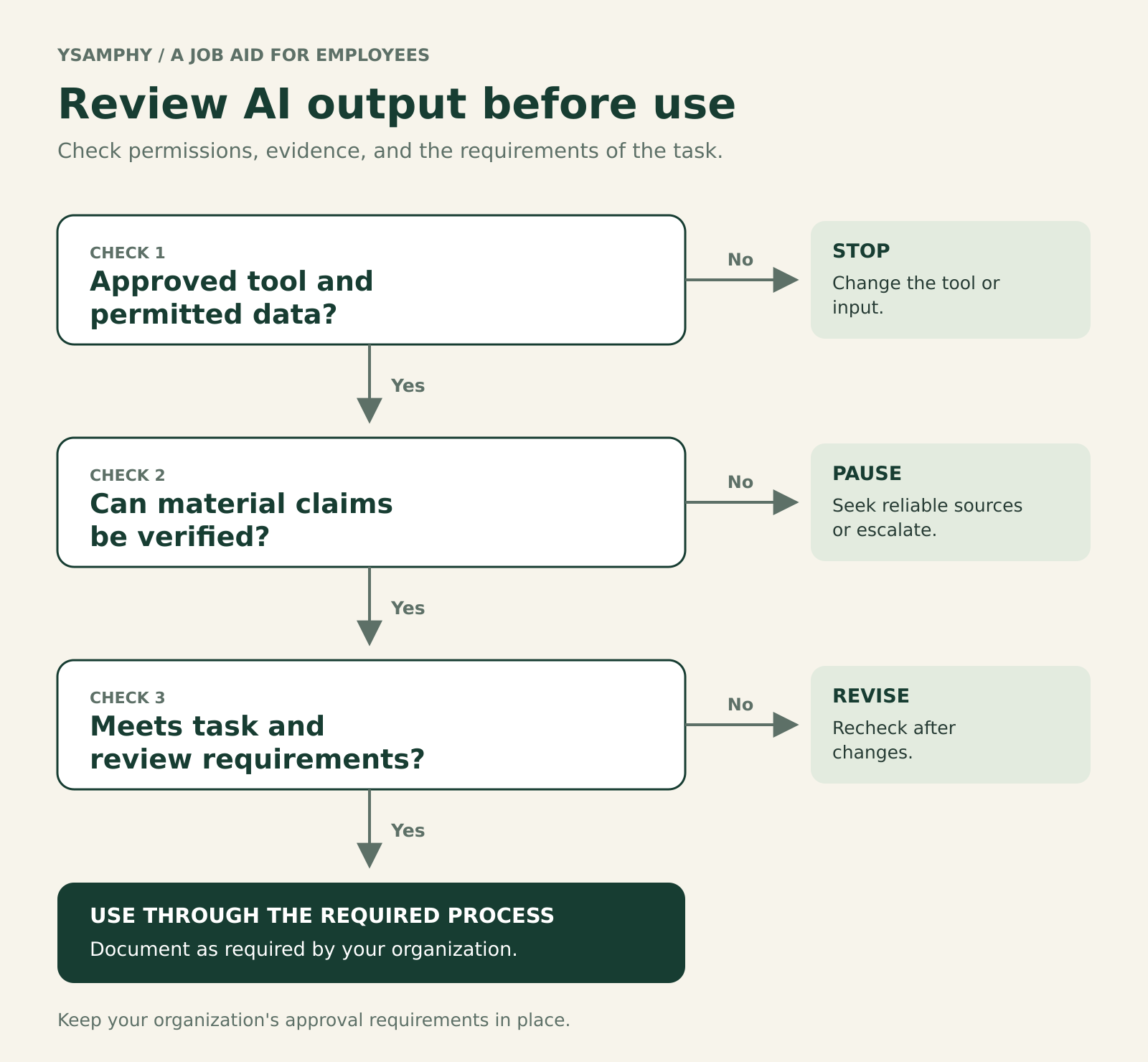
Check permissions, evidence, and task requirements before using an AI-generated output. A prompt to revise an answer does not replace rechecking it.
Assess the work with a shared rubric
| Dimension | What the learner should demonstrate |
|---|---|
| Task selection | Explain why AI assistance is appropriate, or why another method is preferable |
| Input handling | Use the approved tool and permitted material |
| Instructions | Specify the task, sources, audience, and constraints |
| Verification | Check material claims against reliable sources and identify omissions |
| Handoff | Revise, share, or escalate through the required process |
For a simple assessment, score each dimension as needs guidance, performs independently, or can explain and adapt. Treat serious data-handling failures or unverified consequential claims as issues requiring correction, regardless of the total score.
Offer accessible job aids, captioned demonstrations, and examples appropriate to employees’ language and digital skills. Give less experienced learners more guided practice and experienced learners more demanding review cases.
A Practical AI Training Program Structure
A four-week pilot is a workable starting point for a small team learning a limited set of tasks. The timing below is a suggested design, not a validated standard. Adjust it to the complexity of the work and the support employees need.
Before week one, confirm tool access, data rules, a program owner, a manager contact, and representative practice materials. Collect a few examples of current performance so you have a baseline. For a practical example of preparing access, security, and user support, see my Microsoft 365 setup and adoption enablement case study.
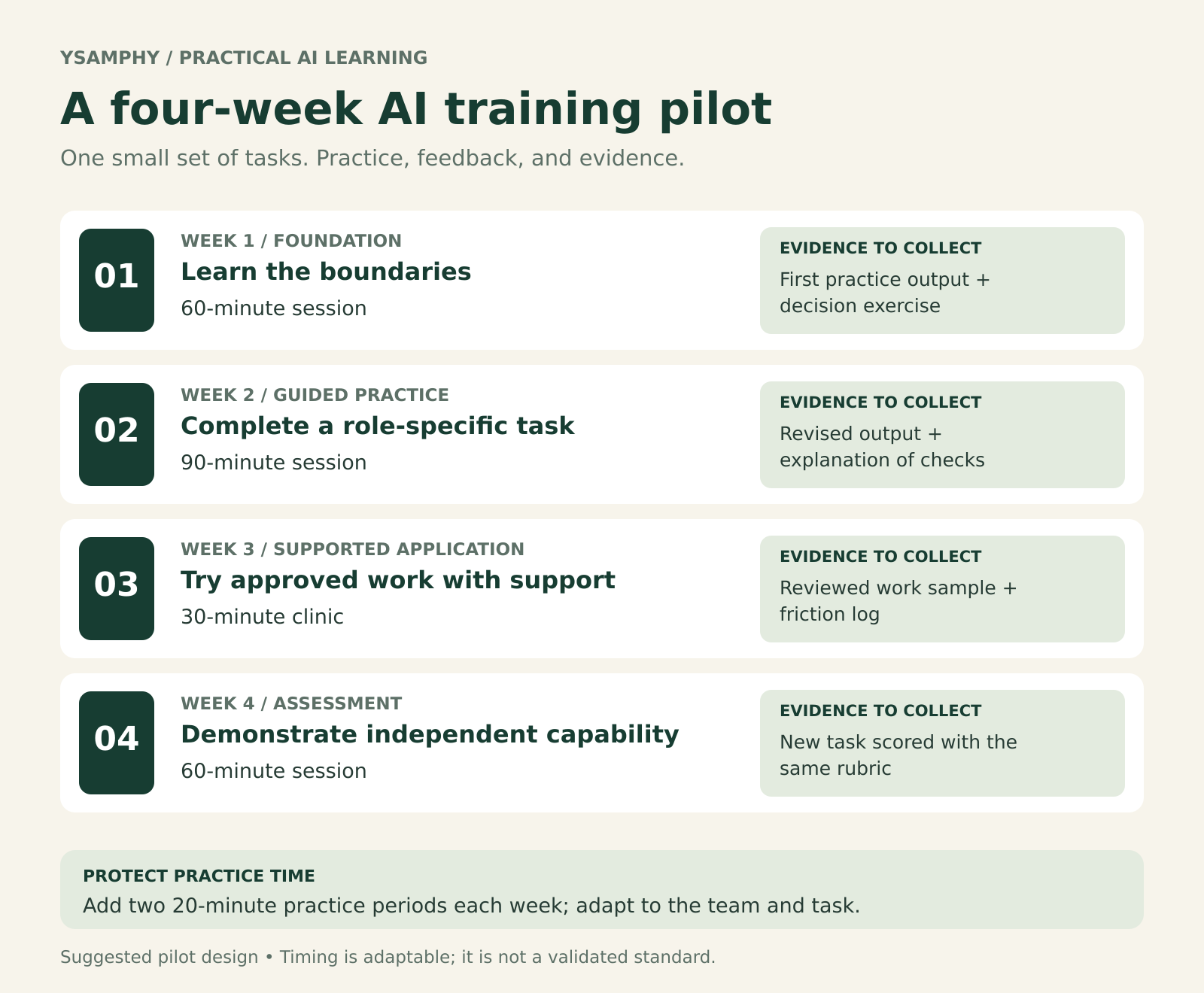
Each week produces evidence of learning, from a completed practice task to a reviewed work sample and an independent assessment.
| Week | Learning focus | Suggested live time | Evidence to collect |
|---|---|---|---|
| 1 | Foundation, boundaries, and one demonstrated task | 60 minutes | A first practice output and a short decision exercise |
| 2 | Guided practice using role-specific examples | 90 minutes | A revised output with checks explained |
| 3 | Supported application to approved work | 30-minute clinic | A reviewed work sample and a friction log |
| 4 | Independent assessment and program review | 60 minutes | A new task assessed with the same rubric |
Add two protected 20-minute practice periods in each week. Where possible, incorporate practice into normal work so employees are not expected to complete it after hours.
In week three, employees apply the method only to tasks and information approved for that stage. Keep required review in place. Successful practice does not automatically authorize a new use case or broader access.
At the end of the pilot, identify what to continue, simplify, revise, or stop. A program that discovers an unsuitable workflow has produced useful information.
My Microsoft 365 and AI quick-start guide for legal teams shows how a shorter introductory session can connect task instructions, information-handling boundaries, and everyday document habits. A longer program can build repeated practice and assessment around that foundation.
How Managers Reinforce AI Learning
Give managers a defined role before training begins. Ask them to nominate suitable tasks, protect practice time, review selected outputs, and remove obstacles employees cannot solve themselves.
A weekly check-in can stay brief:
- Which task did you try, and what did you check?
- Where did the output or process need correction?
- What would help you use the method more confidently next time?
A meta-analysis of training sustainment found positive relationships between training transfer and peer, supervisor, and organizational support. This is general workplace-training evidence, rather than a study of this AI program, but it supports making follow-up part of the design.
Create a shared place for reviewed examples, recurring questions, and updated job aids. Give it an owner and a review date so outdated guidance does not become the default.
Explain what the pilot is intended to improve and how learning evidence will be used. Invite employees to report errors and situations where AI adds work. If people expect every reported problem to count against them, you will learn less about the workflow.
Avoid requiring a target number of prompts. Appropriate use includes deciding that a familiar method is faster, clearer, or more reliable for a particular task.
How to Measure Whether Training Is Working
Separate participation, capability, application, and work outcomes. Each answers a different question.
| Measurement layer | Question | Useful evidence |
|---|---|---|
| Participation | Did employees access and complete the learning? | Attendance, access problems, completion |
| Capability | Can they perform and review the task? | A new exercise assessed against the rubric |
| Application | Are they using the method appropriately at work? | Reviewed samples and manager check-ins |
| Work outcomes | Is the complete task improving? | Total time, quality, rework, and relevant service measures |
Attendance helps diagnose reach. Confidence surveys can identify support needs. Neither replaces a demonstration of capability.
Measure the full task: preparation, generation, checking, editing, and handoff. For example, if an illustrative task previously took 25 minutes and the AI-assisted version takes 18 minutes including review, the apparent saving is seven minutes. That saving matters only if the output meets the same standard and does not create additional downstream corrections.
Compare reasonably similar tasks and use the same rubric before and after training. If possible, have a reviewer assess outputs without knowing which method produced them. Small pilots provide directional evidence; differences in task difficulty, employee experience, or workload can also affect results.
Review application about 30 days after the pilot, and again at 60 or 90 days if usage or workflow conditions change. Look for tasks employees abandoned, recurring verification errors, and guidance that needs updating.
If results are weak, investigate the cause before assigning more training. Missing access, poor source material, conflicting expectations, and an unsuitable task require different responses.
Common AI Training Mistakes
Covering too much in the first session
A large collection of features can leave employees unsure what to do next. Start with a useful task they can practice and review, then add complexity as their capability develops.
Teaching generation without teaching verification
Include review in the demonstration, practice instructions, and assessment. Show what employees should compare against the source and how to handle information they cannot confirm.
Reusing one exercise for every role
Keep the shared foundation, but change the source material, output standard, and review requirements to match the work.
Leaving practice to employees’ spare time
Agree on protected time and manager support before launching. If the team cannot make room for a large program, narrow the scope.
Treating low usage as a motivation problem
Ask what is getting in the way. Employees may lack access, find the workflow cumbersome, or correctly judge that AI assistance is unsuitable.
Counting activity as evidence of success
Pair attendance and usage information with assessed work. A busy training dashboard can coexist with weak performance.
Example: A Small-Team AI Training Program
Consider a fictional 12-person service business whose operations team spends time converting meeting notes into follow-up emails. This is an illustrative design, not a report of client results.
The team chooses one learning outcome: create an accurate follow-up draft from approved notes, with actions, owners, and dates checked before sharing.
Preparation: The operations lead selects fictional practice notes, confirms the permitted tool and input rules, and records current drafting and review time on comparable examples. The facilitator prepares a correct reference version and a deliberately flawed output.
Week one: Employees watch a demonstration and complete a practice draft. They learn to distinguish a decision from a suggestion and to mark missing information for confirmation.
Week two: Learners tackle notes containing an unclear owner and a date mentioned as a possibility. Feedback focuses on whether they identify those uncertainties rather than silently resolve them.
Week three: Employees apply the method to approved meeting notes under the existing review process. They record corrections and obstacles, including any work created by checking the draft.
Week four: Each employee completes a new exercise independently. The manager and facilitator compare capability, total task time, and output quality with the baseline.
If employees repeatedly invent deadlines, the next step is targeted practice in distinguishing proposals from commitments. If capable employees still spend longer checking than they save drafting, simplify the task or stop using AI for that workflow.
Expansion should follow demonstrated capability and appropriate authorization. The team can test another task once it understands what the first pilot achieved and what still needs improvement.
AI Training Program Checklist
Before launching, confirm that you have:
- A defined employee group and a small set of relevant tasks.
- Observable learning outcomes and a consistent assessment rubric.
- Approved tool access, input rules, and an escalation contact.
- Practice materials that employees are permitted to use.
- Demonstrations covering preparation, generation, checking, and handoff.
- Routine cases, difficult cases, and examples where escalation is appropriate.
- Accessible job aids and support for different starting skill levels.
- Protected practice time and a clear manager role.
- Baseline evidence and measures of total task time and quality.
- An owner for follow-up, feedback, and guidance updates.
Frequently Asked Questions
What should AI training for employees include?
Include a shared foundation in capabilities, limitations, approved tools, and data rules; role-specific task practice; output verification; and a clear route for support. Assess performance using realistic exercises, then check whether employees apply the learning appropriately at work.
How long should an employee AI training program be?
Match the length to the tasks and employees’ starting skills. A short introduction can establish basic awareness. The four-week pilot in this guide provides time for practice, feedback, and assessment of a limited set of workflows. Complex or consequential work may require more specialized preparation and oversight.
Do employees need coding skills?
For the drafting and summarization tasks covered here, coding is usually unnecessary. Employees need enough subject knowledge to judge the output and enough tool familiarity to follow the approved process. Building integrations or automated systems involves additional technical skills and permissions.
Can a small business run this without an L&D department?
Yes, if someone owns the program, understands the selected work, and can arrange appropriate review and support. Start with one task and a small group. Bring in specialist help when the task, data, or decisions exceed the team’s expertise.
What if employees are hesitant to use AI?
Ask about their concerns and test the workflow with them. Unclear expectations, confidentiality questions, access problems, and doubts about usefulness need different responses. Give employees a way to practice safely and demonstrate both where the tool helps and where a different method is appropriate.
Start With One Task Your Team Can Practice
Choose one recurring task, define what good work looks like, and build a lesson that includes preparation, output review, and feedback. Give employees time to try it again with a new example. That gives you a concrete basis for deciding what the program should do next.
Need help designing a practical AI training program for your team? Get in touch with your team’s roles, the workflow you want to improve, and the difficulty employees are experiencing. We can discuss a workshop or pilot built around that work.



