
A request arrives without a deadline. Three people search for the latest version of a document. A meeting ends with agreement, but nobody knows who will do the work.
These are useful places to start with Kaizen. You can test a small improvement in how work moves through the office, measure what happens, and keep the change if it helps.
The 12 ideas below focus on administrative and knowledge work: requests, approvals, files, meetings, reporting, onboarding, and everyday handoffs. Each includes a current situation, a proposed change, a measure, and something to watch so you do not simply move the problem to someone else.
Start with one recurring problem. You do not need to introduce all 12 ideas or launch a company-wide program.
Download the free Office Kaizen Improvement Tracker (Exel). It includes a blank test planner and a completed, explicitly fictional example. Prefer paper? Use the printable tracker and example (PDF).
What does Kaizen look like in an office?
Kaizen means continuous improvement. The Lean Enterprise Institute describes it as an ongoing approach to improving processes, involving the people who do the work.
In an office, the process might be how an invoice gets approved or how a client request becomes a clear assignment. A useful improvement makes that process easier to understand, perform, or maintain.
The before-and-after descriptions below are proposed workflow changes, not claims of measured results. Test them against your own baseline. The numerical example later in the article uses simulated data to demonstrate the tracker.
For examples across different types of workplaces, see 15 practical Kaizen examples. This guide focuses specifically on office work.
Choose an office Kaizen idea
| Where work gets stuck | Small change to test | Main measure |
|---|---|---|
| Requests arrive incomplete | A short request template | Requests complete on arrival |
| Nobody owns the next step | An explicit handoff | Time to acceptance |
| Documents are hard to find | A shared naming rule | Time to locate a file |
| Approvals sit in inboxes | A visible approval queue | Time to a decision |
| Information is entered twice | One source record | Re-entry time and corrections |
| Meetings end without action | A decision-and-action close | Actions completed by due date |
| Routine questions interrupt work | A small maintained FAQ | Repeat questions per week |
| Every task feels urgent | Clear intake priorities | Work finished by agreed date |
| Reports consume time without use | A report purpose review | Preparation time and usage |
| Onboarding depends on memory | A role-specific checklist | Time to first independent task |
| Common mistakes recur | A check at the point of entry | First-pass completion rate |
| Improvements quietly disappear | A short follow-up review | Whether the gain lasts |
1. Use a short template for incoming requests
Before: A colleague emails “Can you help with this?” The recipient has to ask about the outcome, deadline, background, and decision-maker before starting.
Proposed change: Test a request template with four prompts: What do you need? What is it for? When is it needed, and why? Where are the relevant materials? Add a contact person if requests come from a shared mailbox.
Measure: Count requests containing the agreed essential information on arrival, divided by all eligible requests. Also record time spent clarifying missing details.
Watch: A long form may reduce the recipient’s work by increasing the requester’s work. Ask how long it takes to complete, and remove fields nobody uses. Keep an exception route for genuinely urgent work.
2. Make the next owner explicit at every handoff
Before: A task is forwarded to a group with “Please handle.” Everyone can see it, but no one has accepted responsibility.
Proposed change: End each handoff with a named owner, the next action, an agreed due date, and a link to the necessary context. Ask the receiver to acknowledge acceptance. Use your existing task system rather than adding another place to check.
Measure: Track the elapsed time between sending a handoff and the next owner accepting it. Define whether you count business hours or calendar hours before collecting data.
Watch: Assignment does not create capacity. Let the receiver flag an unrealistic deadline or missing information without being treated as uncooperative.
3. Give shared files a predictable home and name
Before: The team has several versions of “final,” and finding the right document depends on knowing who last edited it.
Proposed change: Choose one active project folder and agree on a simple pattern such as Project_DocumentType_YYYY-MM-DD. Keep a clear link to the current working document and identify who maintains it. Test the rule on one folder before expanding it.
Measure: Ask a few team members to locate the same set of common documents. Record search time and whether they found the correct version.
Watch: Preserve access controls, retention requirements, and existing links. Archive or rename only with the appropriate owner’s agreement. A tidy folder is useful only if people can still find what they need.
4. Make approval work visible
Before: A purchase, content draft, or internal request sits in an approver’s inbox. The team sends reminders without knowing what is blocking the decision.
Proposed change: Use a shared approval queue showing the item, submission date, decision owner, next action, and blocker. Agree on a review rhythm suited to the work and a clear escalation route for time-sensitive exceptions.
Measure: Track time from a complete submission to a decision. Separate incomplete submissions so an approval delay is not confused with missing input.
Watch: Speed is not the only goal. Track decisions returned for correction, and preserve required authorization. Do not remove a control simply because it takes time.
5. Stop retyping information that already exists
Before: The same client, project, or order details are copied into an intake sheet, a status report, and a billing handoff.
Proposed change: Identify one source record and use its link or identifier wherever possible. Start by replacing one duplicate entry step. If copying remains necessary, agree which record is authoritative and who updates it.
Measure: Record minutes spent re-entering data and the number of corrections caused by inconsistent copies.
Watch: Shared access must be appropriate for the information. A link that recipients cannot open creates a different delay. Test access and ownership before considering automation; a simpler manual flow may be enough.
6. Close meetings with decisions and next actions
Before: People leave a meeting with different interpretations of what was agreed. Another meeting is needed to reconstruct the conversation.
Proposed change: Reserve the final few minutes for three questions: What did we decide? Who owns each next action? When will it be reviewed? Put the answers in the existing shared notes and confirm them aloud.
Measure: Track the proportion of actions completed by their agreed due dates and the number of follow-up clarification messages. Meeting duration is a secondary measure, not the sole test of usefulness.
Watch: Do not force a decision when evidence is missing. Record the uncertainty and assign the next evidence-gathering step. For the wider scheduling problem, see how to prioritize tasks.
7. Turn repeated questions into a small, maintained FAQ
Before: One experienced colleague repeatedly explains the same process, while newcomers receive slightly different answers from different people.
Proposed change: Collect five recurring questions and write short answers with links to the authoritative process. Give the page an owner and a review date. Place it where the questions usually arise, such as the relevant project channel or onboarding checklist.
Measure: Count repeat questions on those five topics before and after the test. Ask users whether the answers helped them complete the task.
Watch: Fewer questions can also mean people have stopped asking for help. Keep an easy way to flag an unclear or outdated answer. Avoid creating a large knowledge base before establishing a maintenance habit.
8. Agree on what makes a request urgent
Before: Most incoming work is labeled urgent, so people switch tasks repeatedly and important commitments slip.
Proposed change: Define a small number of priority categories using business consequences and time constraints. For example, distinguish a service interruption from a routine request with a preferred date. Review new work at an agreed interval and preserve a separate route for genuine emergencies.
Measure: Track completion by agreed date and the number of tasks interrupted by newly promoted urgent work.
Watch: Priority labels should help people make decisions, not conceal overload. If essential work consistently exceeds capacity, make that gap visible. Time blocking can help protect execution time once priorities are clear.
9. Review one recurring report before producing it again
Before: A weekly report is still assembled because it has always been sent, even though nobody can explain which decision it supports.
Proposed change: Ask the recipients what action the report enables, which fields they use, and how often they need it. Test a shorter version or a different frequency with their agreement. Preserve any required reporting or recordkeeping.
Measure: Record preparation time and whether the revised report still supports the intended decision. A brief recipient check may be more useful than an email-open count.
Watch: Low readership does not automatically mean a report is unnecessary. Some reports support exceptions, oversight, or periodic decisions. Confirm the purpose before stopping them.
10. Build onboarding around the first real task
Before: A new colleague attends introductions but cannot complete a routine task because access, examples, or decision rules are missing.
Proposed change: Choose one common task and create a checklist covering access, a worked example, the expected output, and where to ask for help. Assign a buddy and agree on a safe practice attempt before independent work.
Measure: Track time to the first independently completed task that meets the agreed quality standard. Record the blockers encountered along the way.
Watch: Faster onboarding is not better if people feel unable to ask questions or make avoidable mistakes. Include quality and the new colleague’s feedback in the review.
11. Catch common errors where information enters
Before: A missing reference number, inconsistent date, or incomplete brief is discovered only after work has passed through several people.
Proposed change: Add one targeted check at the point of entry: a required field, a short checklist, a worked example, or a simple validation rule. Choose the check based on a recurring error you have actually observed.
Measure: Track first-pass completion: items accepted without returning for correction, divided by all eligible items. Record the time added by the check.
Watch: Overly strict validation can reject legitimate exceptions. Provide a visible exception path and review false rejections. Correct the process rather than relying on reminders to “be more careful.”
12. Schedule a review before calling the improvement finished
Before: A useful change is introduced, but the owner moves on and the team gradually returns to the old method.
Proposed change: Before the test begins, name an owner and schedule a review. If the evidence supports keeping the change, update the existing checklist or instructions and decide when to check it again.
Measure: Repeat the original measure using the same definition. Check whether people can still follow the new method under normal workload.
Watch: A procedure should be revisable when circumstances change. Keep a way to report problems and decide whether to keep, adjust, or stop the change. For a facilitated team session, use these Kaizen activities.
A completed office Kaizen example: clearer requests
This is a fictional teaching example. All numbers are simulated; they are not results from my work or a client project.
Imagine a small operations team handling routine internal requests. Staff often need to clarify the required outcome and find missing background materials before assigning work.
The team tests the four-question request template from idea 1. The scope is one request category handled by the same team. Urgent exceptions remain outside the test and are recorded separately.
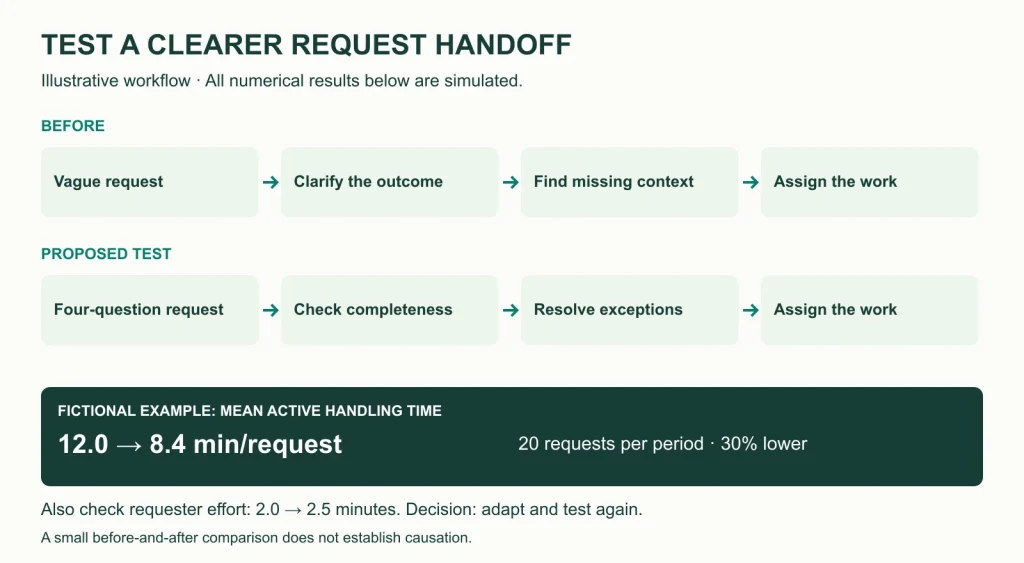
The main measure is mean active handling minutes per eligible request. That includes clarification, locating supplied materials, and assignment. It excludes time waiting for someone to reply. The same definition is used for the baseline and test periods.
| Measure | Baseline: Week 1 | Test: Week 2 |
|---|---|---|
| Eligible requests measured | 20 | 20 |
| Total active handling time | 240 minutes | 168 minutes |
| Mean handling time per request | 12.0 minutes | 8.4 minutes |
| Mean requester preparation time | 2.0 minutes | 2.5 minutes |
The observed handling-time difference in this example is 3.6 fewer minutes per request, or 30% lower than the baseline: (12.0 − 8.4) ÷ 12.0.
Requester preparation time rose by 0.5 minutes. That matters: an improvement for one team can create work for another. In this example, the team had agreed to keep average preparation time at or below three minutes, so the result is within that test limit.
The decision is adapt and test again. The team simplifies one confusing prompt, then repeats the test before wider adoption. The small, non-randomized comparison does not prove the template caused the change or that the result will last. Different request difficulty, workload, and individual experience could affect it.
The downloadable workbook contains the same completed example and the 20 simulated observations for each period, so you can inspect how the averages were calculated.
How to use the free improvement tracker
The Office Kaizen Improvement Tracker has two sheets: Tracker, for your own test, and Completed example, showing the fictional request-handling experiment. Duplicate the blank Tracker sheet when you want to run another test.
- Define the problem. Describe a recurring delay, error, or source of rework. Name the process and the people affected.
- Set the test boundary. Choose one category of work, an owner, and baseline and test periods. Write down what you will exclude.
- Define the measure. Specify its unit, whether higher or lower is better, and how you will collect it. Count the observations behind each average.
- Record the baseline and result. Use the same definition in both periods. The workbook calculates the absolute change and direction-adjusted percentage improvement. Percentage improvement is left blank when the baseline is zero.
- Check the side effects. Record a balancing measure, such as requester effort, error rate, or missed deadlines. Add feedback and unexpected outcomes.
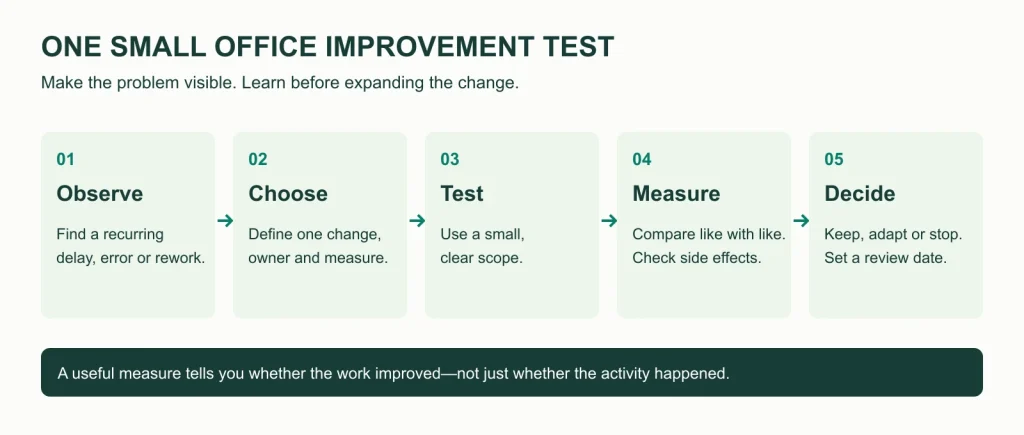
- Make a decision. Keep, adapt, or stop the change. Give the next action an owner and a review date.
The blank sheet is a planner, not an automatic verdict on whether an improvement is proven. The numerical example is for learning and should not be mixed into your own results. You can open the Excel file directly or import a copy into Google Sheets. The two-page printable version includes a blank worksheet and the same completed example.
How to choose your first improvement
Choose something frequent enough to observe, narrow enough to test, and within the team’s ability to change. A useful starting question is: “Where did we have to wait, search, clarify, or redo work this week?”
Ask the people who perform and receive the work to help choose the test. Write down what you expect to happen, then compare it with what actually happens. The Institute for Healthcare Improvement’s Model for Improvement offers a useful structure: define the aim and measures, choose a change, and test it through a Plan-Do-Study-Act cycle.
Use enough observations to learn about normal variation. A week can be a convenient review interval, but it is not automatically an adequate test. Low-volume or seasonal processes may need longer, and high-risk changes require the appropriate review before testing.
If the problem spans several functions and needs coordinated preparation, consider a Kaizen event. For a smaller issue, one well-defined test is a reasonable place to begin.
Common questions
What is a simple Kaizen idea for office work?
A short request template is a practical starting point when incomplete requests repeatedly cause clarification. Begin with the information the recipient actually needs, test it with one request type, and measure both handling time and the requester’s effort.
Do I need new software to try these ideas?
No. Most can be tested with your existing documents, spreadsheets, task system, and meeting notes. Decide what the workflow needs before considering a new tool.
How many Kaizen ideas should a team try at once?
Start with one change in a clearly defined process. This makes it easier to understand the result and gives the team a manageable follow-up commitment. Add further changes when you can track them without losing the connection between a test and its outcome.
How do I know whether a change helped?
Compare the same measure before and during the test, check the sample sizes and working conditions, and ask the people affected. Look for side effects as well as the intended result. A promising small test is a reason to learn more, not a guarantee of a lasting improvement.
Make one piece of office work easier
Pick one recurring problem from the list. Write down the current process, choose a small change, and set a review date before you begin.
Download the improvement tracker and completed example, or print the two-page worksheet. Your first goal is a useful test and a clear next decision.



