
You planned to make progress on an important project. By Friday, you had answered questions, attended meetings, cleared messages, and moved the project to next week.
Where did the time go?
A time audit gives you a practical way to answer that question. For one workweek, record what you actually do, add up the time, and use the patterns to change your next calendar.
You can do this with paper or a spreadsheet. The useful part comes when an observation becomes a decision: protect a project block, give routine messages a window, or reserve capacity for the requests that keep arriving.
This guide includes a blank worksheet, a completed example, and three calendar changes built from the example. All example figures are illustrative, not results from a client or a study.
How to do a time audit in five steps
- Choose the week and your question. Decide what you want to understand about your working time.
- Record actual activities. Note start and finish times, a category, and any useful context.
- Check the log each day. Fill gaps while you can still remember what happened.
- Total the categories and look for patterns. Compare your commitments with the time actually available.
- Test three changes next week. Put them in the calendar and decide how you will review them.
Start with one ordinary workweek. If your work follows shifts or a longer cycle, use a complete cycle that reflects your responsibilities.
Get the free time audit worksheet
FREE TOOLKIT · MAKE YOUR WEEK VISIBLE
Choose the format that fits how you work. Both include a blank log and an illustrative completed example.
PDF: 3 printable pages. Excel: editable log, automatic totals and row checks. No signup required.
Use the blank daily log throughout the week, then complete the summary and next-week experiments. The worked example shows how the parts fit together.
The log fields are Date, Start, End, Activity, Category, Hours, Priority?, Necessary?, and Notes/context. Excel calculates hours and adds an automatic Row status check; on paper, calculate duration yourself.
For Priority?, mark Yes, No, or Unsure according to whether the activity directly advances your chosen priority. For Necessary?, mark whether it is required to sustain your work. The printable uses Y, N, and ? for these flags. An activity can be necessary without advancing this week’s priority.
Keep notes short. “Waiting for approval,” “quick question became troubleshooting,” or “finished outline” is enough. You can also copy these fields into your own notebook.
What is a time audit?
A time audit is a record and review of how you spend time over a defined period. It helps you compare your intended priorities with your actual activities.
A calendar shows what you expected to happen. Your audit records what happened, including the work that never received an invitation or a calendar block.
For this exercise, focus on your working week. You can extend it to your whole day if your question involves commuting, caregiving, study, or evening work. Set the boundary before you begin so the totals remain meaningful.
A time audit can reveal several different problems:
- Important work has enough hours on paper but gets split into unusable fragments.
- Routine communication expands into every available gap.
- Necessary support work is missing from the plan.
- The commitments simply require more time than the week contains.
Those findings call for different decisions. Treating all of them as poor discipline will lead to the wrong fix.
Step 1: Choose a question and define what counts
Write one question at the top of your worksheet.
For example: Why does my priority project keep slipping when I have a full working week?
Other useful questions include:
- How much time does each client require once follow-up is included?
- Which recurring meetings leave enough room for the work they generate?
- How much capacity should I reserve for requests from other people?
Then define your scope: dates, working hours, and whether meals, breaks, travel, and personal tasks belong in the total.
The example below contains 40 tracked work hours across five days. It excludes lunch and personal time from the work total. This is a simplified example, not a recommendation for your workday length or for skipping breaks. In your own log, record breaks explicitly and use your actual working time.
If you track the whole day, give breaks and personal activities their own categories. If you track only work, mark excluded periods so they do not look like missing entries. Do not quietly add evening work to a 40-hour total; record it and update the total.
Step 2: Use a few categories you can apply consistently
Start with these five if they suit your work:
| Category | What belongs here |
|---|---|
| Focused work | Producing a defined output: writing, analysis, design, coding, or preparation |
| Meetings | Scheduled calls, discussions, and collaborative sessions |
| Email/admin | Routine correspondence, scheduling, records, invoices, and other maintenance |
| Reactive/help | Unplanned requests, troubleshooting, and helping someone move forward |
| Planning | Choosing priorities, reviewing progress, and adjusting the calendar |
Adapt the labels to your role. A manager may need coaching and hiring categories. A freelancer may want a separate client or project field. Avoid creating a new category for every small task.
Choose one main category per interval. If an hour contains 40 minutes of analysis and 20 minutes answering a request, split the entry when you can. If you cannot separate simultaneous activities, choose the main one and note the other activity rather than counting the hour twice. The U.S. Bureau of Labor Statistics uses a similar approach in its time-use diary questionnaire, separating activities into intervals when possible and otherwise recording the main activity.
A category describes the work. It does not tell you whether that work was valuable. Helping a colleague can matter more than completing your own planned task.
Step 3: Log what happened while it is still fresh
Record a row when you change activities, or use a short check-in every 30 to 60 minutes. Choose a rhythm that does not become another interruption.
Use actual start and finish times where practical. If you estimate, mark the entry as approximate. Consistent, honest estimates are more useful for this exercise than invented precision.
Suppose you planned to write from 9:00 to 10:30. At 9:40, you spent 20 minutes fixing a problem for someone. Record the writing and help separately. Leaving the whole 90 minutes under writing would hide the pattern you want to understand.
At the end of the day:
- Check for overlaps and missing periods. Use one time format consistently, such as 09:00–10:30, and avoid counting the same interval twice.
- Add work that happened outside your usual hours.
- Note anything unusual, such as an outage or a deadline.
- Record a useful outcome or obstacle before you forget it.
Use neutral descriptions. “Checked messages six times during the proposal” gives you something to examine. “Terrible focus” gives you a verdict without enough information.
Keep confidential names and details out of the worksheet when a general label will do, especially if you intend to share the summary.
Step 4: Review the week without calling necessary work waste
First, total the time in each category. Then read the notes. The hours tell you how the week was distributed; the notes help explain why.
Ask three questions:
What needs protecting? Look for important work that happened only after everything else, or kept losing its intended slot.
What needs a boundary? Look for activities that spread throughout the day without a clear response requirement or stopping point.
What needs an honest allowance? Look for necessary work that repeatedly arrived unplanned. If troubleshooting is part of your role, the next calendar needs capacity for it.
Also ask what you can change yourself. Moving a private work block is different from changing a team’s response expectations or cancelling a meeting you do not own.
If your necessary commitments exceed your available hours, bring the evidence into a conversation about scope, priorities, deadlines, or support. Rearranging an overloaded calendar cannot remove the underlying trade-off.
Worked example: Where a 40-hour week went
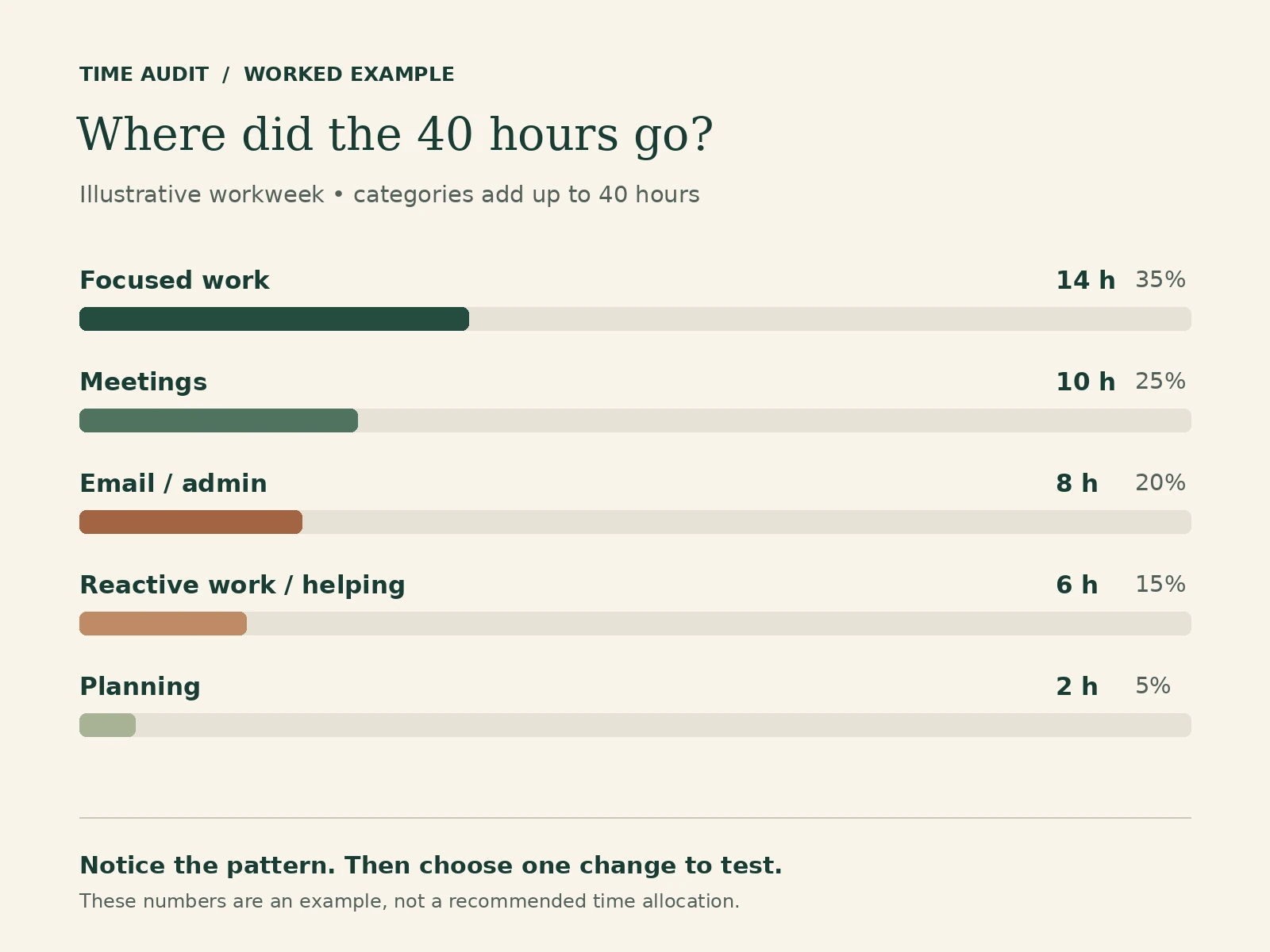
Here is an illustrative week for someone balancing project work, meetings, routine administration, and requests from colleagues.
| Category | Hours | Share of tracked work |
|---|---|---|
| Focused work | 14 | 35% |
| Meetings | 10 | 25% |
| Email/admin | 8 | 20% |
| Reactive/help | 6 | 15% |
| Planning | 2 | 5% |
| Total | 40 | 100% |
The calculation is category hours divided by total tracked hours, multiplied by 100. Focused work is 14 ÷ 40 × 100 = 35%.
These percentages are not performance targets. Another role could reasonably need much more meeting or support time.
The log shows several short project sessions late in the day, eight hours of routine email and administration, and recurring requests from colleagues. Those observations suggest three experiments. The totals alone cannot tell you why the work took that time or whether a different arrangement will help.
Change 1: Protect two specific project sessions
Observation: The week included 14 hours of focused work, with three half-hour project sessions at 17:30. Test whether moving some of that work earlier makes those sessions easier to use.
Calendar experiment: Reserve Tuesday and Thursday, 9:00–10:30, for the priority project. Give each session an output, such as “draft the recommendation section.” Move any existing planning or other commitments deliberately; do not double-book them.
These three hours come from the existing 14-hour focused-work allowance. No new capacity has appeared.
Review question: Did both sessions happen, and did the named outputs move forward? If a session moved, what displaced it and where did it land?
Change 2: Give routine communication a predictable place
Observation: Email and administration took eight hours, mostly in 90-minute afternoon blocks. Test whether shorter, predictable inbox windows and separate administrative blocks fit the work better.
Calendar experiment: Try two 30-minute routine inbox windows each workday. That accounts for five hours over the week. Keep another three hours for administration that needs longer attention.
Check that this rhythm fits your responsibilities and agreed response times. Keep an appropriate route for genuinely urgent requests. A customer-support role may require a completely different arrangement.
Review question: Did routine communication fit the windows without causing missed obligations? If it overflowed, was the allowance too small, or did other work enter those windows?
Change 3: Budget for the requests already arriving
Observation: Six hours went to reactive work and helping others. Because it recurred throughout the week, make that capacity explicit in the next plan.
Calendar experiment: Reserve one hour each workday for requests and follow-up, plus one additional hour of weekly flex. When a genuine urgent issue arrives earlier, use the reserved capacity to relocate displaced work where possible.
This keeps the six-hour allowance visible. It does not assume colleagues will stop needing help or that every request can wait.
Review question: Was six hours enough, and could nonurgent requests wait for the response window? If not, discuss the workload or access expectations rather than repeatedly sacrificing the same project.
Together, these changes preserve the 40-hour total. The experiment is whether a clearer arrangement makes the commitments more workable. Any time savings would need to be observed, not assumed.
Turn your findings into next week’s calendar
Write the observation in your notes, then complete the worksheet’s experiment table:
| Next-week experiment | When | How you will test it |
|---|---|---|
Choose a small number of changes you can explain. “Be more productive” is too vague. “Reserve Wednesday’s first hour for the report, with the outline ready the previous afternoon” gives you a testable next step.
For the full planning process, use my guide to time blocking your week. Your audit supplies the evidence; that guide helps you fit priorities, commitments, and buffer into a calendar.
When should you repeat a time audit?
Review your experiments at the end of the following week. Keep what helped, adjust what did not fit, and note any changed conditions.
You do not need to log every minute forever. Repeat the audit when your role or workload changes, when the calendar repeatedly breaks, or when you need evidence for a capacity decision.
If the first week was unusual, label it and compare it with another week before making lasting changes. One week can expose a useful pattern without representing every season of your work.
Start with one honest week
Choose your question, record what happens, and give yourself time to review it. Finish with three decisions you can see in next week’s calendar.
If you want help taking those decisions further, the free 7-Day Time Blocking Reset includes a workbook and seven daily emails for building and adjusting your weekly plan. Signing up also adds you to The Weekly Signal; you can unsubscribe anytime.



