
A useful weekly time-blocking plan does not begin by filling every available hour.
It begins by deciding what the week must carry, giving the most important work a realistic place, and leaving enough room for the plan to change.
That last part matters.
Most weekly schedules look reasonable before Monday begins. Then a meeting runs long, a client replies late, a child needs attention, or a task takes twice as long as expected. The problem is not always poor discipline. Often, the original calendar simply had no capacity for real life.
Weekly time blocking helps you see the whole week before you commit each day. It shows whether your priorities fit, where your fixed obligations compete, and what must remain flexible.
This guide will show you how to build a weekly schedule that is specific enough to guide your work but flexible enough to survive disruption.
If you are completely new to the method, begin with my Ultimate Guide to Time Blocking. This article focuses on the next level: turning one week’s priorities into an actual calendar.
The Quick Answer
To time block your week:
- Review your commitments and deadlines.
- Choose one to three outcomes that would make the week meaningful.
- Add fixed appointments, meetings, and personal obligations.
- Calculate how much usable time remains.
- Schedule focused work before routine activity fills the calendar.
- Add communication, administration, breaks, and transitions.
- Leave buffer for work that runs long or arrives unexpectedly.
- Refine the plan each day using current information.
- Reset the remaining week when reality changes.
The purpose is not to predict every hour correctly. It is to make better decisions before the week becomes reactive.
Weekly Time Blocking and Daily Time Blocking Solve Different Problems
Weekly and daily time blocking work best together.
A weekly plan gives you perspective. It helps you:
- Choose the week’s important outcomes
- Expose capacity conflicts across several days
- Protect time before meetings and requests take over
- Distribute demanding work and recovery
- Create room for blocks to move
A daily plan gives you precision. It helps you:
- Define today’s specific outputs
- Adjust for current conditions
- Clarify what to do when a block begins
- Refine task order and duration
- Respond to changes that have already occurred
You do not need to choose one horizon.
Use the week to allocate your time. Use the day to execute and adjust it.
Why Plan the Week Before Planning Each Day?
A daily to-do list can hide a weekly capacity problem.
Monday may look manageable by itself. Tuesday may also appear manageable. But when you see the entire week, you may discover that meetings occupy your best focus periods, three deliverables depend on the same afternoon, or every unfinished task has been pushed into Friday.
A weekly calendar makes those conflicts visible early enough to do something about them.
It also turns broad intentions into more specific plans. Research on implementation intentions has found that specifying when, where, and how you will act can make goal pursuit more likely than relying on intention alone.
The calendar does not perform the work for you. It gives the work a defined opportunity to happen.
Step 1: Review the Week Before You Schedule It
Begin with what is already true.
Collect the information that could shape the week:
- Deadlines
- Meetings and appointments
- Client or stakeholder commitments
- Personal and family obligations
- Work carried over from the previous week
- Tasks waiting for someone else’s input
- Important projects without immediate deadlines
- Known periods of lower availability or energy
Do not start dragging tasks onto the calendar yet.
First, look for constraints and conflicts.
Ask:
- Which commitments cannot easily move?
- Which deadlines require work several days earlier?
- What depends on another person?
- Which day is already overloaded?
- Where could an interruption create a chain reaction?
This short review prevents you from building a week around information that is incomplete or already outdated.
Step 2: Choose One to Three Weekly Outcomes
A week filled with activity can still fail to move anything important forward.
Before scheduling routine work, choose one to three outcomes that would make the week meaningful.
An outcome describes what should exist by the end of the week.
Too vague:
- Work on article
- Improve website
- Prepare presentation
- Handle client project
More useful:
- Complete and submit the article draft
- Publish the revised services page
- Finish the first 15 presentation slides
- Deliver the client’s findings and recommendations
The difference matters because a calendar block should protect progress toward a result, not merely reserve time for a topic.
Why limit the number?
Because every priority creates a claim on the same limited week. If you declare ten outcomes equally important, routine work and urgent requests will decide which ones receive attention.
Choose the few results that deserve protection first. Everything else can then compete for the capacity that remains.
Step 3: Add Fixed Commitments
Place the least flexible parts of the week on the calendar:
- Meetings
- Appointments
- Classes
- School drop-off or pickup
- Regular family responsibilities
- Travel time
- Deadlines that occur at a specific hour
- Meals, sleep, exercise, or other non-negotiable personal commitments
Include the time around the event when it is genuinely required.
A meeting from 2:00 to 3:00 p.m. may also require 20 minutes of preparation and 15 minutes to record decisions or send follow-up messages. An appointment across town includes travel. School pickup may determine when focused work must end, even if the pickup itself takes only a few minutes.
Ignoring these edges produces a calendar that appears open but is not actually usable.
The Stanford Center for Teaching and Learning similarly recommends placing non-negotiables and regular commitments before scheduling specific tasks.
Step 4: Calculate Your Real Weekly Capacity
Do not build your plan from the number of hours you theoretically have.
Build it from the hours you can realistically use.
Use this simple capacity calculation:
Total Work Time – Fixed Commitments – Admin & Comms – Breaks – Buffer = Real Priority Capacity
Here is an illustrative 40-hour workweek:
- Start with 40 hours of total available work time.
- Subtract 8 hours for meetings and appointments.
- Subtract 5 hours for communication and administration.
- Subtract 5 hours for breaks and transitions.
- Reserve 6 hours for buffer and overflow.
That leaves 16 hours of realistic priority and project capacity.
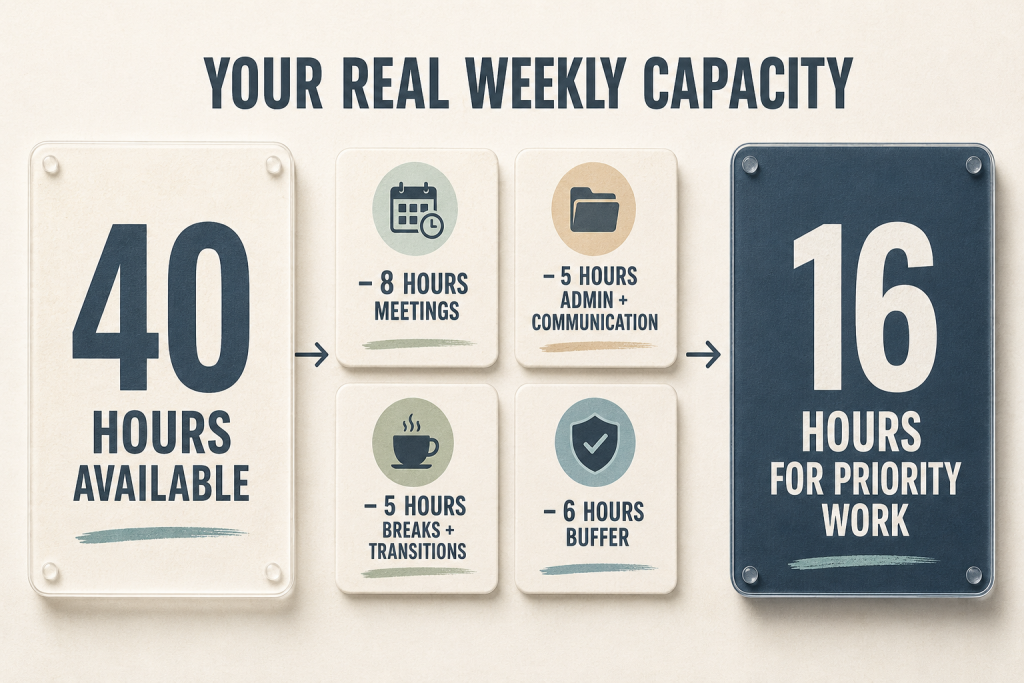
The numbers are examples, not universal rules.
Your work may require more meetings, more recovery, or more reactive availability. The point is to stop treating every nominal work hour as available for focused production.
People often underestimate how long their own tasks will take, a pattern documented in research on the planning fallacy. Your past calendar is usually a better starting point than your best-case imagination.
If similar work has repeatedly required three hours, do not give it one hour because this week feels different.
Step 5: Build the Week With Five Types of Blocks
A realistic week needs more than project blocks.
Use five broad block types as a starting structure.
1. Outcome blocks
These move important work toward completion. Examples include writing, analysis, design, strategy, and production.
2. Commitment blocks
These honor fixed obligations such as meetings, appointments, classes, and delivery deadlines.
3. Access blocks
These give other people predictable ways to reach you. Examples include email, messages, office hours, and client calls.
4. Maintenance blocks
These keep work and life operating. They may contain planning, invoicing, filing, system maintenance, or errands.
5. Recovery blocks
These absorb variation and restore capacity. Examples include buffer, breaks, transitions, lunch, exercise, and time off.
You can rename these categories to fit your work. My guide to time-blocking categories provides more examples.
The important point is that focused production should not be expected to occupy every open space.
Meetings, messages, administrative work, movement, meals, and unexpected problems all consume real time. A weekly plan becomes credible only when it gives those demands somewhere to go.
Step 6: Schedule Important Work Before Routine Work Expands
Now place blocks for your one to three weekly outcomes.
Protect the work that is important but easy to postpone:
- Writing
- Analysis
- Planning
- Designing
- Learning
- Business development
- Difficult decisions
- Preparation for a future deadline
Whenever possible, match demanding work to the periods when you usually concentrate best.
Do not assume that every open hour is equally useful. A quiet Tuesday morning may support two hours of writing. Thirty minutes between meetings may be suitable only for email, preparation, or a small decision.
Longer blocks can also reduce unnecessary switching between unrelated tasks. Research on attention residue suggests that part of our attention may remain attached to an unfinished task after we switch to another one.
That does not mean you must eliminate every transition. It means a calendar fragmented into tiny, unrelated blocks may cost more attention than the visible minutes suggest.
Step 7: Give Every Important Block a Clear Output
A block should tell you how to begin and what progress should exist when it ends.
Weak block:
Website work
Clearer block:
Draft the homepage problem, promise, and proof sections
Weak block:
Client A
Clearer block:
Review Client A’s data and write five findings
Weak block:
Presentation
Clearer block:
Build slides 1 to 10 and identify missing evidence
A clear output reduces the amount of decision-making required when the block begins.
For complex work, also place the first action in the calendar description:
Open the research notes and draft the three section headings.
You do not need to plan every action in advance. You only need enough clarity to start without reopening the entire project decision.
Step 8: Add Access and Maintenance Windows
Communication and administration matter, but they can spread through the entire week unless you give them boundaries.
Create realistic windows for activities such as:
- Email and messages
- Client responses
- Team questions
- Scheduling
- Approvals
- Invoicing
- File organization
- Expense tracking
- Weekly review
You may need several access windows each day, or only one. The right frequency depends on your role and the response expectations you have established.
The goal is not to ignore people.
It is to stop every routine message from becoming an immediate context switch.
If you manage several clients, the complete examples in my time-blocking templates for freelancers may fit your work better than a general weekly schedule.
Step 9: Leave Visible Buffer
Buffer is not wasted time.
It is the capacity that allows the rest of the plan to survive.
Use buffer for:
- Tasks that take longer than expected
- Meeting follow-up
- Late information
- Small urgent requests
- Technical problems
- Travel delays
- Transitions
- A lower-energy period
- Work displaced by a genuine priority
Do not hide buffer by filling it with optional tasks in advance. Leave at least some of it visibly open.
There is no universal percentage that fits every job. As a practical starting point, leave more open capacity when your work is unpredictable and less when your week is stable. Then compare the plan with what actually happens.
If every buffer block is used for several consecutive weeks, you probably do not have buffer. You have recurring work that has not yet been acknowledged in the plan.
Step 10: Check the Shape of Each Day
Step back and look at the week as a pattern.
Ask:
- Does one day depend on everything going perfectly?
- Are all demanding tasks concentrated on the same day?
- Have meetings fragmented every focus period?
- Is important work scheduled after the deadline it supports?
- Does unfinished work have somewhere realistic to move?
- Are meals, transitions, and personal obligations visible?
- Does Friday contain everything that did not fit elsewhere?
Move blocks before the week begins if the load is obviously uneven.
You are not trying to make every day identical. You are checking whether the week contains a credible rhythm of concentration, access, maintenance, and recovery.
A Practical Weekly Time-Blocking Example
Here is a simplified week for a professional balancing project work, meetings, communication, and planning.
Monday
- Morning: Weekly review followed by the priority project
- Midday: Email and lunch
- Afternoon: Meetings and follow-up
- Closing block: Adjust Tuesday’s plan
Tuesday
- Morning: Focused production
- Midday: Communication and lunch
- Afternoon: Project work followed by buffer
- Closing block: Record progress and the next action
Wednesday
- Morning: Focused production
- Midday: Administration and lunch
- Afternoon: Meetings or collaboration
- Closing block: Conduct a midweek reset
Thursday
- Morning: Complete the priority project
- Midday: Communication and lunch
- Afternoon: Review, revisions, and buffer
- Closing block: Confirm Friday’s remaining work
Friday
- Morning: Finish and deliver
- Midday: Email and lunch
- Afternoon: Business development, maintenance, and overflow
- Closing block: Complete the weekly review
The structure matters more than the exact hours.
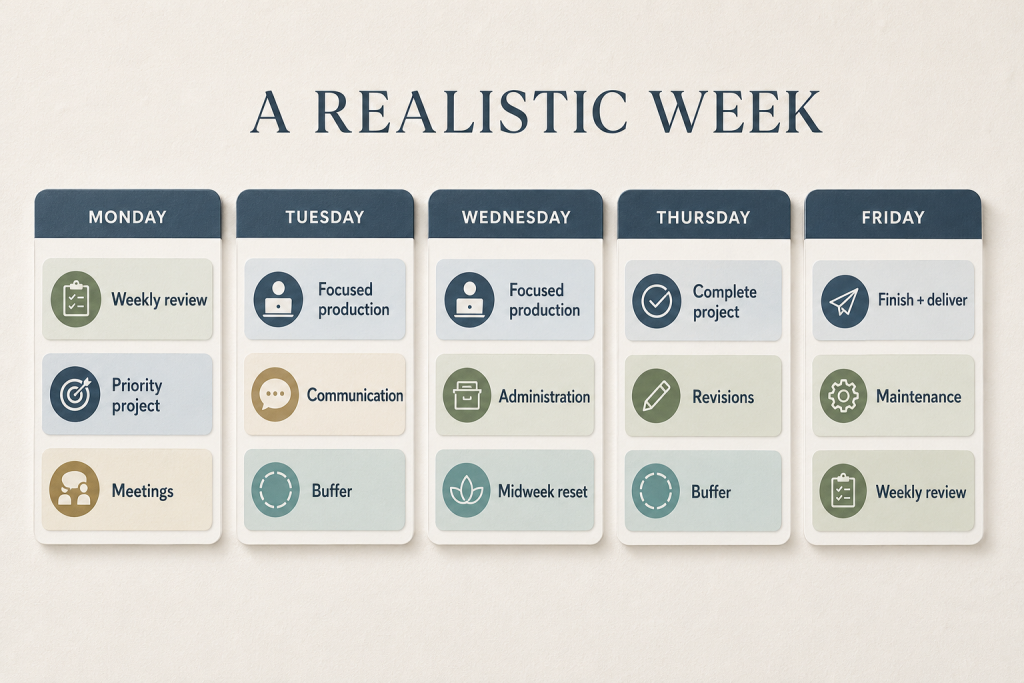
This week includes:
- Early protection for the most important project
- Predictable communication periods
- Meeting space that does not fragment every morning
- A midweek reset
- Buffer before the final deadline
- A Friday review instead of carrying every decision into the weekend
Your version may look completely different. A manager may need shorter focus blocks. A creator may need several uninterrupted mornings. A parent may build the week around school hours. A consultant may alternate delivery days and meeting days. An entrepreneur may need a role-based weekly system for strategy, sales, operations, leadership, and buffer.
A useful weekly structure reflects your constraints rather than pretending they do not exist.
Download the Free Weekly Time Blocking Planner
Put the system into practice with this free two-page printable planner.
Page one helps you choose up to three weekly outcomes, calculate your real priority capacity, and distribute work, buffer, and recovery across the week.
Page two provides a midweek reset and end-of-week review so unfinished work is traded against existing commitments instead of stacked onto an already-full schedule.
Refine the Week One Day at a Time
The weekly plan gives direction, but it should not become a contract with outdated information.
At the end of each workday, spend a few minutes checking the next day.
Ask:
- What changed today?
- Which unfinished work still matters?
- What is tomorrow’s most important output?
- Does it still fit in the assigned block?
- What will move if something new must be added?
Then make the smallest useful adjustment.
Do not redesign the entire week every evening. Refine the next day and protect the broader structure where it still makes sense.
Use a Midweek Reset Before the Plan Collapses
By Wednesday, the information you used to plan the week may no longer match reality.
That is normal.
Use a short midweek reset:
- Compare the calendar with what actually happened.
- Remove work that no longer matters.
- Reconfirm the week’s most important remaining outcome.
- Move unfinished work into a real opening.
- Decide what will be displaced to make room.
- Protect at least one recovery or buffer period.
The critical rule is simple:
Trade blocks. Do not stack them.
If Tuesday’s two-hour task moves to Thursday, Thursday must give up two hours somewhere. Merely adding the task to an already-full day does not reschedule it. It hides the conflict.
If your whole schedule has already become disconnected from reality, use The Time Blocking Reset to rebuild the affected period without starting your entire system over.
Build a Minimum Viable Week
Some weeks will not support your ideal structure.
When travel, illness, deadlines, caregiving, or urgent work reduces your capacity, create a minimum viable week instead.
Protect only:
- The commitments that truly cannot move
- One essential outcome
- The communication required to prevent avoidable problems
- Basic recovery and personal responsibilities
- One buffer period
Everything else becomes optional, delegated, delayed, or removed.
This is not giving up on the week.
It is aligning the plan with the capacity that actually exists.
A smaller credible plan is more useful than a complete fictional one.
Common Weekly Time-Blocking Mistakes
Filling every open hour
A full calendar has nowhere to absorb variation. Leave visible space.
Planning from best-case estimates
Use the time similar work actually required, not the time you hope it will require.
Treating routine work as invisible
Email, coordination, administration, breaks, and transitions still consume capacity even when they are absent from the calendar.
Naming topics instead of outputs
“Project work” does not tell you how to begin. Define the progress the block should produce.
Moving work without making room
Rescheduling requires a trade. Do not keep stacking unfinished work onto tomorrow.
Judging the plan instead of learning from it
A missed block is information about priorities, estimates, energy, interruptions, or capacity. Use it to improve the next plan.
For a deeper troubleshooting guide, read Why Time Blocking Doesn’t Work.
Frequently Asked Questions
How far in advance should I time block my week?
Plan far enough ahead to protect important work, but not so far ahead that the schedule becomes imaginary. Friday afternoon, Sunday, or Monday morning can all work. Choose a time when you have enough information about the coming week.
Should I time block the entire week or only work hours?
Block the parts of life that compete for the same capacity. You do not need to schedule every personal activity, but fixed family responsibilities, appointments, travel, meals, and recovery may need to be visible if they affect your work plan.
How much buffer should I leave?
There is no universal amount. Start with more open space than feels necessary, especially if your work is reactive. Review how much buffer you actually use and adjust from evidence rather than preference.
What should I do when I miss a time block?
First, decide whether the work still matters. If it does, move it into a real opening and identify what will give up that time. Do not automatically add it to an already-full tomorrow.
Is weekly time blocking better than daily time blocking?
They solve different problems. Weekly planning allocates priorities and capacity across several days. Daily planning refines execution using current information. Most people benefit from using both.
Should I use paper or a digital calendar?
Use the tool you are most likely to review and update. Paper can make the whole week easy to see. A digital calendar makes recurring blocks and schedule changes easier. You can use my free time-blocking templates or follow the complete process for time blocking in Google Calendar.
Build a Week You Can Adjust and Return To
The purpose of weekly time blocking is not to make the calendar predict reality.
It is to decide what matters before urgent activity takes over, expose conflicts while you can still resolve them, and create a structure you can adjust when the week changes.
Start with what is fixed.
Choose a few meaningful outcomes.
Calculate your real capacity.
Protect important work.
Leave room.
Then review and adjust without treating every disruption as failure.
The week will break. The system is the return path.
Put the System Into Practice
If your calendar keeps falling apart after a promising start, use the free 7-Day Time Blocking Reset.
You will receive one short practical lesson each day and a reusable workbook for planning, recovery, and building a weekly schedule that can survive real life.
You can also explore more practical planning and focus systems in the Better Work hub.



