
Entrepreneurs rarely have only one job.
In the same week, you may need to make strategic decisions, generate sales, serve customers, review finances, improve a product, support a team, and solve unexpected problems. Every responsibility competes for the same limited capacity.
Time blocking is a planning method that assigns specific periods on your calendar to a task or category of work. For entrepreneurs, it works best when the calendar allocates time among business roles instead of becoming a storage place for every individual task.
Across consulting, writing, training, and business ownership, I have found that the hardest weeks are not always those with the most tasks. They are the weeks in which every role expects immediate attention.
The goal is not to fill every hour. It is to protect enough capacity to operate the business today while still building what it will need tomorrow.
Quick answer: To time block as an entrepreneur, calculate your flexible weekly capacity, map your work across five business roles (Direct, Grow, Build, Operate, and Lead) and reserve Buffer separately. Add fixed commitments first, protect strategic and revenue-generating work, group routine operations and communication, and review the balance each week.
If you are new to the underlying method, begin with my Ultimate Guide to Time Blocking. This article focuses specifically on allocating an entrepreneur’s limited capacity among the different responsibilities required to operate and grow a business.
Why Entrepreneurs Need a Different Kind of Weekly Schedule
Most task-management systems treat work as a collection of actions.
That may be enough when you have one relatively stable role. It becomes less useful when you are simultaneously acting as strategist, salesperson, operator, manager, creator, administrator, and problem-solver.
A Harvard Business School study of CEO time examined how 27 CEOs allocated nearly 60,000 hours across competing responsibilities. The leaders continually had to balance planned priorities, internal work, external relationships, decisions, and unexpected demands.
A small-business owner is not the same as the CEO of a large organization. You may not have an executive assistant, a leadership team, or entire departments handling finance, marketing, operations, and people management.
But the underlying scheduling problem is similar: the calendar must accommodate several legitimate responsibilities at once.
The U.S. Small Business Administration’s business-management guidance covers areas such as finance, employees, taxes, compliance, marketing and sales, cybersecurity, fraud protection, and emergency preparation. Each area can create real demands on an owner’s time.
Your schedule probably has a role-allocation problem when:
- Most weeks are shaped by incoming requests.
- Sales happen only when revenue begins to decline.
- Strategic projects repeatedly move to next week.
- Team members can interrupt you at any time.
- Administrative work appears in scattered fragments.
- Every free block becomes operational catch-up.
- You finish the week busy but unsure whether the business improved.
This is not simply a discipline problem.
Work required to operate the business is usually more immediate than work required to improve or grow it.
A customer complaint produces an immediate consequence. A delayed invoice needs attention. A team member is waiting for a decision. A delivery problem cannot be ignored.
By contrast, postponing strategic thinking, process improvement, customer research, or business development may not cause a visible crisis today. The cost appears gradually.
Without deliberate protection, the urgent work of running the business will repeatedly displace the important work of building its future.
Step 1: Calculate Your Flexible Weekly Capacity
Before deciding what to time block, determine how many hours remain available after the week’s unavoidable demands have been accounted for.
Entrepreneurs often build schedules around their total work window.
You may expect to work 40 or 50 hours, but not all of those hours are available for strategic projects, business development, or discretionary work. Meetings, communication, administration, transitions, and unexpected problems have already claimed part of that capacity.
Use this formula:
Flexible weekly capacity = total work window − fixed commitments − recurring overhead − transitions and recovery − protected buffer
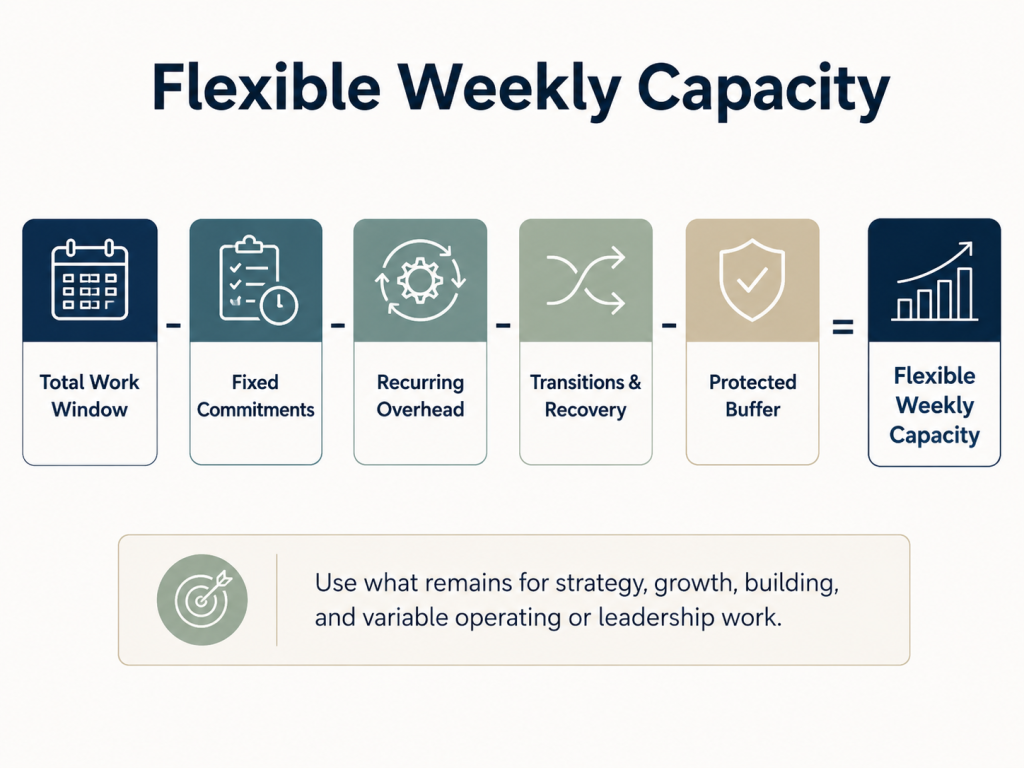
Suppose you expect to work 45 hours this week.
Before adding discretionary projects, subtract:
- 7 hours of fixed meetings and appointments
- 4 hours of routine communication
- 3 hours of recurring finance and administration
- 3 hours of transitions, setup, and recovery
- 5 hours of protected buffer
That leaves 23 hours of flexible capacity for strategic work, growth, building, and variable operating or leadership responsibilities.
The other 22 hours have not disappeared. They remain part of the calendar.
The seven hours of meetings and seven hours of communication and administration must not be added again later. The formula is designed to reveal what remains after those commitments have already been recognized.
What to Account for Before Planning Flexible Work
Start with five categories.
Fixed Commitments
These include meetings, appointments, delivery deadlines, recurring calls, school pickups, medical visits, and other obligations that cannot easily move.
Recurring Overhead
This includes email, messages, bookkeeping, routine approvals, scheduling, document review, and other work required to keep the business functioning.
Transitions and Recovery
Travel, preparation, setup, closing work, meals, breaks, and the time needed to reorient between different kinds of work all consume capacity.
Personal Constraints
Family responsibilities, health needs, caregiving, and other nonbusiness commitments may affect when and how much you can work.
Protected Buffer
This is capacity intentionally left available for delays, urgent customer issues, technical problems, staff questions, and work that takes longer than expected.
The U.S. Chamber’s guidance for entrepreneurs recommends examining how time is actually used, identifying peak-energy periods, grouping similar work, and leaving white space instead of scheduling 100% of the calendar.
A realistic schedule is not necessarily less ambitious. It makes ambition fit inside the capacity you actually have.
Step 2: Map Five Business Roles and Reserve Buffer Separately
The framework uses five labels for business work and one label for protected capacity.
Direct, Grow, Build, Operate, and Lead describe work the business requires.
Buffer describes time deliberately left available for delays, escalations, overruns, and unexpected decisions.
Keeping that distinction clear prevents Buffer from becoming another category you feel obligated to fill.
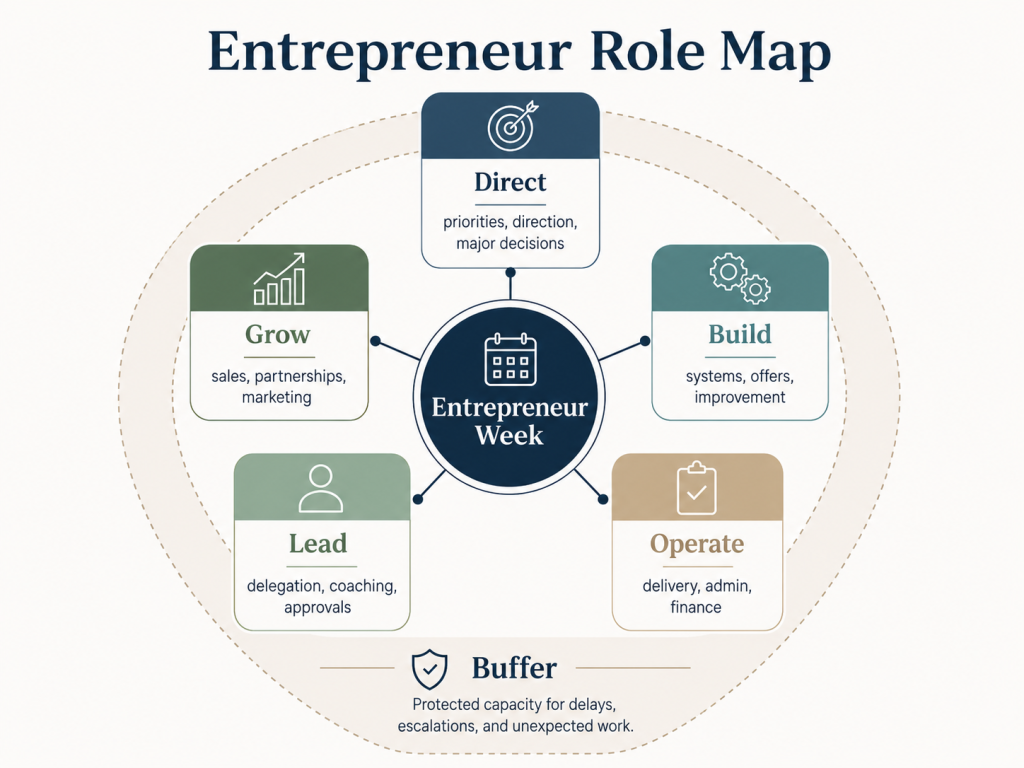
Direct: Set the Direction of the Business
Here, Direct means determining where the business is going. Routine supervision and people management belong under Lead.
Direct work includes:
- Setting priorities
- Reviewing the business model
- Making major decisions
- Choosing a market position
- Planning future direction
Grow: Create Future Demand and Revenue
Grow work includes:
- Prospecting and sales follow-up
- Partnerships
- Marketing
- Customer research
- Offer improvement
Build: Improve What the Business Can Do
Build work includes:
- Developing products or services
- Improving processes
- Creating reusable systems
- Automating repetitive work
- Strengthening business capabilities
Operate: Fulfill Current Commitments
Operate work includes:
- Serving customers
- Delivering projects or products
- Reviewing finances
- Completing administration
- Maintaining quality and systems
Lead: Help Other People Perform
Lead work includes:
- Delegating
- Coaching
- Reviewing work
- Giving approvals
- Clarifying standards
Buffer: Protect Capacity for Normal Unpredictability
Buffer may absorb:
- Customer escalations
- Staff absences
- Supplier delays
- Technical problems
- Work that takes longer than expected
When an activity could fit more than one category, classify it by its immediate purpose.
Customer research intended to improve an offer may be Build. Customer outreach intended to create an opportunity is Grow. Serving an existing customer is Operate.
The categories are scheduling lenses, not permanent job descriptions.
Audit the Previous Two Weeks
Review your calendar, task history, or work notes from the previous two weeks.
Label each major period:
- Direct
- Grow
- Build
- Operate
- Lead
- Buffer
Then ask:
- Which category consumed most of my time?
- Which category received almost none?
- Which activities genuinely required me?
- Which could another person have completed?
- Which category expanded because I had no buffer?
- Which important role repeatedly disappeared?
You may discover that nearly all your capacity is going toward Operate while Direct, Grow, and Build receive whatever remains.
That does not necessarily mean you are working on the wrong things. It means your current calendar reflects a business dominated by present delivery and maintenance.
The audit gives you evidence for deciding whether that balance should change.
Step 3: Protect Strategy Before Operations Fill the Week
Strategic work is easy to delay because it rarely demands immediate attention.
There is always something more visible to do:
- Reply to a message
- Review a document
- Resolve a customer issue
- Approve a purchase
- Join another meeting
- Fix an operational problem
Each action may be legitimate. Together, they can consume the entire week.
Only 52% of executives in one McKinsey survey of time allocation said the way they spent their time largely matched their organizations’ strategic priorities.
The broader lesson is not that entrepreneurs should copy corporate executives. It is that declared priorities do not automatically become calendar priorities.
For an entrepreneur, protecting strategic time does not mean spending every morning discussing a five-year vision.
It means reserving enough uninterrupted capacity to advance the decisions and projects that will affect the future of the business.
Protect One Strategic Outcome at a Time
Choose one meaningful strategic outcome for the week.
Avoid a vague block such as:
Work on strategy.
Use an observable outcome instead:
Decide which customer segment the new service should target and document the positioning.
Other examples include:
- Review six months of sales and decide whether to discontinue the lowest-performing offer.
- Define the capabilities required before opening another location.
- Decide which service should become the primary offer next quarter.
- Evaluate whether the current pricing model still supports the business.
Then:
- Estimate how many focused sessions the outcome requires.
- Schedule those sessions during dependable energy periods.
- Prepare the information you will need.
- Define what would justify interrupting the block.
- Reschedule a displaced block instead of silently deleting it.
A useful calendar entry might be:
Tuesday, 9:00–11:00: Decide Q4 service positioning and draft the three associated offer changes.
Strategic work should not automatically outrank delivery or urgent customer needs. The purpose is to stop it from being displaced every week merely because its consequences are less immediate.
This is a practical application of protecting work that is important but not immediately urgent, a distinction you can explore further in the Eisenhower Matrix guide.
Step 4: Schedule Revenue-Generating Work Explicitly
Many entrepreneurs say sales are important but do not reserve time to perform them.
Sales and business development are often left for:
- A quiet afternoon
- The end of the week
- A period when delivery slows down
- The moment revenue becomes concerning
That makes growth reactive.
A healthier schedule protects both current and future revenue.
Operations protect current revenue. Growth blocks create future revenue.
TweetA viable entrepreneur schedule needs both.
Do Not Schedule a Block Called “Sales”
Sales is too broad to guide action.
Create blocks with observable outputs instead:
- Contact 10 qualified prospects.
- Follow up on five open proposals.
- Conduct two customer interviews.
- Draft one partnership offer.
- Assign a next action to every active lead.
- Prepare and send three renewal proposals.
You can divide Grow work into four practical types.
Immediate Revenue
Work connected to active opportunities, including proposals, sales calls, negotiation, follow-up, renewals, and upselling.
Pipeline Building
Work that creates future opportunities, including prospecting, referrals, outreach, partnerships, and networking.
Market Learning
Work that improves your understanding of customers, including interviews, sales-call reviews, win-loss analysis, and reviewing support questions.
Demand Creation
Work that helps suitable customers discover and trust the business, including useful content, email campaigns, demonstrations, case studies, and community engagement.
Not every business needs all four types every week.
The principle is to stop treating revenue generation as optional work that happens after operations are complete. Operations are never fully complete.
Step 5: Create Windows for Team Decisions and Communication
As a business grows, the owner can become the default destination for every question.
A team member needs approval. A supplier needs a decision. A customer wants an exception. A contractor is waiting for feedback.
Without boundaries, the owner remains available all day.
That may feel responsive, but it fragments concentration and can teach the business to wait for the owner before moving.
Research summarized by the American Psychological Association on task switching shows that moving repeatedly between tasks creates cognitive switching costs because the mind must disengage from one set of rules and reorient to another.
The answer is not to become inaccessible.
It is to create predictable access.
Establish Communication and Decision Windows
A simple structure might include:
- 11:30 a.m.–12:00 p.m.: Routine questions, approvals, and team decisions
- 4:00–4:30 p.m.: Messages, follow-up, and unresolved issues
- Immediate escalation only for defined urgent conditions
You may also use:
- Weekly one-to-one meetings
- Team office hours
- A shared list of decisions awaiting review
- Approval deadlines
- A dedicated escalation channel
- Clear decision authority
Define What Can Wait
Routine questions can usually wait for the next communication window.
Time-sensitive decisions may need a response within a defined period.
Urgent issues may justify immediate interruption.
An urgent issue might include:
- A safety concern
- A major system outage
- A customer escalation with immediate financial consequences
- A legal or compliance deadline
- A problem preventing the team from serving multiple customers
A routine formatting preference is not urgent.
A minor purchase approval is not automatically urgent.
A status update is usually not urgent.
Communication windows are not about withholding support. They create predictable access while preserving enough concentration for work that cannot be completed in fragments.
Step 6: Remove Work That Does Not Require the Owner
A calendar cannot improve for long if the owner continues to hold every responsibility.
As businesses grow, work that once required the founder may become routine, repeatable, or teachable.
Yet it often remains on the owner’s calendar because:
- The owner can complete it quickly.
- Explaining it feels slower than doing it.
- Standards have not been documented.
- Nobody has been given clear authority.
- The process is unreliable.
- The task has never been reconsidered.
The result is a schedule filled with work the owner can do instead of work only the owner should do.
For each recurring responsibility, ask:
- Must this work still be done?
- Must it be done by me?
- Could someone else complete it with clear standards?
- Could a system or automation reduce it?
- Is the recurring problem caused by the task or by the absence of a reliable process?
Then use one of four labels.
Owner Only
Work that genuinely requires your judgment, authority, expertise, relationships, or accountability.
Delegate
Work another person can complete with the right context, standards, resources, and decision rights.
Systemize or Automate
Work that can be simplified through templates, checklists, standard procedures, software, or automation.
Eliminate
Work that no longer creates enough value to justify the capacity it consumes.
A practical delegation process begins by documenting recurring work, assigning clear standards, and using structured check-ins rather than reviewing every step.
Do not try to redesign the entire business in one week.
Identify one recurring responsibility that can begin moving out of your calendar.
It may free only 30 minutes initially. More importantly, it begins changing the assumption that the owner must remain involved in everything.
Step 7: Leave Capacity for Unexpected Business Problems
Unexpected work is not always exceptional.
For many entrepreneurs, it is a recurring category whose exact content is unpredictable.
You may not know whether next week’s disruption will involve a customer, employee, supplier, payment, system, or delivery.
But you can reasonably expect that something will require attention.
A calendar that assumes otherwise is incomplete.
Use Three Kinds of Buffer
Daily Buffer
Leave small open periods between major commitments or near the end of the day.
Use them for minor delays, short overruns, quick problem-solving, preparation, and routine spillover.
Weekly Operating Buffer
Reserve a larger block that can absorb a significant issue requiring focused attention.
For example:
Thursday, 2:00–4:00: Operating buffer
When no urgent issue appears, use the block for process improvement, backlog reduction, documentation, strategic work, or recovery.
Recovery Block
Identify one movable block that can restore important work displaced earlier in the week.
This prevents a disrupted strategy or sales block from disappearing completely.
Buffer is unused capacity by design. It is not evidence of poor planning.
The SBA’s Business Resilience Guide treats preparation, continuity, and recovery as normal parts of running a resilient business. Protected calendar buffer applies the same principle at the level of the entrepreneur’s week.
A week without disruption may leave some buffer unused. That is acceptable.
The alternative is to allocate every hour and then finance every unexpected problem with evenings, weekends, or the cancellation of important work.
When disruption has already disconnected your calendar from reality, use The Time Blocking Reset to repair the affected period instead of abandoning the whole system.
Step 8: How to Time Block Your Week as an Entrepreneur
You now have the elements needed to build the calendar.
Do not begin by placing every task into an empty week.
Fixed commitments and routine overhead identified in Step 1 are already part of the week. Do not schedule them twice. The process below allocates the flexible capacity remaining after those obligations and buffer have been accounted for.
1. Add Fixed Commitments
Place meetings, appointments, delivery deadlines, personal obligations, and other time-specific commitments.
These reveal the actual shape of the week.
2. Reserve Buffer
Add daily and weekly buffer before discretionary work fills the available space.
If buffer is always added last, there will rarely be room for it.
3. Protect Strategy
Schedule the focused sessions required for the week’s primary Direct outcome.
Choose periods when concentration is usually dependable.
4. Add Growth Blocks
Reserve capacity for prospecting, sales, partnerships, marketing, customer research, or offer improvement.
Give each block an observable output.
5. Add Build Blocks
Place product, service, process, system, or capability development.
These blocks should make the business easier to operate or more valuable over time.
6. Add Variable Operating Work
Place delivery, customer service, quality control, finance, and maintenance that were not already counted as fixed or recurring overhead.
7. Add Leadership Windows
Schedule team communication, decisions, approvals, reviews, coaching, and delegation.
8. Check the Total Load
Compare the complete calendar with the flexible capacity calculated earlier.
If the planned work exceeds available capacity, do not shorten every block until everything appears to fit.
Instead:
- Reduce scope.
- Move a lower priority.
- Delegate something.
- Remove something.
- Replace an existing block.
When work moves, trade blocks rather than stacking them onto an already-full day.
For the complete mechanics of turning priorities and constraints into a calendar, use How to Time Block Your Week.
Example Entrepreneur Time-Blocking Schedule
The following example shows how the five business roles and Buffer can coexist inside one week.
It represents a small-business owner who remains involved in delivery, leads a small team, needs to generate new business, and is improving one internal system.
The exact allocation should change according to your business stage, team size, customer demands, and current bottleneck.
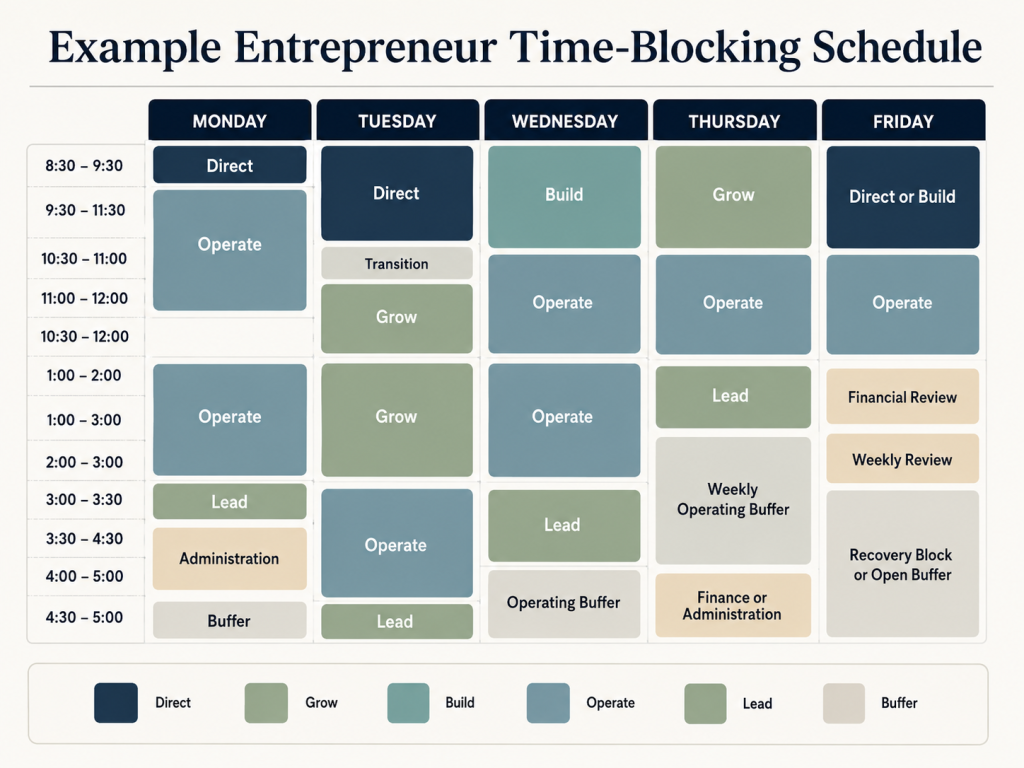
Monday: Set Direction and Stabilize Operations
- 8:30–9:30 – Direct: Review key numbers and choose the week’s primary business priority.
- 9:30–11:30 – Operate: Handle customer delivery, quality review, or another core operating responsibility.
- 1:00–3:00 – Operate: Continue delivery or other essential operational work.
- 3:00–3:30 – Lead: Make routine team decisions and approvals.
- 3:30–4:30 – Administration: Complete recurring financial, scheduling, or administrative work.
- 4:30–5:00 – Buffer: Leave this period open for delays, spillover, or unexpected issues.
Tuesday: Protect Strategy and Revenue
- 8:30–10:30 – Direct: Work on the week’s primary strategic project.
- 10:30–11:00 – Transition: Reset, prepare, and switch contexts deliberately.
- 11:00–12:00 – Grow: Follow up on active opportunities.
- 1:00–3:00 – Grow: Work on proposals, outreach, partnerships, or another revenue-generating activity.
- 3:00–4:30 – Operate: Return to customer delivery or other operating responsibilities.
- 4:30–5:00 – Lead: Handle routine questions, approvals, and team follow-up.
Wednesday: Build the Business
- 8:30–10:30 – Build: Improve a product, service, workflow, system, or recurring process.
- 10:30–12:00 – Operate: Handle delivery or other current commitments.
- 1:00–3:00 – Operate: Continue operational work.
- 3:00–4:00 – Lead: Review delegated work, coach team members, or resolve pending decisions.
- 4:00–5:00 – Buffer: Use this time only if a legitimate operating issue needs attention.
Thursday: Create Future Demand
- 8:30–10:30 – Grow: Focus on pipeline building, partnerships, marketing, or business development.
- 10:30–12:00 – Operate: Handle current delivery or customer commitments.
- 1:00–2:00 – Lead: Complete team decisions, approvals, or one-to-one conversations.
- 2:00–4:00 – Weekly Operating Buffer: Reserve this larger block for unexpected business problems that require focused attention.
- 4:00–5:00 – Finance or Administration: Review recurring financial or administrative responsibilities.
Friday: Review, Restore, and Close the Week
- 8:30–10:30 – Direct or Build: Finish the week’s strategic priority or make progress on a system-building project.
- 10:30–12:00 – Operate: Complete remaining customer or delivery work.
- 1:00–2:00 – Financial Review: Review cash flow, invoices, expenses, or other key business numbers.
- 2:00–3:00 – Weekly Review: Assess how the week’s capacity was actually used.
- 3:00–5:00 – Recovery Block or Open Buffer: Restore important work displaced earlier in the week or leave the time open if no recovery is needed.
This is not a universal founder schedule. It is an example of how strategy, growth, building, operations, leadership, and buffer can coexist without trying to maximize every hour.
A solo service provider, retail owner, agency founder, or entrepreneur with a more mature team will need a different balance.
When most of your week revolves around client projects, revisions, and delivery deadlines, use the time-blocking templates for freelancers instead.
Step 9: Review the Business Balance Each Week
A useful entrepreneur schedule should change as the business changes.
The allocation required during a product launch may not work during a hiring period. A week dominated by customer delivery may need a different balance from one focused on systems improvement.
The purpose of the weekly review is not to grade your discipline.
It is to improve the relationship between priorities and capacity.
Ask:
- Did strategic work receive protected time?
- Did revenue-generating work happen?
- Which operational issues consumed unexpected capacity?
- Which decisions remained unresolved?
- Where did unnecessary interruptions occur?
- Which responsibility should be delegated or systemized?
- Was the planned workload within flexible capacity?
- Which business role was neglected?
- How much buffer did the week use?
- What needs to change next week?
End the review with only three decisions:
- One role to protect more
- One activity to reduce, delegate, or remove
- One scheduling rule to change
For example:
- Protect one additional Grow block.
- Delegate the weekly inventory report.
- Move routine approvals into the afternoon decision window.
Avoid redesigning the entire system after every difficult week.
Change the smallest part that explains the problem.
Common Time-Blocking Mistakes Entrepreneurs Make
Filling Every Available Hour
A fully booked calendar leaves no room for delays, operating problems, transitions, or normal variation.
Correction: Calculate flexible capacity and reserve buffer before adding discretionary work.
Treating Buffer as Another Task Category
If you feel obligated to fill every buffer block, it stops functioning as protected capacity.
Correction: Leave it open unless a legitimate need appears.
Treating Every Responsibility as Owner-Only Work
The schedule remains overloaded because tasks are added faster than responsibilities leave.
Correction: Label recurring work Owner Only, Delegate, Systemize, or Eliminate.
Giving Operations the Best Focus Hours Automatically
Routine operational work can expand into the periods when you are best able to think strategically, sell, or build systems.
Correction: Protect a small number of high-value Direct, Grow, or Build blocks first.
Using Vague Blocks
A block called “marketing,” “strategy,” or “admin” does not define what completion means.
Correction: Give important blocks observable outcomes.
Instead of:
Marketing
Use:
Draft and schedule the next three customer-education emails.
Remaining Continuously Available
Routine questions interrupt focused work because the team has no predictable alternative.
Correction: Create communication and decision windows supported by clear escalation rules.
Copying Another Entrepreneur’s Schedule
Another founder’s routine may reflect a different business stage, team, financial position, and level of support.
Correction: Allocate time according to your present responsibilities and constraints.
Abandoning the Calendar After Disruption
One difficult day leads to the conclusion that the whole method has failed.
Correction: Repair the affected part of the week. Move displaced work deliberately instead of rebuilding everything from zero.
For deeper troubleshooting, read Why Time Blocking Doesn’t Work.
Frequently Asked Questions
What Is Time Blocking for Entrepreneurs?
Time blocking for entrepreneurs means assigning calendar periods to the different roles required to operate and grow a business.
Instead of scheduling every task separately, the entrepreneur protects capacity for setting direction, generating revenue, building the business, operating it, leading people, and handling unexpected problems.
How Many Hours Should an Entrepreneur Time Block?
There is no ideal number.
Begin with your flexible weekly capacity after accounting for fixed commitments, recurring overhead, transitions, recovery, personal constraints, and buffer.
You do not need to time block every working hour. Leaving part of the calendar open can make the blocks you do schedule more dependable.
What Should an Entrepreneur Schedule First?
Add fixed commitments and recurring operating constraints first so the calendar reflects reality.
Reserve buffer next. Then protect strategic and revenue-generating work before variable operations fill the remaining capacity.
How Much Buffer Time Should a Business Owner Leave?
Use evidence from recent weeks rather than a universal percentage.
Review the previous two to four weeks and estimate how much time was consumed by unplanned but legitimate business work. Use that as your starting buffer and adjust it through weekly review.
Should Entrepreneurs Time Block Every Day?
Daily blocks can be useful, but the week is often the better planning unit.
Strategy, sales, building, leadership, and operations do not require identical amounts of time every day. Weekly planning lets you distribute them more realistically.
What Is the Best Time-Blocking Schedule for a Founder?
There is no universal founder schedule.
The right design depends on the business stage, current bottleneck, team size, customer needs, revenue stability, owner responsibilities, personal constraints, and energy patterns.
How Should Entrepreneurs Handle Urgent Problems?
First, define what qualifies as urgent.
Use operating buffer when possible. If the issue displaces an important block, move that block deliberately rather than adding it to an already-full day.
Repeated emergencies should trigger a systems question:
Is this truly unpredictable, or is it a recurring problem that needs clearer ownership, a stronger process, or more capacity?
Build a Week That Can Operate and Grow
Time blocking for entrepreneurs is not about controlling every minute.
It is about deciding which parts of the business deserve capacity before the week begins making those decisions for you.
A useful entrepreneur schedule:
- Protects strategic work without neglecting delivery
- Reserves time for future revenue
- Gives operations adequate capacity
- Creates predictable access for teams
- Moves recurring work away from the owner when appropriate
- Leaves room for unexpected problems
- Improves through weekly review
The schedule will not always work exactly as planned.
That is not the standard.
The standard is whether the calendar helps you notice trade-offs, protect important work, and recover when conditions change.
Start with one action:
Review last week’s calendar and label each major period Direct, Grow, Build, Operate, Lead, or Buffer.
The imbalance will show you what the next week needs to protect.
Build Your Own Role-Based Week
Time Blocking OS gives you a practical system for turning real capacity, priorities, business roles, and buffer into a weekly calendar you can review and adjust.
It includes printable planning tools, weekly review sheets, AI-assisted scheduling prompts, a Google Calendar workflow, and guidance for choosing between time blocking and time boxing.
Is your current schedule already overloaded or repeatedly collapsing? Start with the free 7-Day Time Blocking Reset, which includes a workbook and seven practical daily lessons for rebuilding a realistic week.



