
Most teams do not need a week-long improvement event to begin using Kaizen. They need a real problem, people who understand the work, and a small change they can test.
Kaizen activities are structured exercises that help a team observe work, find waste, investigate causes, test countermeasures, and preserve what works. The best activity is not the most elaborate one. It is the activity that moves the team from complaint to evidence and from a promising idea to an owned experiment.
If you need one simple place to begin, ask every team member to identify one recurring friction in the work. Choose a problem within the team’s influence, investigate what actually happens, and plan the smallest useful test. The ten activities below provide different ways to do that.
Kaizen is usually discussed as continuous improvement, but the human side matters as much as the method. The Toyota Way places Continuous Improvement alongside Respect for People. In a team activity, that means examining how the work is designed without turning the session into a search for someone to blame. Toyota describes these as the two pillars of the Toyota Way.
If you are looking for outcomes rather than exercises, see these practical Kaizen examples from different workplaces. This guide focuses on what your team can run together.
What Makes an Activity Genuinely Kaizen?
Not every brainstorming session is a Kaizen activity. A useful activity should include most of the following:
- A real process, problem, delay, error, or source of friction
- The people who perform or directly receive the work
- Observation or evidence about the current condition
- A problem narrow enough for the team to influence
- A small countermeasure that can be tested without pretending it is already the solution
- An owner, measure, and review date
- A decision to adopt, adapt, or abandon the change based on what happens
A formal Kaizen workshop may last several days and include analysis, implementation, testing, standardization, and a report-out. The Lean Enterprise Institute describes a Kaizen workshop as a group activity commonly lasting five days. The exercises in this article are smaller. You can use one activity by itself or combine several into a longer workshop.
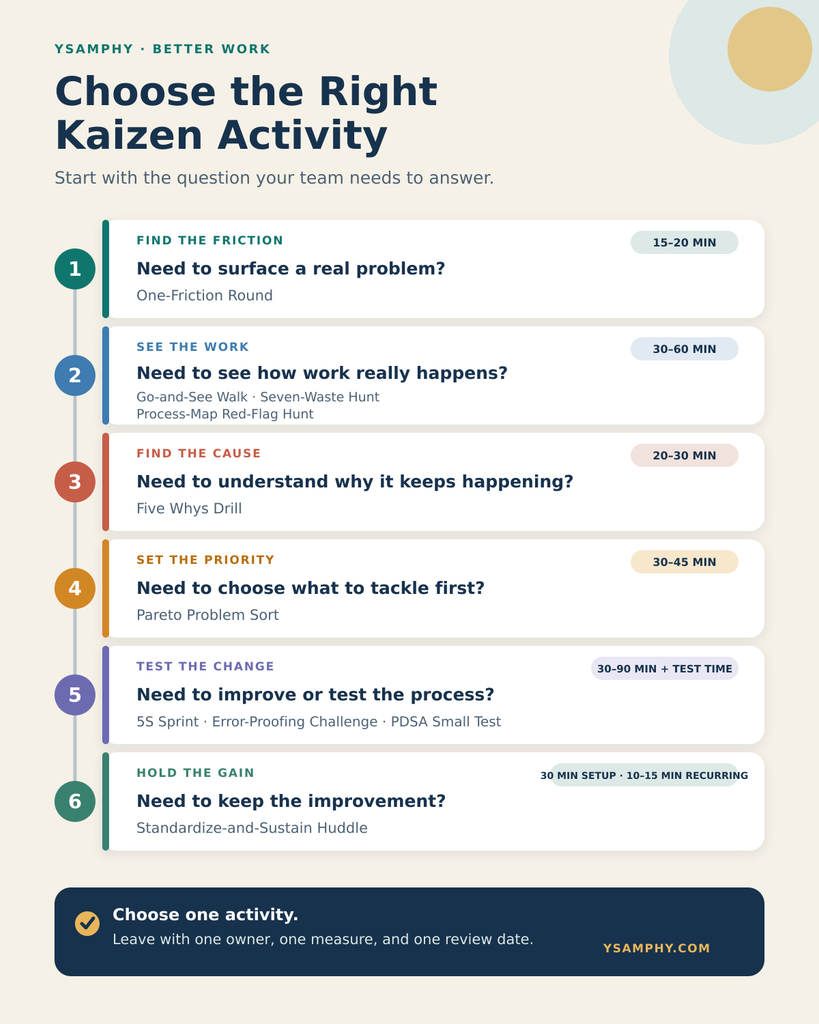
Choose the Right Kaizen Activity for Your Team
Use the problem your team is trying to solve to choose where to begin:
- Surface recurring frustrations: Start with the one-friction round. Allow 15–20 minutes. The team should leave with a prioritized friction backlog.
- Understand what actually happens: Run a go-and-see walk for 30–45 minutes. The useful output is an observation log grounded in the real work.
- Find non-value-adding work: Conduct a seven-waste hunt for 30–45 minutes. Finish with a waste list and one target to investigate.
- See a workflow from start to finish: Use the process-map red-flag hunt. Allow 45–60 minutes to produce a current-state map and identify one red flag.
- Investigate a recurring problem: Run the Five Whys drill for 20–30 minutes. The output should be a cause hypothesis the team can verify.
- Choose among many problems: Use a Pareto problem sort. Allow 30–45 minutes after collecting the data. Finish with an evidence-based priority.
- Organize a shared workspace: Run a 5S sprint for 45–90 minutes. The team should establish an organized area and a simple upkeep rule.
- Prevent a repeated mistake: Hold an error-proofing challenge for 30–45 minutes. Finish with a countermeasure prototype to test.
- Test whether an idea works: Plan a PDSA small test in about 30 minutes, followed by the test itself. Leave with a test plan, owner, measure, and review date.
- Keep a successful change from fading: Establish a standardize-and-sustain huddle. Allow about 30 minutes for setup, followed by recurring 10–15-minute reviews. The output is a current standard and follow-up routine.
Do not schedule all ten. Choose the activity that answers the team’s next unanswered question.
1. Run a One-Friction Round
Best for: A team that senses work is harder than it should be but has not agreed on a specific improvement target.
Time: 15–20 minutes
Materials: Sticky notes and a wall, or a shared digital board
This is a simple facilitation exercise built around a Kaizen principle: the people closest to the work often see recurring problems first.
How to run it
- Ask each person to write one recurring friction they experience during a normal week. Use one note per issue.
- Require observable descriptions. “The team communicates badly” is too broad. “Client handoff notes are often missing the agreed deadline and owner” is specific enough to investigate.
- Place the notes where everyone can see them and group similar problems.
- Ask three questions about each cluster:
- How often does this happen?
- Who or what does it affect?
- Is the cause or only the symptom visible?
- Select one issue that is frequent, consequential, and within the team’s influence.
Output: A short friction backlog and one problem to investigate.
Facilitator caution: Do not let the session become a vote on which colleague is most frustrating. Rewrite complaints about people as questions about the process, information, decision rights, tools, workload, or conditions around the work.
Remote version: Give participants three quiet minutes to add notes before discussion. This reduces the chance that the first speaker defines the whole problem for the group.
2. Conduct a Go-and-See Walk
Best for: A process people discuss from memory even though no one has recently observed it from start to finish.
Time: 30–45 minutes
Materials: Observation sheet, timer, and access to the place or digital environment where the work occurs
In Lean practice, gemba means the actual place where value is created. A gemba walk is a way to understand the current situation through direct observation and inquiry before taking action. The Lean Enterprise Institute recommends following the customer-facing process across functions while discussing its purpose, process, and people.
How to run it
- Choose one narrow slice of work: processing an order, responding to a support request, preparing a weekly report, approving an invoice, or publishing an article.
- Define the start and finish. Do not try to observe an entire department.
- Watch the work as it occurs. Record steps, waiting, handoffs, searches, interruptions, rework, and decisions.
- Ask neutral questions:
- What should happen here?
- What usually happens?
- What information is needed?
- Where does the work wait or return?
- What makes this step easier or harder?
- Debrief after the observation. Separate facts, interpretations, and possible changes.
Output: An observation log showing what happens, where variation occurs, and what needs further investigation.
Facilitator caution: A go-and-see walk is not an inspection tour. Leaders should enter as learners. If people feel watched for mistakes, the activity will distort the very process the team is trying to understand.
Remote version: Follow one digital work item through a screen share, audit trail, or collaborative walkthrough. Obtain the process owner’s agreement and observe the workflow rather than monitoring the person.
3. Hold a Seven-Waste Hunt
Best for: A team that wants to reduce delay, duplicated effort, excessive handoffs, backlog, or rework.
Time: 30–45 minutes
Materials: A current process, observation notes, and seven waste labels
Lean’s seven categories of waste are overproduction, waiting, conveyance, overprocessing, inventory, motion, and correction. The Lean Enterprise Institute explains the seven wastes as activities that do not add value for the customer and should be reduced through improvement.
For office and knowledge work, the same categories can appear in less physical forms:
- Overproduction: Reports, slides, or data produced before anyone needs them
- Waiting: Work paused for approval, information, access, or a decision
- Conveyance: Excessive handoffs or information forwarded through several people
- Overprocessing: Duplicate entry, unnecessary formatting, or reviews that do not change the result
- Inventory: Unfinished requests, unread messages, queued cases, or an expanding content backlog
- Motion: Searching across folders, switching tools, or repeatedly locating the same information
- Correction: Fixing errors, recreating work, or clarifying incomplete instructions
How to run it
- Select one process the team observed or mapped.
- Review each step and label any waste you can support with an example.
- Record its frequency and effect. Avoid treating every inconvenience as equally important.
- Ask which waste is caused by another. A queue, for example, may result from an unclear approval rule.
- Choose one source of waste for a small test.
Output: An evidence-based waste list and one priority to reduce.
Facilitator caution: A step that does not directly create customer value is not automatically removable. Compliance, safety, coordination, and risk-control work may be necessary. Understand why the step exists before eliminating it.
4. Build a Process Map and Hunt for Red Flags
Best for: A cross-functional team in which each person understands one part of the workflow but no one sees the complete path.
Time: 45–60 minutes
Materials: Sticky notes, markers, and a large surface or digital whiteboard
A flowchart or process map represents the steps of a workflow in sequence. ASQ describes a flowchart as a visual process map that teams can use to understand how work proceeds. A full value-stream map is more detailed; for this activity, keep the scope narrow enough to finish a useful current-state map.
How to run it
- Write a clear start and finish, such as “customer submits request” and “customer receives confirmed resolution.”
- Ask the people who perform the work to add the actual steps, one per note.
- Include decisions, queues, handoffs, systems, rework loops, and waiting—not only the official procedure.
- Mark red flags:
- Repeated entry or review
- Unclear ownership
- Work that moves backward
- Long queues
- Decisions with no stated rule
- Information that regularly arrives incomplete
- Select one red flag to investigate rather than redesigning the whole map at once.
Output: A current-state process map and one specific improvement target.
Facilitator caution: Map what happens now, not what the policy says should happen. If the group immediately designs an ideal process, it may solve an imagined workflow rather than the one creating the problem.
5. Use a Five Whys Root-Cause Drill
Best for: A specific problem that keeps returning after the team fixes its visible symptom.
Time: 20–30 minutes
Materials: A verified problem statement and any available process evidence
The Five Whys method asks “why?” repeatedly to move beyond an obvious symptom toward an underlying cause. The number five is not a target. The point is to continue until the team reaches a cause it can verify and address. The Lean Enterprise Institute’s Five Whys guide makes the same distinction.
How to run it
- Begin with a measurable problem: “Four of the last ten client reports were delivered after the internal review deadline.”
- Ask why it happened and record the answer.
- For each answer, ask whether it is a fact, an assumption, or a cause that needs evidence.
- Continue asking why until the team reaches a process condition it can test or change.
- Verify the likely cause with records, observation, or the people involved before choosing a countermeasure.
A simplified chain might look like this:
- Review began late.
- The complete report package reached the reviewer late.
- Supporting data had to be assembled manually.
- The process did not name data owners or an internal cutoff date.
The next step is not to declare the fourth answer “the root cause.” The team should test whether named owners and a cutoff date reduce late packages during the next reporting cycle.
Output: A cause hypothesis, an evidence gap, and a countermeasure to test.
Facilitator caution: Complex problems rarely have one neat chain of causes. If the answers branch, use a cause-and-effect diagram or investigate several hypotheses instead of forcing the discussion through exactly five questions.
6. Run a Pareto Problem Sort
Best for: A team with many complaints, defects, delays, or customer issues and limited capacity to address them.
Time: 30–45 minutes after data is collected
Materials: A defined period of incident, delay, defect, complaint, rework, or support data
A Pareto chart sorts categories by frequency, cost, time, or another relevant measure. ASQ describes Pareto analysis as a way to analyze the frequency of problems or causes in a process.
How to run it
- Choose a useful period, such as the last four weeks or the last 100 cases.
- Agree on categories. Combine duplicate labels without hiding meaningful differences.
- Count the frequency or total effect of each category. Depending on the problem, effect may mean delay hours, rework time, cost, risk, or customer impact.
- Sort the categories from largest to smallest.
- Discuss whether the largest category is both actionable and worth addressing now.
- Select one priority and define the next diagnostic activity.
Output: A ranked problem list and an evidence-based improvement priority.
Facilitator caution: The goal is not to prove that an exact 80/20 split exists. It is to stop treating a long list of issues as though each deserves equal attention. If no usable data exists, a dot vote can identify the team’s current hypothesis—but label it as a hypothesis and collect evidence before investing heavily.
7. Run a 5S Sprint
Best for: A physical or digital workspace where people lose time searching, duplicate files, store obsolete material, or use inconsistent naming and placement.
Time: 45–90 minutes for a small area
Materials: A clearly bounded workspace, labels, holding area, and an owner
5S stands for Sort, Set in Order, Shine, Standardize, and Sustain. ASQ’s 5S overview describes it as a method for creating a clean, uncluttered, safe, and organized workspace.
How to run it
- Sort: Separate what is required from what is obsolete, duplicated, broken, or unrelated. Move uncertain items to a temporary review area rather than deleting them immediately.
- Set in order: Place and name what remains according to when, where, and by whom it is used.
- Shine: Clean the physical area or repair the digital environment—broken links, inconsistent filenames, abandoned folders, and unclear permissions.
- Standardize: Agree on simple rules for labels, locations, naming, ownership, and archiving.
- Sustain: Assign an owner and schedule a brief check to see whether the new arrangement still works.
For a digital team, the sprint might focus on one shared project folder, template library, knowledge base, or content-production workspace. Do not attempt to reorganize the entire company drive in one session.
Output: An organized work area, a visible standard, and a follow-up owner.
Facilitator caution: Do not delete records, customer information, project evidence, or regulated material without confirming ownership and retention requirements. “Sort” is not permission to destroy information.
8. Hold an Error-Proofing Challenge
Best for: A repeated mistake that training and reminders have not eliminated.
Time: 30–45 minutes
Materials: Examples of the error, the current workflow, and simple prototyping materials
Error-proofing, also called mistake-proofing or poka-yoke, changes the design of the work so an error becomes impossible, harder to make, or visible before it travels downstream. The Lean Enterprise Institute’s error-proofing guide gives physical examples; the same design logic can improve forms, software, documents, and service processes.
How to run it
- Choose one repeated error and identify the exact point where it enters the process.
- Ask the team to propose countermeasures in four categories:
- Prevent: Remove the opportunity to make the error.
- Constrain: Limit choices to valid options.
- Prompt: Make the correct action obvious at the right moment.
- Detect early: Flag the error before the next person or customer receives it.
- Build the simplest prototype that can be tested.
- Try it with a small number of real cases.
- Record whether the error decreases and whether the countermeasure creates a new burden elsewhere.
Examples in knowledge work include required form fields, validated date formats, controlled templates, automated duplicate checks, clear default options, and a handoff checklist embedded at the point of transfer.
Output: A countermeasure prototype and a small test plan.
Facilitator caution: “Be more careful” is not error-proofing. Neither is another training session by itself. Look for a change in the workflow, interface, information, sequence, or environment that supports the correct action.
9. Plan a PDSA Small Test
Best for: A team with a plausible improvement idea that has not yet been validated in its actual environment.
Time: 30 minutes to plan, followed by the test and a scheduled review
Materials: Baseline information and a test worksheet
Kaizen often uses the Plan-Do-Check-Act cycle. A closely related version, Plan-Do-Study-Act, makes the learning step explicit. The Institute for Healthcare Improvement explains PDSA as a method for testing a change on a small scale, observing the result, and acting on what the team learns.
How to run it
- Plan: State the problem, target, prediction, owner, scope, date, and measure.
- Do: Test the change with the smallest useful unit—one shift, one customer, one report, one project, or one week.
- Study: Compare the result with the baseline and the team’s prediction. Record unexpected effects and feedback.
- Act: Decide whether to adopt the change, adapt it and test again, or abandon this approach while preserving the learning.
For example, a support team might test a revised intake form with ten requests before replacing the form for every customer. The measure could be the percentage of requests that arrive with all required information. A balancing measure could be the time customers need to complete the form.
Output: A documented test, measure, owner, and review date.
Facilitator caution: Testing and implementation are different decisions. A result from one convenient case is useful learning, not proof that the change will work everywhere.
Use the free Kaizen Improvement Worksheet to document the plan, test, result, and next decision.
10. Create a Standardize-and-Sustain Huddle
Best for: A team that makes improvements but gradually returns to the old way of working.
Time: 30 minutes to establish the standard; 10–15 minutes for each recurring huddle
Materials: The tested process, evidence of improvement, a visible standard, and an owner
Standardized work creates a baseline that the team can maintain and improve. The Lean Enterprise Institute notes that standardized work becomes the object of further Kaizen, rather than a rule that can never change. Brief improvement huddles help teams compare expected and actual performance, investigate gaps, and assign the next experiment.
How to run it
- Confirm that the tested change produced a useful result without an unacceptable side effect.
- Write the current best-known method in the form people will actually use: a short checklist, visual cue, template, job aid, workflow rule, or documented sequence.
- Remove or archive the obsolete version so two standards do not compete.
- Name an owner and decide where the standard will be visible.
- Schedule a seven-day and 30-day check.
- Use a brief huddle to ask:
- What result did we expect?
- What actually happened?
- Where is the gap?
- What should we investigate or test next?
Output: A current standard, an owner, and a routine for finding the next useful improvement.
Facilitator caution: A standard is the best-known method today, not the final answer. If people routinely work around it, investigate why. The workaround may reveal that the standard is unrealistic or that conditions have changed.
How to Adapt These Kaizen Activities for Remote Teams
Remote work changes where the process is visible, not the need to understand it.
- Follow one work item across tools instead of walking across a physical space.
- Use system timestamps to identify queues, handoffs, rework, and response delays.
- Let participants add observations silently before group discussion.
- Keep cameras optional when the activity depends on documents and workflows rather than facial reactions.
- Use one shared board, but assign a facilitator so managing the board does not consume the discussion.
- Do not record screens, messages, customer data, or individual activity without an appropriate purpose and permission.
- End with the same requirements as an in-person session: one owner, one measure, one test, and one review date.
For distributed teams, asynchronous evidence gathering can improve the session. Participants can document examples before the meeting, leaving the live time for clarification and decisions.
A 60-Minute Kaizen Activity Plan
If your team has one hour and a reasonably narrow problem, combine four activities:
- 0–5 minutes: Frame the session. Name the process, the customer or recipient, and the rule that the team will examine the work rather than blame people.
- 5–15 minutes: Run the one-friction round. Select one recurring issue within the team’s influence.
- 15–30 minutes: Sketch the current process. Map only the steps connected to that issue and mark waiting, handoffs, and rework.
- 30–42 minutes: Use the Five Whys. Develop a cause hypothesis and identify what evidence is missing.
- 42–55 minutes: Plan a small PDSA test. Define the countermeasure, prediction, scope, owner, and measure.
- 55–60 minutes: Close the loop. Confirm the test date and schedule the review before the meeting ends.
The session should produce four things: a specific problem, a current-state sketch, a cause hypothesis, and a small test with an owner. If the team lacks enough evidence to choose a countermeasure, make observation or data collection the next action instead of forcing a solution.
Common Ways Kaizen Activities Go Wrong
Starting With a Solution
The leader presents a preferred change and uses the activity to obtain agreement.
Correction: Begin with the current condition and evidence. Treat the proposed solution as one hypothesis among others.
Choosing a Problem That Is Too Large
“Improve communication” or “fix customer service” cannot be tested meaningfully in one cycle.
Correction: Narrow the problem to a specific event, workflow, handoff, delay, or error.
Excluding the People Who Perform the Work
A management-only group redesigns a process it sees only through reports.
Correction: Include the people who perform, receive, support, and depend on the work.
Measuring Activity Instead of Improvement
The team counts meetings, suggestions, or completed templates but does not check whether the process improved.
Correction: Compare the same meaningful measure before and after the test. Add a balancing measure when the change could shift the burden elsewhere.
Ending Without a Review Date
The team leaves with ideas but no moment when evidence will be examined.
Correction: Treat the owner, measure, test date, and review date as part of the activity—not as administration to complete later.
Frequently Asked Questions About Kaizen Activities
What Are the Best Kaizen Activities for Beginners?
Start with a one-friction round, a short go-and-see or waste walk, and one small PDSA test. These activities teach the essential sequence: surface a real problem, understand what happens, and test a change without overcommitting.
A 5S sprint is also a practical starting point when the team shares a visibly disorganized physical or digital workspace.
Are Kaizen Activities the Same as a Kaizen Event?
No. A Kaizen activity can be a short exercise such as process mapping, Five Whys, 5S, error-proofing, or planning a small test. A Kaizen event or workshop is a coordinated improvement effort that may last several days and typically includes preparation, team roles, analysis, implementation, testing, standardization, and follow-up.
Can Kaizen Activities Work for Office and Remote Teams?
Yes. Office and remote teams can examine customer requests, approvals, reporting, onboarding, content production, support, invoicing, or other information workflows. Waiting, excessive handoffs, duplicated processing, backlog, searching, and rework occur in digital work as well as physical operations.
How Often Should a Team Run a Kaizen Activity?
Use the rhythm the team can close. One completed improvement cycle is more valuable than a large backlog of untested ideas.
A brief weekly huddle can monitor current tests and identify gaps. Longer activities can be scheduled when the team has a specific problem, relevant evidence, and capacity to follow through.
How Should a Team Measure a Kaizen Activity?
Choose a measure connected to the problem, such as lead time, error frequency, rework hours, percentage complete on first submission, queue size, response time, or customer effort. Record the baseline and use the same definition after the test.
If the improvement could create a new burden, include a balancing measure. A faster intake process, for example, should not produce more incomplete requests or transfer excessive work to the customer.
Start With One Real Problem
Do not turn the list into a new program your team has to maintain.
Choose the activity based on the next question:
- Where does the work break? Observe it or map it.
- What is creating waste? Run a waste hunt.
- Why does the problem keep returning? Use the Five Whys.
- Which issue matters most? Use a Pareto sort.
- Will this proposed change help? Run a small PDSA test.
- How will we keep the gain? Standardize it and review it.
The goal is not to hold a Kaizen meeting. It is to make one useful change, learn from the result, and leave the process easier to improve again.
Download the free two-page Kaizen Improvement Worksheet to plan the test, record what happened, and decide whether to adopt, adapt, or abandon the change.



