
In 2026, the primary difference between time blocking and time boxing is that time blocking protects when you will work, while time boxing controls how long you will work. Time blocking turns your calendar into a visual plan by reserving blocks of time for specific priorities, such as deep work, meetings, admin, exercise, or family time. Time boxing adds a fixed-duration task limit, meaning you decide in advance that a task gets 25 minutes, 60 minutes, or 2 hours, and then you stop, ship, review, or move on.
Use time blocking when your main problem is a chaotic schedule, too many competing priorities, or constant context-switching. Use time boxing when your main problem is perfectionism, procrastination, or tasks that expand endlessly because they have no clear finish line.
The best productivity system is not “time blocking vs time boxing.” For most professionals, creators, students, and small business owners, the best answer is to combine both: block time for the right work, then box the task so it does not consume your whole day.
Want the simple version?
Download the free Time Blocking vs Time Boxing Quick Start Guide and plan your first focused day in under 20 minutes.
What Is Time Blocking?
Time blocking is a calendar-based planning method where you assign a specific period of time to a specific type of work. Instead of keeping a to-do list and hoping you will eventually “find time,” you create time visually before the day begins.
For example:
- 8:30–10:00: Deep work on proposal
- 10:00–10:30: Email and messages
- 10:30–12:00: Client project
- 1:00–2:00: Meetings
- 2:00–3:30: Writing or strategy
- 4:00–4:30: Admin closeout
The purpose of time blocking is intent. It forces you to decide what your time is for before other people, notifications, and emergencies decide for you.
A normal to-do list says, “Here are the things I should do.” A time-blocked calendar says, “Here is when I will do them.” That distinction matters because most people do not fail at productivity because they lack tasks. They fail because they have too many tasks competing for the same invisible hours.
Time blocking is especially powerful for knowledge work, creative work, studying, content creation, consulting, management, and small business growth. It helps you see your day as a limited asset. If your calendar is already full, your list cannot keep pretending that ten more tasks are possible.
For beginners, the easiest way to start is with a printable or digital template. You can use my Ten Time Blocking Templates to test different layouts, including simple daily blocks, break reminders, horizontal planning, mood tracking, and minimal schedules.
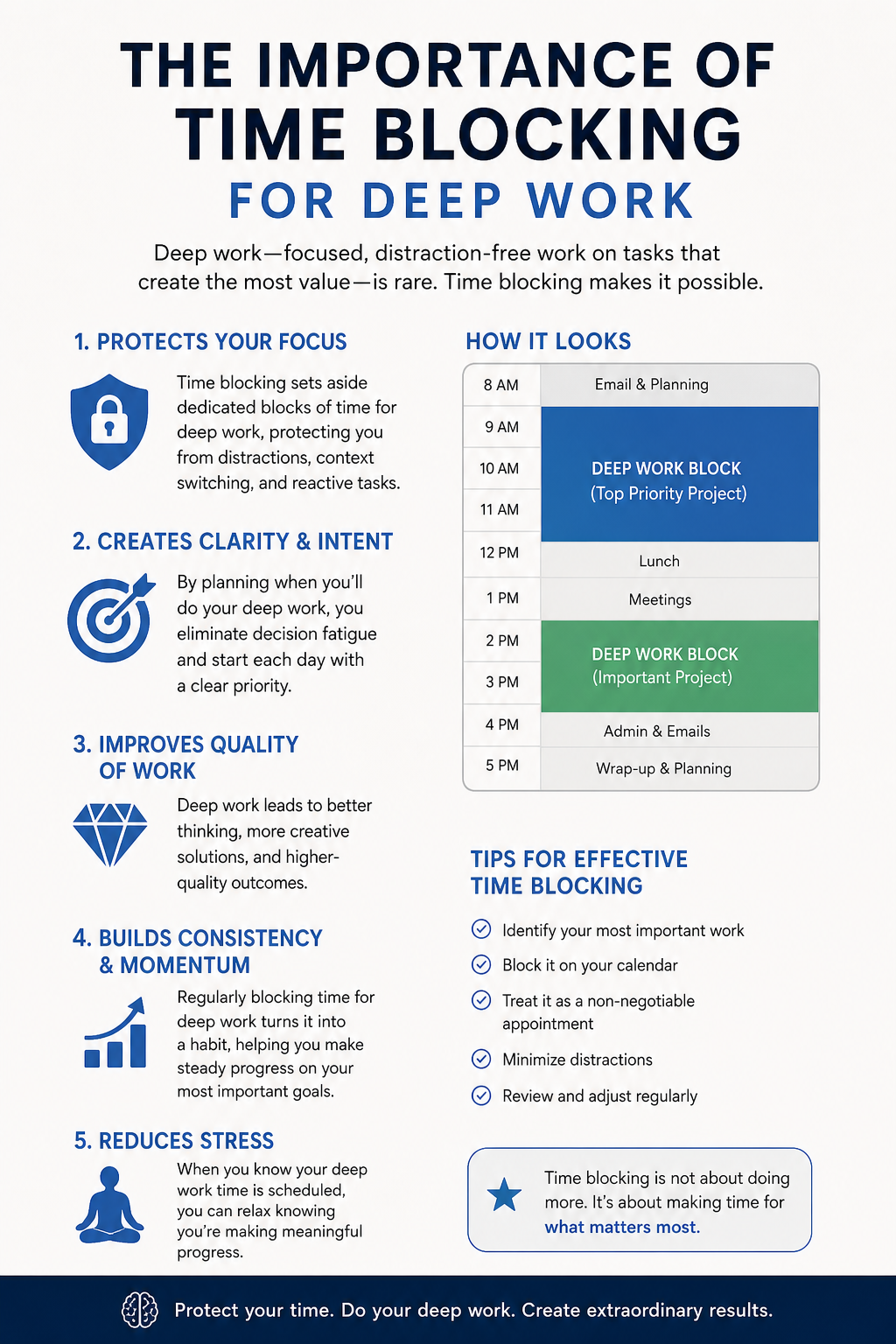
Why Time Blocking Is Essential for Deep Work
Deep work requires more than motivation. It requires a protected environment, a clear target, and reduced context-switching.
Every time you jump from writing to email, from email to Slack, from Slack to your phone, and from your phone back to the document, your brain pays a switching cost. This is not only a time cost. It is also a cognitive load cost. You have to reload the goal, remember where you stopped, rebuild concentration, and fight the temptation to check one more thing.
A practical Deep Work Protocol uses time blocking to reduce that damage:
- Choose one high-value task.
- Block 60–120 minutes.
- Close unrelated tabs.
- Put your phone away.
- Write down the next action before starting.
- Use a short reset ritual if interrupted.
Research on interrupted work is often summarized as showing that people can take about 23 minutes to resume an interrupted task. In real life, your exact number may vary, but the principle is simple: interruption is expensive.
A strong time blocking system cannot eliminate every interruption. But it can reduce the number of preventable context switches and make recovery faster. When you use a written restart cue, keep the same document open, and return to a clearly defined next action, you can often reduce the visible reset routine from a long drift to under 6 minutes.
That is the real value of time blocking in 2026. It is not just a calendar habit. It is an attention-protection system.
What Is Time Boxing?
Time boxing is a constraint-based productivity method where you give a task a fixed amount of time before you begin. The task does not get unlimited attention. It gets a box.
For example:
- “I will draft this article outline in 45 minutes.”
- “I will clean my inbox for 25 minutes.”
- “I will research competitors for 90 minutes.”
- “I will spend 15 minutes choosing a design, then move on.”
- “I will give this report two hours, then send version one.”
Time boxing is less about visualizing your day and more about forcing discipline. It is useful when the danger is not that you forgot to schedule the task, but that the task has no boundary.
Some work expands because it genuinely needs more time. But much work expands because we allow it to. Administrative tasks, research, formatting, planning, editing, and decision-making can absorb unlimited hours if we never define “good enough.”
This is why time boxing works so well for perfectionists, procrastinators, creators, managers, and entrepreneurs. It creates a finish line before the work begins.
Using Parkinson’s Law to Defeat Procrastination
Parkinson’s Law says that work expands to fill the time available for its completion. If you give yourself one full day to write a simple email, that email can become a day-long mental burden. You will think about the tone, rewrite the introduction, check your inbox, come back, over-edit, and still feel unfinished.
Time boxing defeats this by creating a hard runtime constraint.
A hard runtime constraint means the time limit is not a vague suggestion. It is part of the task definition. You are not “working on the slide deck.” You are “creating a 10-slide rough draft in 90 minutes.” You are not “catching up on admin.” You are “processing invoices for 30 minutes and stopping when the timer ends.”
That constraint forces efficiency because your brain has to prioritize. You stop asking, “How can I make this perfect?” and start asking, “What is the most useful version I can complete inside this box?”
Time boxing also reduces procrastination because it makes starting less intimidating. “Work on taxes” feels heavy. “Spend 25 minutes collecting tax documents” feels doable. “Build a content strategy” feels overwhelming. “Draft five content pillars in 40 minutes” feels concrete.
In 2026, time boxing is even more important because AI tools make it easy to over-produce. You can generate ten drafts, twenty outlines, and fifty variations. But more output is not always more progress. Time boxing protects you from endless optimization by forcing a decision: create, review, ship, or schedule another box.
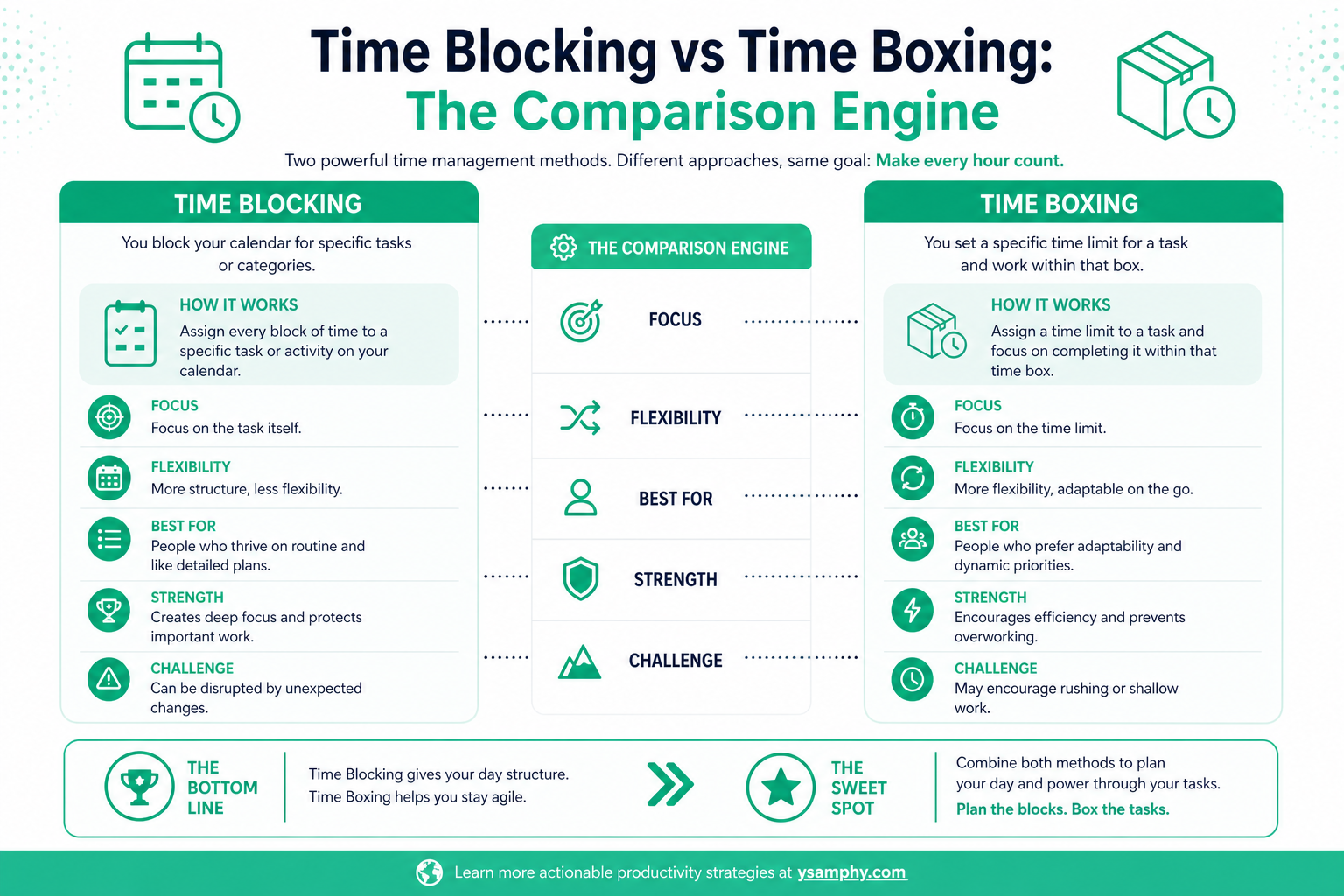
Time Blocking vs Time Boxing: The Comparison Engine
| Factor | Time Blocking | Time Boxing |
|---|---|---|
| Main purpose | Protects time on your calendar | Limits how long a task can take |
| Best for | Deep work, routines, business priorities, study plans | Admin, writing sprints, decision-making, procrastination |
| Core question | “When will I do this?” | “How long will I give this?” |
| Main benefit | Reduces chaos and context-switching | Reduces perfectionism and task expansion |
| Best tool | Calendar, planner, weekly schedule | Timer, task estimate, sprint format |
| Risk | Overplanning your day too tightly | Stopping too early before quality is reached |
| Works well with AI? | Yes, especially AI auto-scheduling | Yes, especially AI task estimation and sprint planning |
| Best 2026 use case | Designing a focused workweek | Shipping useful work faster |
When to Use Time Blocking for Small Business Growth
Use time blocking when you need to protect high-leverage work before urgent work consumes your week. For small business owners, this means blocking time for sales, content, hiring, finance review, customer follow-up, and strategic thinking.
Without time blocking, business owners often spend their best hours reacting: replying to messages, solving staff issues, handling small admin problems, and checking dashboards. Important work gets pushed to the evening when energy is lower.
A simple weekly business block might include:
- Monday morning: sales pipeline review
- Tuesday morning: content creation
- Wednesday afternoon: operations improvement
- Thursday morning: client delivery
- Friday afternoon: finance and weekly review
This is how time blocking turns business growth from a vague ambition into a calendar commitment.
Why Time Boxing Is Better for Administrative Tasks
Administrative tasks rarely need your best creative energy. They need completion. That makes them perfect for time boxing.
Instead of giving admin work an open-ended place in your day, give it a container:
- Email: 30 minutes
- Receipts: 20 minutes
- File organization: 25 minutes
- CRM updates: 40 minutes
- Meeting notes: 15 minutes
The goal is not to make admin beautiful. The goal is to process it, close it, and move back to higher-value work.
Want the simple version?
Download the free Time Blocking vs Time Boxing Quick Start Guide and plan your first focused day in under 20 minutes.
How to Get Started: A 20-Minute Setup
You do not need a complicated productivity system to begin. Start with one day.
Step 1: Choose Three Priority Outcomes
Write down the three outcomes that would make tomorrow successful. Not tasks — outcomes.
Weak: “Work on website.”
Better: “Publish landing page draft.”
Weak: “Study.”
Better: “Complete one module and summarize key notes.”
Step 2: Block Your Energy Peaks
Put your most demanding task into your highest-energy time of day. For many people, this is morning. For others, it may be late evening. The point is to match cognitive load with energy, not convenience.
Step 3: Add Time Boxes Inside the Blocks
Now add fixed duration task limits. A two-hour writing block might contain:
- 15 minutes: outline
- 60 minutes: draft
- 20 minutes: edit
- 10 minutes: headline and CTA
- 15 minutes: buffer
This is where time blocking and time boxing work together.
Step 4: Protect Transition Time
Do not stack every block back-to-back. Add 5–10 minutes between demanding tasks. This protects your brain from context-switching fatigue and gives you time to capture loose ends.
Step 5: Review and Adjust
At the end of the day, ask:
- Which blocks worked?
- Which boxes were too short?
- What kept interrupting me?
- What should be moved, deleted, delegated, or automated?
This review is where your system improves.
The 2026 Super Worker Tool Review: Best Apps for Time Blocking and Time Boxing
The best productivity tool in 2026 is not the one with the most features. It is the one that helps you protect attention, reduce planning friction, and make better decisions about time.
1. Motion: Best for AI Auto-Scheduling
Motion is useful if you want AI to automatically place tasks on your calendar based on deadlines, priorities, and available time. It is especially helpful for busy professionals, founders, managers, and consultants whose schedules change often.
The strength of Motion is dynamic rescheduling. If a meeting appears or a task takes longer than expected, the system can adjust your calendar instead of leaving you with a broken plan.
Best for: AI auto-scheduling, task prioritization, busy calendars
Watch out for: You still need to define tasks clearly. AI cannot prioritize vague work.
2. Lifestack: Best for Energy-Aware Scheduling
Lifestack is interesting for 2026 because it connects productivity with energy. Instead of treating every hour as equal, it helps users plan around energy peaks, circadian rhythm, and health data from wearables.
This matters because time management is not only about time. It is also about state. A 90-minute deep work block at the wrong energy level can fail, while a 45-minute block at the right time can produce excellent work.
Best for: energy-aware scheduling, wellness-focused productivity, deep work timing
Watch out for: It works best if you actually pay attention to your energy patterns.
3. Reclaim.ai: Best for Protecting Focus Time
Reclaim.ai is strong for people who live inside Google Calendar or Outlook and need help defending focus time, habits, breaks, and flexible tasks. It is especially useful for teams because it can schedule around existing commitments.
For time blocking, Reclaim helps create protected work sessions. For time boxing, it helps keep flexible tasks from disappearing when meetings take over.
Best for: focus time, team calendars, habits, automatic rescheduling
Watch out for: Too much automation can hide the need for strategic choices.
4. Sunsama: Best for Calm Daily Planning
Sunsama is less about aggressive automation and more about mindful daily planning. It helps you pull tasks from different tools, decide what fits today, and timebox tasks directly onto your calendar.
This is a good fit for people who do not want their calendar fully controlled by AI. It works well for professionals who want a slower planning ritual and a realistic daily workload.
Best for: daily planning, work-life balance, task-to-calendar planning
Watch out for: It requires a daily habit to get the full value.
5. Google Calendar + Timer: Best Free Starter Stack
If you are new, start simple. Use Google Calendar for time blocking and a timer for time boxing. Create recurring blocks for deep work, admin, exercise, and planning. Then use a countdown timer for each task.
Best for: beginners, students, freelancers, simple workflows
Watch out for: Manual systems require discipline. They do not reschedule themselves.
CTA: Want a simple version you can use today? Download the free Time Blocking vs Time Boxing Quick Start PDF and use it to plan your first focused day in under 20 minutes.
Common Questions About Time Blocking vs Time Boxing

Can I use both methods together?
Yes. In fact, the best system is usually a hybrid. Use time blocking to reserve a period on your calendar, then use time boxing to define how long each task inside that block should take. For example, block 9:00–11:00 for content creation, then box 20 minutes for research, 60 minutes for drafting, and 30 minutes for editing.
Is time boxing better for teams?
Time boxing is often better for team meetings, sprints, decision-making, and collaborative work because it creates boundaries. A team can agree to spend 30 minutes defining a problem, 45 minutes brainstorming solutions, and 15 minutes choosing next steps. This prevents meetings from expanding without progress.
Is time blocking good for ADHD?
Time blocking can help some people with ADHD because it makes time visible and reduces decision fatigue. However, overly rigid blocks can backfire. A flexible version with buffers, reminders, and visual templates often works better than a packed calendar.
What is the biggest mistake beginners make?
The biggest mistake is planning an ideal day instead of a realistic day. Beginners often forget breaks, transitions, meals, interruptions, and energy dips. Start with fewer blocks than you think you need. Leave white space. A sustainable system beats a perfect-looking calendar.
Which method is better for procrastination?
Time boxing is usually better for procrastination because it makes the task smaller and safer to start. Instead of committing to finishing everything, you commit to working for a fixed time. Once you start, momentum often follows.
Final Verdict: Don’t Choose; Combine Them
Time blocking and time boxing solve different problems.
Time blocking protects your calendar from chaos. Time boxing protects your tasks from expansion. Time blocking asks, “When will this happen?” Time boxing asks, “How much time does this deserve?”
If your days feel reactive, start with time blocking. If your tasks drag on too long, add time boxing. If you want a 2026-ready productivity system, combine both with AI auto-scheduling, realistic energy planning, and a weekly review.
The goal is not to control every minute. The goal is to make your attention easier to protect, your work easier to start, and your progress easier to repeat.



