Managers do not have the same calendar problem as individual contributors.
Your work depends on other people, and their work often depends on you. A team member needs a decision. A project needs coordination. A one-on-one runs long. An urgent issue displaces the planning block you expected to use for concentrated work.
That does not mean time blocking is unsuitable for managers. It means the schedule must account for leadership as real work.
A useful manager calendar protects time for decisions, coaching, coordination, and focused work while giving the team predictable access and leaving capacity for legitimate surprises.
If you are new to the method itself, begin with the Ultimate Guide to Time Blocking. This article focuses specifically on adapting the method to people management.
The Quick Answer: How Should Managers Time Block Their Week?
Start by dividing the manager’s work into six kinds of blocks:
- Lead: One-on-ones, coaching, feedback, recognition, and employee development
- Decide: Priorities, approvals, trade-offs, escalations, and consequential judgment
- Coordinate: Team meetings, project reviews, cross-functional work, and shared planning
- Focus: Analysis, writing, preparation, planning, and difficult individual work
- Operate: Email, administration, follow-up, routine reviews, and system maintenance
- Buffer: Unplanned but legitimate team needs, overruns, urgent problems, and recovery
You do not need to give every category the same amount of time. The purpose is to see what the week must carry before meetings and messages consume the available space.
For additional role and activity labels, see these time-blocking category examples.
A manager’s time-blocked calendar should answer three questions:
- When can the team reliably reach me?
- When will important management work receive sustained attention?
- What capacity remains when the week changes?
The goal is not permanent availability or perfect control. It is predictable access, visible trade-offs, and a schedule that can recover.
Why Ordinary Time Blocking Often Fails Managers
Many time-blocking examples assume that the calendar belongs to one person.
A manager’s calendar is partly shared infrastructure. It coordinates decisions, information, support, accountability, and relationships across a team. Other people can make legitimate claims on the manager’s time.
This creates several problems that an ordinary productivity schedule may ignore.
Availability is part of the job
If a manager protects every morning and afternoon from interruption, the team may wait too long for decisions or invent workarounds. If the manager remains continuously available, however, planning, analysis, documentation, and difficult decisions never receive enough attention.
The answer is not to choose between access and focus. It is to make access more predictable.
Meetings create work outside the meeting
A one-hour project review may require preparation beforehand and decisions, notes, or follow-up afterward. A calendar that records only the meeting hides part of its cost.
When meetings sit back to back, those invisible tasks spill into lunch, the end of the day, or the next focus block.
Small decisions fragment attention
A manager may answer dozens of short questions without recognizing them as a meaningful workload. Individually, each interruption looks minor. Collectively, they can prevent sustained progress on work that requires context and judgment.
Research on attention residue suggests that part of a person’s attention can remain attached to unfinished work after switching tasks. That does not mean managers should avoid every transition. It does mean that constant switching carries a cost that a calendar should acknowledge. See the research on attention residue.
Focus blocks are easier to cancel than meetings
A meeting has other people waiting, so it feels fixed. A private planning block has no visible audience, so it is repeatedly displaced.
The result is a manager who attends every conversation but delays the analysis, preparation, documentation, and system improvement that would make future work easier.
Audit the Manager Week Before Redesigning It
Do not begin by creating an ideal calendar. Begin with evidence from the calendar you already have.
Review the previous two weeks and label each substantial period:
- Essential meeting
- Optional or poorly designed meeting
- Team support
- Decision work
- Focused individual work
- Communication and administration
- Unexpected interruption
- Preparation, transition, or follow-up
Then ask:
- Which meetings produced a decision, plan, or useful coordination?
- Which activities genuinely required a manager?
- Which interruptions were actually recurring work?
- Which decisions waited because no time was reserved for them?
- Which focus blocks were repeatedly displaced?
- Which tasks could have been delegated, documented, shortened, or handled asynchronously?
Do not use the audit to blame yourself or the team. Use it to identify the real shape of the job.
Use the week to allocate capacity, then refine the next day with current information. This daily versus weekly time-blocking comparison explains how the two planning horizons work together.
A large mixed-methods study of information workers found that scheduling preferences and actual practices differed according to meeting load, time zones, job function, and job title. One universal manager calendar is therefore unlikely to fit every context. Read the scheduling-practices study.
Choose One Team Outcome and One Management Outcome
A manager can spend the entire week responding without moving an important result forward.
Before scheduling routine work, choose:
- One team outcome: A result the team should produce, resolve, or advance
- One management outcome: A leadership, decision, development, or system result that requires the manager
Examples include:
| Team outcome | Management outcome |
|---|---|
| Finalize the implementation plan | Clarify decision rights for escalations |
| Resolve the customer-service bottleneck | Coach the new team lead through the revised process |
| Complete the quarterly project review | Hold three overdue development conversations |
| Prepare the product launch | Approve the risk and staffing decisions |
This distinction prevents the manager’s work from disappearing behind the team’s visible deliverables.
When both outcomes are clear, use the weekly time-blocking process to compare them with the capacity that remains after fixed commitments.
Build the Week Using Six Manager Blocks
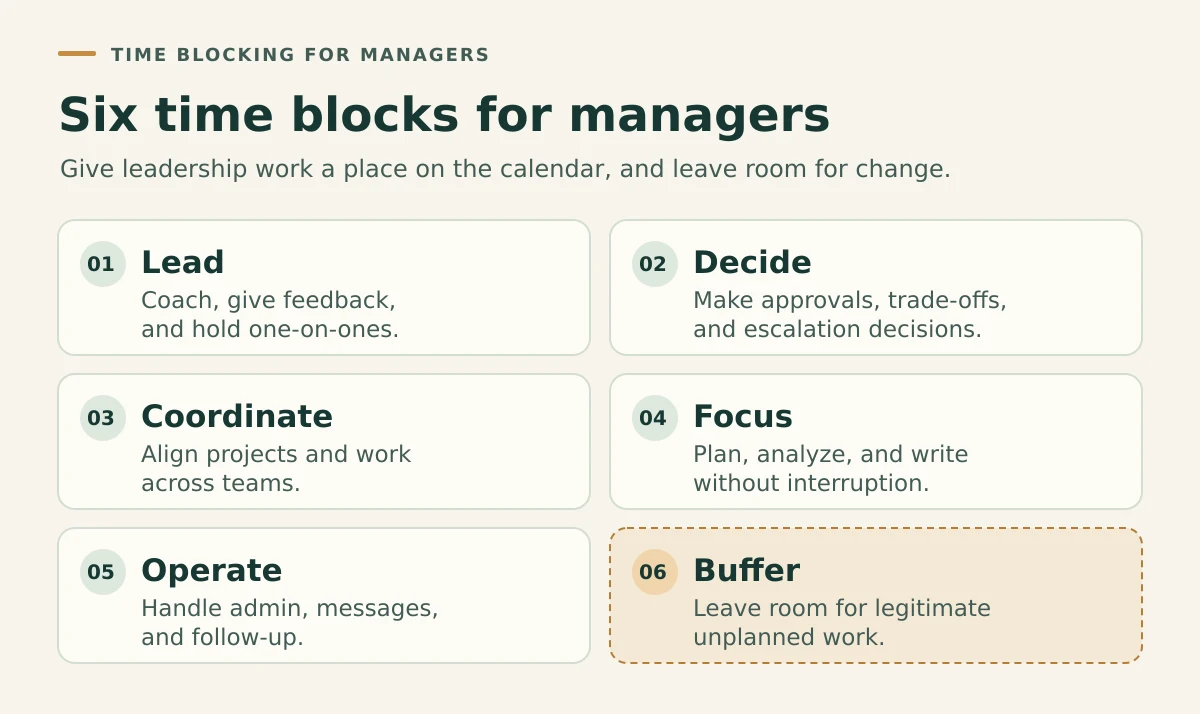
The six blocks create a practical vocabulary for deciding what deserves calendar space.
1. Lead
Lead blocks support people rather than merely process work.
They may include:
- One-on-ones
- Coaching and feedback
- Performance and development conversations
- Recognition
- Conflict resolution
- Onboarding
- Preparing for sensitive conversations
Do not treat every employee interaction as a meeting to minimize. Some conversations are core management work.
The important question is whether the block helps the employee think, decide, develop, or move work forward.
2. Decide
Decision blocks give accumulated questions somewhere to go.
They may include:
- Approving priorities or resources
- Resolving trade-offs
- Reviewing exceptions
- Making staffing decisions
- Evaluating risks
- Clarifying ownership
Not every decision needs a separate meeting. Ask team members to provide the relevant context, options, recommendation, and deadline. Then group suitable decisions into a recurring review window.
3. Coordinate
Coordinate blocks align work that genuinely depends on several people.
They may include:
- Team planning
- Project reviews
- Cross-functional meetings
- Dependency resolution
- Stakeholder updates
- Hiring interviews
Coordination is valuable when it reduces confusion, waiting, rework, or conflicting decisions. It becomes expensive when the meeting exists only because nobody has defined another way to share information.
4. Focus
Managers still need uninterrupted time for work that cannot be completed between messages.
Focus blocks may contain:
- Workforce or capacity planning
- Budget review
- Project risk analysis
- Performance documentation
- Preparing consequential decisions
- Writing difficult communications
- Process or system improvement
Protect one or two meaningful focus blocks before trying to create a calendar full of aspirational deep work. A manager with a meeting-heavy role may benefit more from two dependable 90-minute blocks than from five imaginary three-hour sessions.
5. Operate
Operate blocks keep routine management work from spreading through the whole day.
Examples include:
- Email and messages
- Meeting follow-up
- Approvals
- Scheduling
- Routine reporting
- Reviewing dashboards
- Updating project or people systems
Operational work is not unimportant. It simply needs boundaries so that it does not interrupt every other block.
6. Buffer
Buffer is intentionally unassigned capacity.
Use it for:
- An urgent employee concern
- A delayed meeting
- A customer or operational escalation
- Work that takes longer than expected
- Preparation or follow-up that could not happen earlier
- A transition after emotionally demanding work
If buffer is filled with optional tasks before the week begins, it is not buffer.
When the same “unexpected” issue consumes buffer every week, convert it into visible recurring work or fix the system producing it.
Create Predictable Access Instead of Permanent Availability
Managers often fear that protecting focus time will make them appear unavailable.
The better question is:
Does the team know when and how to reach me, what counts as urgent, and which decisions they can make without me?
Create an access system using some combination of:
- Office-hour or drop-in windows
- Regular one-on-ones
- A defined channel for urgent problems
- Response-time expectations for ordinary questions
- A shared decision or question list
- Clear delegation and decision rights
For example:
- Routine questions go into a shared list for the 2:00 p.m. access window.
- Customer-impacting problems use the team’s escalation channel.
- Employees may make reversible decisions within agreed limits.
- The manager’s Tuesday and Thursday focus blocks remain protected unless a defined exception occurs.
Predictable access can reduce waiting without requiring immediate response to every message.
Cluster Meetings Without Ignoring Team Needs
Meeting batching can protect larger pieces of the week, but it should not become a rigid rule that makes collaboration harder.
Look for meetings that can be grouped naturally:
- One-on-ones on the same afternoon
- Project reviews within one coordination window
- Hiring interviews on one or two designated days
- Administrative approvals before a recurring deadline
- Cross-functional meetings during shared overlap hours
Then protect the edges.
A 60-minute meeting may need:
- 15 minutes to prepare
- 60 minutes to meet
- 15 minutes to record decisions and send follow-up
If the calendar repeatedly schedules only the middle 60 minutes, the remaining work will invade another block.
Research on meeting-free periods also shows that removing meetings changes how people negotiate access and attention. The lesson is not that every organization needs meeting-free weeks. It is that collaboration norms must change alongside the calendar. Read the meeting-free-weeks study.
A Realistic Manager Time-Blocking Example
This example represents a manager with several direct reports, cross-functional responsibilities, and individual planning work. It is a capacity pattern, not a universal ideal week.
| Day | Morning | Afternoon | Protected capacity |
|---|---|---|---|
| Monday | Weekly direction, team priorities, decision review | One-on-ones and team access | 30-minute buffer before close |
| Tuesday | 90-minute focus block, project preparation | Project reviews and communication window | Meeting follow-up block |
| Wednesday | Cross-functional coordination | Coaching, approvals, operating buffer | Midweek reset |
| Thursday | 90-minute focus block, consequential decisions | Team access and stakeholder meetings | Unassigned escalation capacity |
| Friday | Development conversations and unfinished decisions | Follow-up, systems work, weekly review | Plan next week before leaving |
This schedule works because it:
- Creates several predictable ways for the team to reach the manager
- Clusters suitable meetings without forcing every conversation onto one day
- Protects two realistic focus blocks
- Makes decision work visible
- Includes follow-up and buffer instead of pretending meetings are self-contained
- Provides a midweek opportunity to reset the plan
If your days vary significantly, compare this pattern with the seven realistic time-blocking schedule examples. A manager may use a meeting-heavy pattern on Monday, a reactive pattern on Wednesday, and a focus-oriented pattern on Thursday.
Download the Free Weekly Time Blocking Planner
Use the free two-page Weekly Time Blocking Planner to calculate your real capacity, choose weekly outcomes, create visible buffer, and conduct a midweek reset.
Download the Free Weekly Time Blocking Planner
Use the six manager blocks as your labels: Lead, Decide, Coordinate, Focus, Operate, and Buffer.
What to Do When the Manager Schedule Breaks
A team problem, executive request, customer escalation, or employee concern can legitimately disrupt the week.
The mistake is moving the displaced work into another full day without acknowledging the trade.
Use five choices:
- Move: Reschedule the block into genuine open capacity.
- Shorten: Reduce the scope while preserving the most important output.
- Delegate: Transfer work with the authority, information, and standard required to complete it.
- Replace: Remove a lower-value block so the new priority has somewhere real to go.
- Remove: Decide that the displaced work no longer deserves capacity this week.
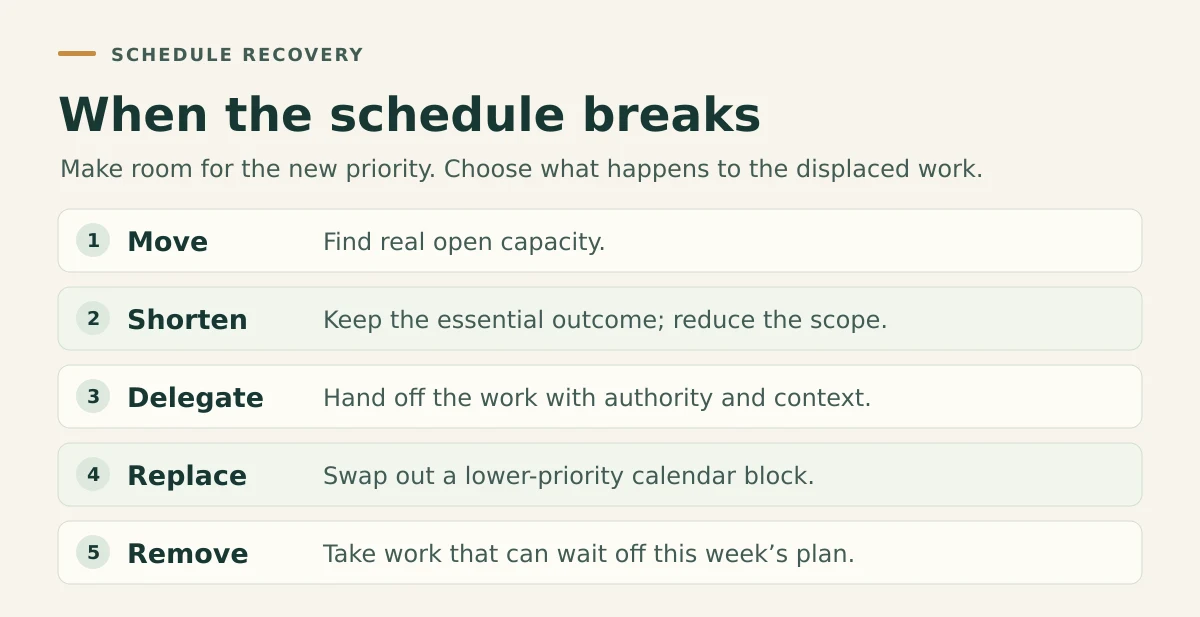
Use this rule:
When urgent work enters a full week, decide what it replaces.
If the entire calendar has become disconnected from reality, use The Time Blocking Reset to rebuild the affected period without treating disruption as personal failure.
Conduct a 15-Minute Manager Weekly Review
At the end of the week, compare the planned calendar with what actually happened.
Ask:
- Where did the team need more access?
- Which interruptions were actually predictable?
- Which decisions waited too long?
- Which meetings created insufficient value?
- Which focus block was repeatedly displaced?
- What should be delegated, documented, or clarified?
- What deserves protected capacity next week?
Do not grade yourself on whether every block happened exactly as planned.
Evaluate whether the calendar helped the team move, gave important management work a place, and made trade-offs easier to see.
In my management, training, and consulting work, the calendar problem was rarely that one responsibility did not matter. Team questions, preparation, delivery, follow-up, and longer-term design work all competed for the same week. The useful change was not pretending one category could disappear. It was deciding which work needed protected time, which access could become predictable, and which recurring issue needed a better system.
Common Time-Blocking Mistakes Managers Make
Copying an individual contributor’s schedule
A manager cannot treat every interruption as a failure. Team support and coordination are part of the role.
Correction: Protect meaningful focus while giving leadership and access visible capacity.
Blocking focus time without setting access expectations
A “busy” calendar entry does not tell the team what to do when they need help.
Correction: Pair focus blocks with access windows, escalation rules, and delegated decisions.
Scheduling meetings without preparation or follow-up
The meeting ends, but its decisions and actions remain unfinished.
Correction: Include the true edges of important meetings in the calendar.
Treating every question as urgent
Immediate answers train the system to depend on immediate availability.
Correction: Define which issues require escalation and batch ordinary questions appropriately.
Remaining the approval point for routine work
If the manager must approve every small decision, both the team and the calendar will wait.
Correction: Clarify decision rights and boundaries, then review exceptions instead of every case.
Protecting personal focus by fragmenting everyone else’s calendar
A schedule can work for the manager while making the team’s work harder.
Correction: Consider shared overlap, time zones, dependencies, and the team’s need for sustained attention.
Moving unfinished work without removing anything
Stacking displaced work onto tomorrow hides the conflict.
Correction: Move, shorten, delegate, replace, or remove.
Filling the buffer in advance
A calendar with no visible capacity cannot absorb a normal management week.
Correction: Leave some buffer genuinely open.
If your blocks repeatedly fail for reasons beyond a manager’s meeting load, use this broader guide to diagnose why time blocking does not work as planned.
Frequently Asked Questions About Time Blocking for Managers
Does time blocking work for managers?
Yes, when the schedule treats leadership, decisions, coordination, team access, and interruptions as real work. A manager should not simply copy a deep-work calendar designed for an individual contributor.
How much focus time should a manager schedule?
There is no universal target. Start with one or two blocks long enough to make meaningful progress, then compare them with actual meeting load and team needs. Two dependable 90-minute blocks may be more useful than several large blocks that are repeatedly cancelled.
How should managers handle interruptions?
Define what qualifies as urgent, create predictable access windows, delegate suitable decisions, and reserve buffer for legitimate surprises. Repeated interruptions should trigger a system question: can the information, ownership, process, or expectation be improved?
Should managers group one-on-ones?
Grouping one-on-ones can reduce unnecessary switching and preserve other parts of the week. However, the cadence and placement should reflect employee needs, time zones, workload, and the emotional demands of the conversations. Leave space to prepare and recover when necessary.
What belongs in a manager’s weekly review?
Review team outcomes, unresolved decisions, employee support, meeting value, recurring interruptions, displaced focus work, workload risks, and work that should be delegated or documented.
How can managers protect focus time without becoming unavailable?
Pair the focus block with a clear access system. Tell the team when you will be available, what channel to use for genuine urgency, and which decisions they may make independently.
What should a manager do when meetings consume the week?
Audit which meetings produce decisions or coordination, shorten or remove weak meetings, group suitable conversations, and include preparation and follow-up in the calculation. Then protect at least one block for work that only the manager can do.
Build a Week That Supports the Team and the Work
Time blocking for managers is not about becoming harder to reach.
It is about creating a week in which access, decisions, coordination, focused work, routine operations, and unexpected needs can coexist without remaining invisible.
Begin with the calendar you actually have.
Choose one team outcome and one management outcome.
Use the six manager blocks.
Create predictable access.
Protect a realistic amount of focus.
Leave buffer.
Then review and adjust the system when the week changes.
Turn Your Management Priorities Into a Workable Week
Time Blocking OS helps you calculate real capacity, protect important work, build buffer, and reset the calendar when conditions change.
It includes printable planning tools, weekly review sheets, AI-assisted scheduling prompts, a Google Calendar workflow, and guidance for choosing between time blocking and time boxing.
If your schedule is already overloaded or repeatedly collapsing, begin with the free 7-Day Time Blocking Reset.
You can find more practical systems for planning, focus, learning, and sustainable performance in the Better Work hub.