
Should you plan your schedule one day at a time, or map the whole week before Monday begins?
Both approaches can work. They simply solve different problems.
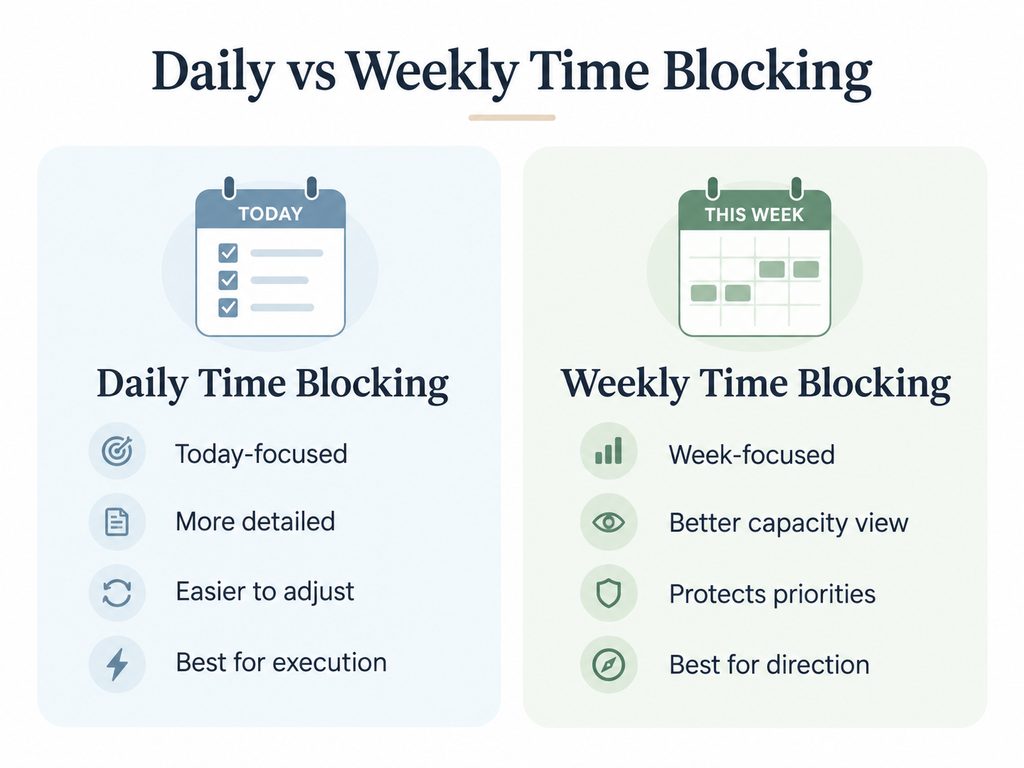
Weekly time blocking gives you perspective. Daily time blocking gives you precision.
A weekly plan helps you decide what deserves space before meetings, requests, and routine work consume the week. A daily plan helps you execute that intention using the information you actually have today.
For most people, the strongest approach is therefore not daily or weekly time blocking.
It is both:
Use the week to decide where your time should go. Use the day to decide how today’s version of that plan should work.
If you are new to the method itself, start with my Ultimate Guide to Time Blocking. This article focuses specifically on choosing the right planning horizon.
The Quick Answer: Should You Time Block Daily or Weekly?
Use daily time blocking when you need:
- detailed control of today’s work
- frequent adjustments
- a short planning horizon
- clear sequencing of tasks
- flexibility in an unpredictable schedule
Use weekly time blocking when you need:
- visibility across several days
- protection for important projects
- better workload and capacity decisions
- coordination across multiple priorities
- advance space for deep or focused work
Use both when your week needs direction but rarely unfolds exactly as planned.
A useful way to think about the distinction is:
Weekly planning = allocation.
Daily planning = execution and adjustment.
Daily vs Weekly Time Blocking at a Glance
| Dimension | Daily Time Blocking | Weekly Time Blocking |
|---|---|---|
| Planning horizon | One day | Entire week |
| Main purpose | Execution | Direction and capacity |
| Level of detail | High | Medium |
| Flexibility | Very high | Moderate |
| Workload visibility | Mainly today | Across several days |
| Handling disruptions | Easy to replan quickly | Requires moving work across days |
| Protecting important work | Good for today’s priorities | Better before the week fills up |
| Multiple projects | Harder to balance | Easier to compare |
| Planning effort | Small but frequent | Larger upfront session |
| Main risk | Becoming reactive | Becoming too rigid |
| Best fit | Unpredictable work | Competing priorities and commitments |
Neither column is inherently superior.
The right question is not, “Which planning method is better?”
It is:
Which decision am I trying to make?
What Daily Time Blocking Is Best For
Daily time blocking turns today’s available hours into a concrete execution plan.
Instead of opening a task list and repeatedly deciding what to work on, you decide in advance that a particular period belongs to a particular task or kind of work.
For example:
9:00–10:30 — Draft proposal findings
10:30–11:00 — Email and client messages
11:00–12:00 — Project review
1:00–2:30 — Revise presentation
2:30–3:00 — Buffer
That specificity can reduce the gap between deciding that something matters and actually starting it.
Research on implementation intentions has found that specifying when, where, and how an intended action will happen can improve goal pursuit compared with relying on intention alone.
Daily planning works especially well when your work changes quickly
Suppose you are a consultant.
At 4 p.m. Monday, a client sends information that changes Tuesday’s priorities.
A detailed plan created last Friday may now be obsolete.
Planning Tuesday on Monday evening lets you use information that simply did not exist when the week began.
The same is true for managers, entrepreneurs, service professionals, parents, and anyone whose available time depends heavily on other people.
Daily time blocking also gives you more execution detail
A weekly block might say:
Tuesday morning — Client report
A daily block can become:
9:00–10:30 — Draft findings section
10:30–11:00 — Check calculations
11:00–11:45 — Write recommendations
That level of detail is useful when your main problem is not knowing what matters, but actually getting started and finishing it.
The weakness of daily-only planning: it can become reactive
If you only ask:
What needs to happen tomorrow?
urgent work can win every day.
Monday’s urgent request pushes your important project to Tuesday.
Tuesday brings another request.
By Friday, you were busy all week but the work that mattered most never received protected time.
That is the limitation of looking at one day in isolation.
What Weekly Time Blocking Is Best For
Weekly time blocking solves the opposite problem.
Instead of asking what fits today, you ask:
What must this entire week carry?
That changes the planning conversation.
You can see:
- deadlines across several days
- meetings competing for the same focus periods
- projects requiring multiple work sessions
- personal and family commitments
- days that are already overloaded
- where unfinished work could realistically move
- whether your priorities actually fit
Stanford’s Student Learning Programs similarly recommends planning the week by placing fixed obligations and personal non-negotiables first, then scheduling specific work while keeping the plan flexible enough to change.
Weekly planning protects important work before the week becomes reactive
Imagine you need four hours to finish an important strategy document.
If you wait until each morning to find time for it, those four hours must compete with whatever else has appeared.
A weekly view lets you say:
Tuesday 9–11: Strategy document
Thursday 9–11: Finish strategy document
The work now has a claim on the week before routine activity expands into the space.
Weekly planning exposes capacity problems
This may be its biggest advantage.
A to-do list can contain twenty hours of work even when you have only twelve hours available.
Nothing on the list warns you.
A weekly calendar does.
This matters because people are vulnerable to the planning fallacy: we often underestimate how long future work will require and imagine future time as more available than it eventually becomes.
Weekly planning forces priorities to compete for actual hours rather than imaginary capacity.
The weakness of weekly-only planning: the future changes
The danger is treating Sunday’s information as if it will remain correct on Thursday.
It will not.
Meetings move.
Tasks take longer.
Priorities change.
Energy changes.
A client sends something unexpected.
Weekly time blocking becomes frustrating when the calendar is treated as a contract rather than a working model.
That is why my [INTERNAL LINK: How to Time Block Your Week] guide deliberately includes daily refinement and a midweek reset rather than assuming the original weekly plan will survive untouched.
When Daily Time Blocking Works Better
Daily planning deserves more weight when uncertainty is high.
Your work is highly reactive
Customer support, operations, leadership, consulting, and client service may generate genuinely important work with little notice.
A lighter weekly structure plus stronger daily planning can handle this better than a highly detailed five-day calendar.
You know your priorities but struggle with execution
Maybe the strategic decisions are already clear.
You know the report must be written.
You know the campaign must launch.
You know the application must be submitted.
Your problem is turning that intention into two focused hours this morning.
Daily blocking is often enough.
Your schedule varies dramatically
If no two days look similar, trying to maintain a detailed weekly calendar may create more planning maintenance than value.
Plan the broad week, then make the day concrete.
You need short feedback loops
Daily planning lets you learn quickly.
You estimated 90 minutes for a task yesterday.
It actually took three hours.
Today’s plan can immediately reflect that information.
When Weekly Time Blocking Works Better
Weekly planning deserves more weight when competition for capacity is high.
You manage several projects at once
A daily view may tell you Tuesday is fine.
It does not show that Project A has occupied every productive morning while Projects B and C are quietly approaching their deadlines.
Weekly visibility makes those trade-offs harder to ignore.
Important work keeps getting postponed
Strategic work often loses to activity with an immediate signal attached to it:
- meetings
- messages
- requests
- administration
- other people’s priorities
A weekly plan lets you protect important work before those demands expand.
You routinely overcommit
If your plan repeatedly assumes more productive hours than the week contains, you have a capacity problem before you have an execution problem.
A weekly view makes the arithmetic visible.
Work and personal responsibilities compete for the same time
The calendar should represent the life the work has to fit inside.
That means including:
- family commitments
- school schedules
- exercise
- appointments
- travel
- meals
- recovery
- other non-work responsibilities
If those realities are invisible, the calendar is not actually showing your available capacity.
Why Daily and Weekly Time Blocking Work Better Together
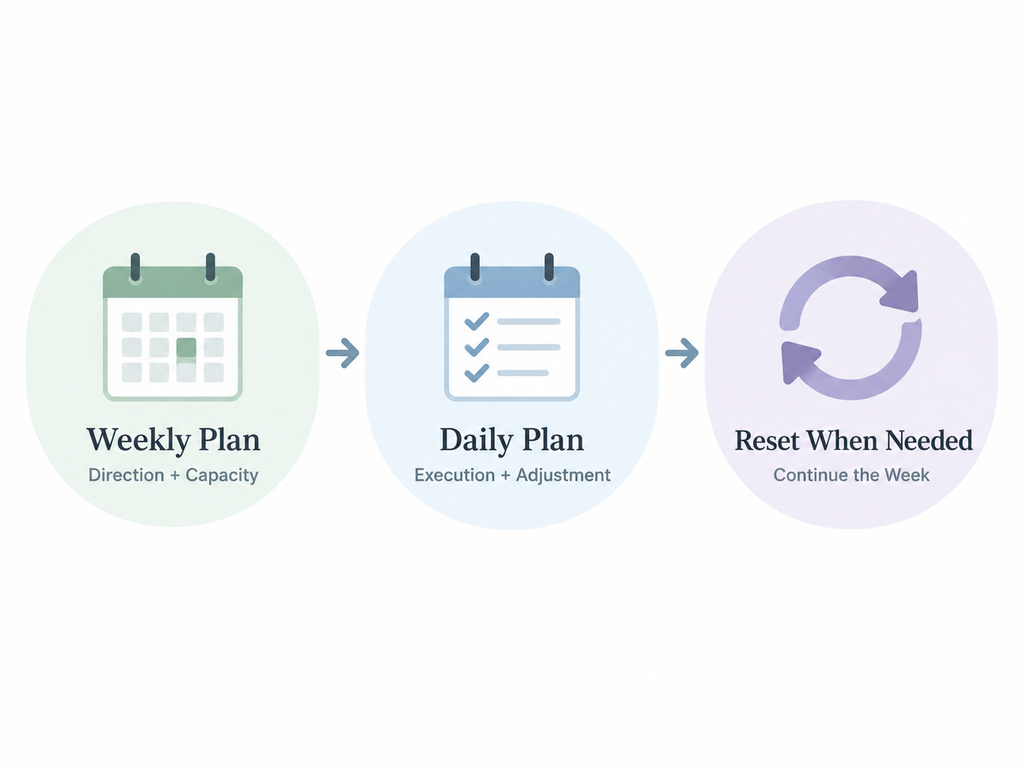
The distinction becomes much simpler when you stop making the two methods compete.
Think of it this way:
The weekly plan is the map. The daily plan is the steering.
The map tells you where you intend to go.
Steering responds to what is happening on the road.
You need both.
The weekly layer decides:
- which outcomes matter
- where important work gets protected
- which commitments are fixed
- how much capacity remains
- where buffer exists
- what can move if necessary
The daily layer decides:
- what today’s specific output is
- what order the work should happen in
- what changed yesterday
- what needs to move
- what no longer deserves time
- how to use today’s actual energy and information
Cal Newport describes a similar relationship between broader planning and daily time blocking: he plans at longer horizons but updates the actual daily block schedule when reality changes, rather than treating the first version as permanent.
The hybrid approach avoids the main weakness of each method.
Daily only: flexible, but potentially reactive.
Weekly only: strategic, but potentially brittle.
Weekly + daily: directional and adaptable.
A Simple Weekly-to-Daily Time Blocking Workflow
You do not need two complicated planning rituals.
Use one lightweight cycle.
1. Choose one to three outcomes for the week
Ask:
What needs to be meaningfully further ahead by Friday?
Focus on outcomes rather than a long task inventory.
2. Add fixed commitments
Put in the things that cannot easily move:
- meetings
- appointments
- deadlines
- classes
- family responsibilities
- travel
- other non-negotiables
3. Protect major work blocks
Reserve enough time for the week’s priorities before filling every remaining gap with smaller activity.
4. Leave buffer
Do not assume every available hour can be used productively.
Leave capacity for:
- overruns
- interruptions
- transitions
- urgent work
- recovery
5. Refine tomorrow rather than rebuilding the whole week
Near the end of each day, ask:
- What changed?
- What remains important?
- What moved?
- What is tomorrow’s key output?
- Does the existing block still make sense?
Then make the smallest useful adjustment.
6. Reset the remaining week when necessary
If one day goes badly, do not discard the entire system.
Trade blocks.
Remove lower-priority work.
Move important work into a real opening.
If the calendar has become completely disconnected from reality, use The Time Blocking Reset rather than trying to “catch up” by stacking everything onto tomorrow.
For the full step-by-step weekly method, use How to Time Block Your Week.
An Example of the Hybrid Approach
Suppose your weekly priorities are:
- Finish a client strategy
- Publish an article
- Prepare a presentation
Your weekly plan might initially look like this:
Monday morning: Client strategy
Tuesday morning: Article
Wednesday morning: Client strategy
Thursday morning: Presentation
Friday morning: Final delivery and overflow
That is enough detail for the weekly layer.
Then Monday evening, you learn that the client cannot provide necessary data until Wednesday.
You do not need to declare the week ruined.
Tuesday’s daily plan might become:
9:00–10:30: Draft article
10:30–11:00: Break and messages
11:00–12:00: Article revision
1:00–2:00: Presentation outline
2:00–3:00: Meetings
3:00–4:00: Administration
4:00–4:15: Review Wednesday
The weekly priorities remain.
The daily execution changes.
That is the point.
Which Time-Blocking Approach Should You Use?
If you are still unsure, use the problem you are trying to solve.
Start with daily time blocking if:
- your schedule changes constantly
- detailed weekly planning feels excessive
- you already know your priorities
- your main difficulty is execution
- you need frequent replanning
Start with weekly time blocking if:
- important work repeatedly gets crowded out
- you manage several projects
- deadlines compete across several days
- you routinely overestimate your available time
- you need visibility across work and personal commitments
Use both immediately if:
- you want structure
- your weeks are moderately predictable
- but you know the original plan will need adjustment
For most professionals, that third option is the most practical.
I would begin with a relatively light weekly plan plus a five- to ten-minute daily adjustment.
Not two full planning systems.
One system operating at two levels.
What Should You Use to Build the Plan?
The tool matters less than the planning decision.
If you prefer a digital system that lets you move blocks, track priorities, and review weekly capacity, I created a free Google Sheets and Excel Time Blocking Template.
If you think better with pen and paper, use one of my printable time blocking templates instead.
The method is the same:
Decide → allocate → execute → adjust.
Do not spend so much time maintaining the planning tool that the tool becomes another form of work.
Common Questions About Daily and Weekly Time Blocking
Should I plan my week on Sunday or Monday?
Either can work.
Plan early enough that you can see the week’s commitments before important work begins.
If Sunday planning feels like work invading your weekend, use the final 15–30 minutes of Friday or the beginning of Monday instead.
Consistency matters more than the particular day.
How often should I change my weekly plan?
Change individual blocks whenever new information makes the existing plan unrealistic.
Do not rebuild the entire week every time one block moves.
A useful rule is:
Adjust locally until the changes become structural.
If Tuesday changes, update Tuesday.
If Tuesday’s change pushes several deadlines and priorities across the rest of the week, run a short weekly reset.
Can I use daily time blocking without weekly planning?
Yes.
Daily-only time blocking can work well when priorities are already clear and your work is highly unpredictable.
Its main limitation is that you may lose visibility across several days.
If important work repeatedly gets postponed, add a lightweight weekly review rather than immediately building a highly detailed weekly calendar.
How detailed should a weekly time-blocking plan be?
Detailed enough to reserve real capacity, but not so detailed that every small change requires rebuilding the schedule.
Your weekly blocks might say:
- Client delivery
- Article draft
- Focus work
- Business development
Then the daily plan can define the specific output.
The further into the future you are planning, the less precision you generally need.
The Better Question Is Not Daily or Weekly
Daily and weekly time blocking are not competing productivity philosophies.
They are two planning horizons.
Weekly planning helps you protect priorities before the week fills.
Daily planning helps you execute those priorities using today’s reality.
If your schedule is highly unpredictable, lean more heavily on the daily layer.
If you manage competing projects and commitments, strengthen the weekly layer.
But for most people:
Plan the direction weekly. Refine the execution daily.
And when reality breaks the original plan, do not interpret that as evidence that the system failed.
Adjust it.
The week will break.
The system is the return path.
Put the System Into Practice
If your biggest problem is not creating a calendar but returning to it after the plan changes, start with my free 7-Day Time Blocking Reset.
It gives you a practical workbook and a seven-day process for rebuilding a realistic schedule without starting over every time life interrupts the plan.
Already comfortable with the method and ready to build next week?
Use the free Google Sheets and Excel Time Blocking Template to turn your weekly priorities into an editable plan.



