
A Kaizen event brings the people who do a process together to improve it within a focused period of time. To run one, choose a narrow problem, collect a baseline, give the team time and authority to test a change, and assign someone to follow the results after the event.
The difficult part is rarely filling an agenda. It is moving from a room full of opinions to a change that works in everyday conditions.
This guide gives you a preparation checklist, an adaptable three-day agenda, and an illustrative office-workflow example. You can use it to plan your first event without turning it into a large improvement program.
When Should You Run a Kaizen Event?
A Kaizen event is a coordinated effort to improve a specific process. It normally involves more preparation and implementation than a single brainstorming session. The EPA’s Lean toolkit describes three phases: preparation, implementation, and presentation with follow-up. It describes the event itself as lasting two to five days, depending on scope.
You do not have to force every problem into that format. Use a focused event when the work crosses several roles, the problem recurs often enough to observe, and the team can make a meaningful test during the available time.
For example, requests may repeatedly move between sales, operations, and a delivery team because nobody agrees what information is needed before work starts. Bringing those people together can help them examine the same handoff and test a shared approach.
A short exercise is enough when the next step is simply to understand one issue or plan one small test. See these Kaizen activities for teams for exercises and a 60-minute session plan. If you need ideas for what to improve, start with the workplace Kaizen examples.
Postpone the event if nobody can own the process afterward. A workshop can produce an attractive new workflow that quietly disappears when normal work resumes.
Prepare Before You Invite the Team
Send participants a short brief they can read before the event. Keep it specific enough that two people would agree on what is inside and outside the scope.
Write a One-Page Event Charter
Use these fields as a starting point:
- Problem: What repeatedly goes wrong, where, and for whom?
- Process boundary: What triggers the process, and where does this event’s responsibility end?
- Evidence: Which recent examples, timestamps, or records show the problem?
- Aim: What would a useful improvement look like, and by when?
- Measures: How will you judge the result and detect extra burden elsewhere?
- Authority: What can the team change during the event? Who must approve anything outside that boundary?
- Owner: Who will maintain the process and review the test?
Replace “improve communication” with something observable, such as “reduce clarification loops between receiving a standard internal request and assigning its owner.” The narrower wording makes it easier to collect evidence and choose a realistic test.
Choose Roles Around the Work
Invite people because of what they know or can decide. A useful group includes:
- Process owner: responsible for the workflow after the event.
- People doing the work: able to show exceptions, workarounds, and actual constraints.
- A requester or recipient: able to explain how the proposed change affects the other side of the handoff.
- Facilitator: keeps discussion connected to evidence, decisions, and time.
- Sponsor or decision-maker: resolves resource or policy barriers the team cannot resolve.
One person can fill more than one role in a small team. However, a facilitator should make room for disagreement, especially when they also manage the participants.
Collect a Baseline You Can Repeat
Decide what counts before calculating an average. For a request process, does the clock start at the first email or only after the request is complete? Does “assigned” mean a name entered in a system, or an owner accepting responsibility?
Keep the definition fixed during the comparison. Choose a baseline period that includes ordinary variation in the work. Record the number and type of requests as well as the result; a quiet week of easy requests is a weak comparison for a busy week of complex ones.
Also arrange access to the records, a shared workspace, and coverage for participants’ normal responsibilities. A calendar invitation does not create protected working time by itself.
A Three-Day Kaizen Event Agenda
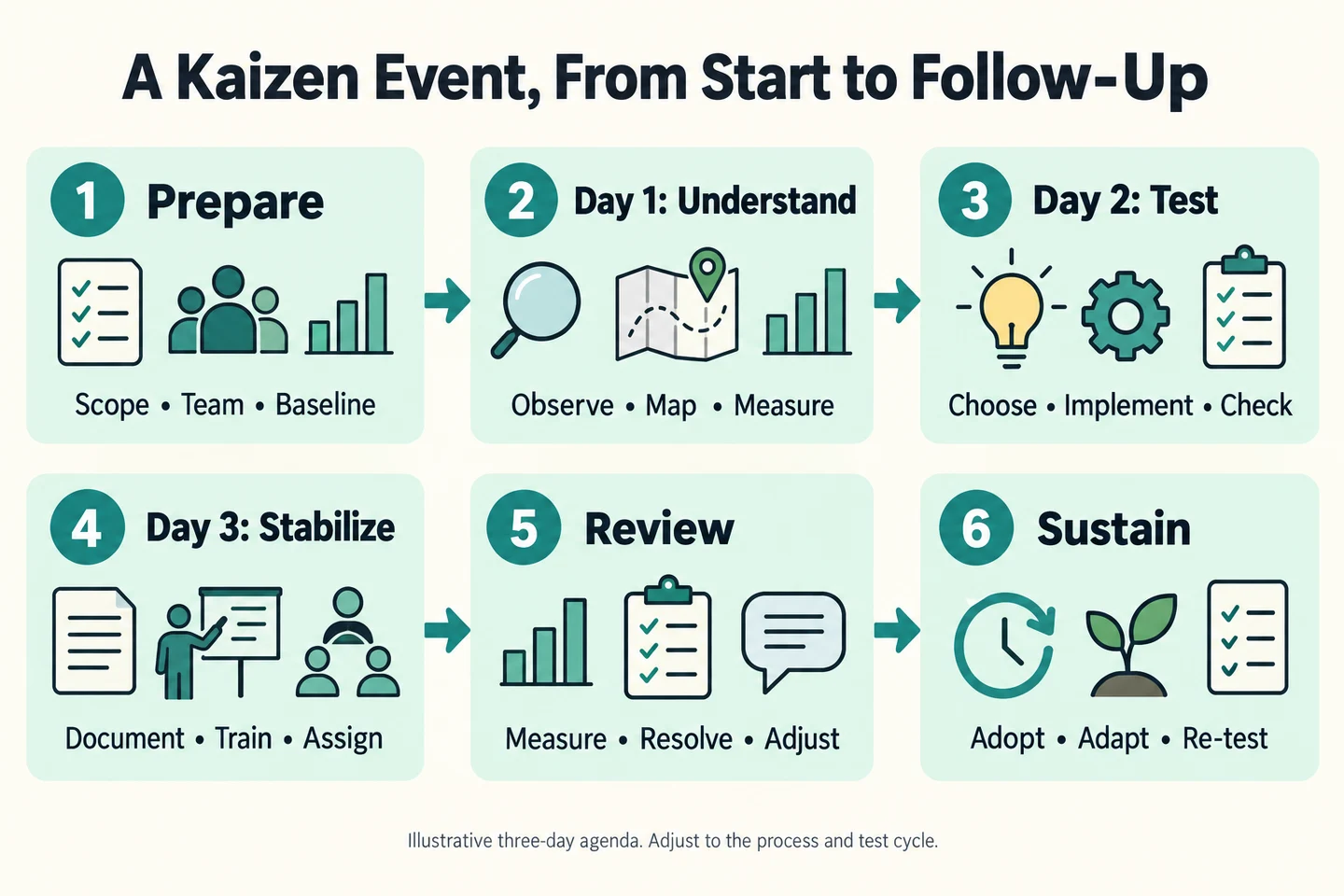
The agenda below is a suggested format for a narrow office or service process. It is an original planning example, not a requirement that every event take three days. Preparation happens beforehand, and follow-up continues afterward. Expand the test period when the process takes longer to produce useful evidence.
Day 1: Understand the Current Work
Morning: Confirm the charter and invite the people doing the work to walk through recent cases. Trace what actually happened, including waiting, clarification, handoffs, and repeated entry of information. Separate observed facts from explanations that still need checking.
Afternoon: Draw a simple current-state map. Mark the point where the selected problem appears and examine a few contrasting cases: one that went smoothly, one delayed, and one with an exception. Use those differences to develop a testable explanation.
Leave with: an agreed process map, measurement definitions, and one cause hypothesis with supporting evidence. If you cannot explain why the problem occurs, assign further observation before choosing a solution.
Day 2: Implement a Small Test
Morning: Compare a few changes against the hypothesis. Ask which one is small enough to try, reversible if it fails, and likely to answer the team’s most important question. Write down a prediction before starting.
Afternoon: Put the selected change into use on a limited, agreed scope. Observe people using it. Record confusion, exceptions, extra effort, and anything that makes the proposed workflow impractical.
Leave with: a working test, an observation log, and a clear decision about what happens next. A mock-up can reveal usability problems, but it does not establish the performance of the real process. Label simulated tests accordingly.
Day 3: Stabilize the Test and Assign Follow-Up
Morning: Review the evidence available so far. Adjust the test if necessary. Document the current instructions, including what to do when a request does not fit the normal path. Let someone who did not design the change try following them.
Afternoon: Give a short report-out: the problem, baseline, proposed change, what was tested, what was observed, and what remains uncertain. Assign owners and due dates to open actions before the team disperses.
Leave with: a named process owner, usable instructions, a measurement plan, and a review appointment. If the evidence is incomplete, the output is a controlled pilot with follow-up, not a declaration of success.
Worked Example: Clarifying Internal Request Handoffs
This is an illustrative scenario, not a documented client project or a claim about results achieved by Samphy. The numbers below are invented to demonstrate measurement.
Imagine an operations team receiving routine requests through email. Requests often lack the desired outcome, deadline, or supporting file. The coordinator asks follow-up questions before an owner can accept the work.
The Charter
- Scope: standard internal requests, from first submission to accepted ownership. Urgent and unusual requests keep a separate escalation route.
- Problem: missing details create clarification loops before assignment.
- Hypothesis: people do not share a clear definition of a ready-to-assign request.
- Proposed test: one team uses a short request format for one week, with examples beside each required field.
- Owner: the operations coordinator, supported by a requester representative.
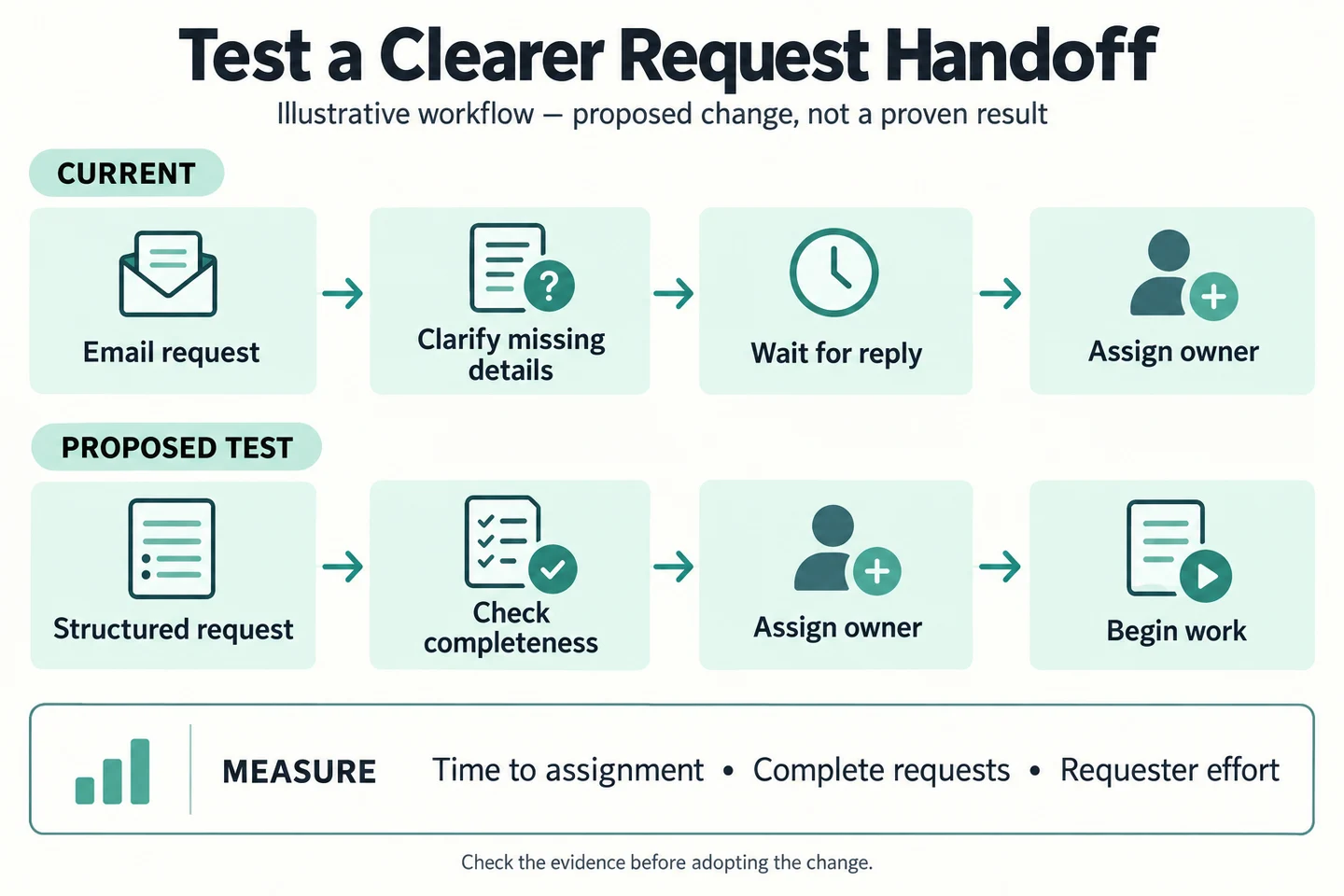
During day one, the team would review real request records to check the hypothesis. If delays mostly occur after complete requests arrive, a new request format may address the wrong problem. That is useful learning before introducing another form.
For day two, the proposed format could ask for just four things: desired outcome, needed-by date with a reason, relevant files, and a contact for questions. A checklist would tell the coordinator what to verify before assignment. The team would also specify how incomplete requests return for clarification without becoming invisible in the queue.
Measure the Same Start and Finish
Suppose a fictional baseline contains 20 comparable requests, of which 8 arrived complete. The completeness rate is 8 ÷ 20 = 40%. A later pilot contains 10 comparable requests, of which 7 arrived complete: 7 ÷ 10 = 70%. That would be an increase of 30 percentage points in this invented example.
Even then, the team would need to ask whether the request mix changed, whether people received extra help during the pilot, and whether the result persists. A small before-and-after comparison does not prove that the new format caused the difference.
Track three complementary measures:
- Time to accepted assignment: from the initial submission to an owner accepting the request. Include clarification time. Specify whether you use elapsed or business hours.
- Completeness at first submission: complete requests divided by all eligible requests, using the same checklist.
- Requester effort: time or difficulty involved in preparing the request, plus repeated or abandoned submissions where observable.
The third measure matters because a faster coordination step can conceal extra work pushed onto the requester. Also watch the oldest unassigned requests; a better median should not hide a growing tail of unresolved work.
Follow Up Until the Change Works in Normal Conditions
Book the first review before the event ends. For the one-week request pilot above, review at the end of that week, then check again after several ordinary work cycles if the team adopts the change. Choose dates that fit the process rather than treating a fixed 30-day schedule as a rule.
At the review, make one explicit decision:
- Adopt: keep the change within the tested scope, update instructions, and continue checking performance.
- Adapt: revise a specific part and state the next prediction.
- Abandon: stop the change when it adds burden or fails to address the problem, while retaining what the team learned.
Maintain a short action log with an owner, due date, and evidence of completion for each item. “Train everyone” is difficult to verify. “Walk the two receiving teams through three sample requests and record unresolved questions” gives the owner something concrete to finish.
Do not close an event solely because the presentation happened. Close its remaining actions when responsibilities have transferred, necessary instructions are available, and the next performance review has an owner.
Common Mistakes That Weaken a Kaizen Event
- Arriving with the answer: a manager’s preferred tool becomes the project before the team examines the work. Start with the problem and test the explanation.
- Inviting only managers: the new process misses the exceptions people handle every day. Include those who perform and receive the work.
- Spending every day analyzing: the team leaves with recommendations nobody has tried. Reserve time and authority for an appropriately scoped test.
- Removing a step without understanding it: an apparent delay may serve a necessary quality or approval purpose. Preserve that purpose while testing a better way to achieve it.
- Reporting only a good-looking number: faster work may come with more mistakes or extra burden elsewhere. Keep a balancing measure beside the main result.
Common Questions About Running a Kaizen Event
Can a Kaizen Event Last One Day?
A narrowly scoped process may allow a useful change and test in one day if preparation is complete. If the session only identifies problems or plans a later test, describe its output that way. Extend the work when implementation or observation needs more time.
How Many People Should Participate?
Choose the smallest group that can understand the whole selected process, make the necessary decisions, and carry out the test. Check representation across the handoff before deciding on a headcount. Invite specialists for the part where their input is needed.
Can You Run a Kaizen Event Remotely?
Yes. Ask participants to bring a few appropriately redacted work examples and build a shared process map. Use short live sessions for decisions, with observation and testing between them. Keep one visible action log so the next step is not lost across messages and meetings.
Do You Need Special Software?
A shared document, a simple board, and access to relevant records can be enough. Use tools the team already understands unless the test specifically concerns a tool limitation. The most important artifact is a clear account of what changed and what happened.
Plan Your First Test
Start with one recurring problem and write its boundary in a sentence. Name the process owner, collect a baseline, and decide what evidence would make a small test worth continuing.
Use the free Kaizen Improvement Worksheet (PDF) to record an individual improvement test. Pair it with the charter and agenda above; the worksheet supports the test rather than replacing the full event plan.
For the wider approach, read how Kaizen can improve productivity. Your first event does not need to transform an entire department. It needs to leave one process better understood, one change properly tested, and someone responsible for what happens next.



