
Office hour appointments are a versatile time management strategy for anyone who needs to coordinate meetings, consultations, or support sessions. Whether you’re a teacher supporting students, a business professional managing clients, or an individual seeking better time management, mastering open hour scheduling can enhance productivity, foster meaningful interactions, and streamline communication.
This guide explores the benefits, tools, and strategies to make open hour scheduling work for diverse audiences and needs.
Why Open Hour Scheduling Matters
Scheduling office hours involves designating specific time slots during which people can book meetings or consultations. It offers several advantages:
Accessibility: Clear scheduling makes it easy for others to know when they can connect with you.
Efficiency: Organized schedules reduce interruptions and ensure focused time for other tasks.
Engagement: Dedicated time slots encourage meaningful, real-time interactions.
From supporting clients or team members to enhancing personal productivity, scheduling office hours is a flexible solution that suits many scenarios.

Types of Open Hours: In-Person vs. Virtual

In-Person Open Hours
In-person open hours allow face-to-face interaction and are ideal for:
Educators: Supporting students with coursework, projects, or mentoring.
Professionals: Hosting consultations, team check-ins, or collaborative sessions.
Scheduling and managing virtual office hour meetings can also streamline the setup process for educators.
Tips for Effective In-Person Scheduling:
Consistency: Set regular hours (e.g., every Tuesday from 2-4 PM) for reliability.
Clear Communication: Notify your audience via email, signage, or announcements.
Preparation: Encourage participants to bring questions or topics in advance.
Virtual Office Hours
Virtual open hours leverage technology to provide flexibility and accessibility, especially for remote participants. Common tools include Zoom, Google Meet, and Microsoft Teams.
Advantages:
Accessibility for people in different locations or time zones.
Convenience for those with busy schedules or mobility challenges.
The ability to record sessions for review.
Tips for Effective Virtual Scheduling:
Use Scheduling Tools: Platforms like Calendly simplify bookings.
Create Virtual Waiting Rooms: Keep sessions organized with tools like Zoom’s waiting room feature.
Share Details in Advance: Provide meeting links and instructions ahead of time.
Tools for Optimizing Open Hour Scheduling

Google Calendar Appointment Slots
Google Calendar’s appointment slots feature helps organize open hours efficiently. It allows you to define time blocks and share a booking link.

How to Use:
- Visit Appointment Scheduling with Google Calendar page (You’ll need to pay an extra fee or be part of an organization that uses Google Workplaces to be able to use the feature)
Click “Create”
- In the dropdown menu, click “Appointment Schedule”
Specify slot duration (e.g., 15 minutes).
Share the booking link with your audience.
Calendly
Calendly provides a user-friendly way to schedule appointments. It integrates with tools like Zoom and automatically adjusts for time zones.
Features:
Automated reminders reduce no-shows.
Flexible scheduling options, including group bookings.
Integration with calendars and video conferencing tools.
Here’s how to create a booking page with Calendly:
Microsoft Teams
Ideal for virtual open hours, Microsoft Teams offers:
Scheduling through Outlook.
Features like screen sharing and file collaboration.
Secure communication for sensitive discussions.
Microsoft Bookings
Microsoft Bookings, free for Microsoft 365 business users, provides robust solutions for online appointment scheduling, catering to professionals, educators, and service providers alike.
Microsoft Bookings:
Enables businesses and educators to set up a professional booking page.
Offers customizable appointment types with different durations.
Syncs with Outlook calendars for seamless scheduling and availability management.
Sends automatic email confirmations and reminders to participants.
See this video on how to set up a booking page with Microsoft Bookings:
The tool enhances productivity by streamlining the scheduling process and providing participants with clear and accessible booking options.
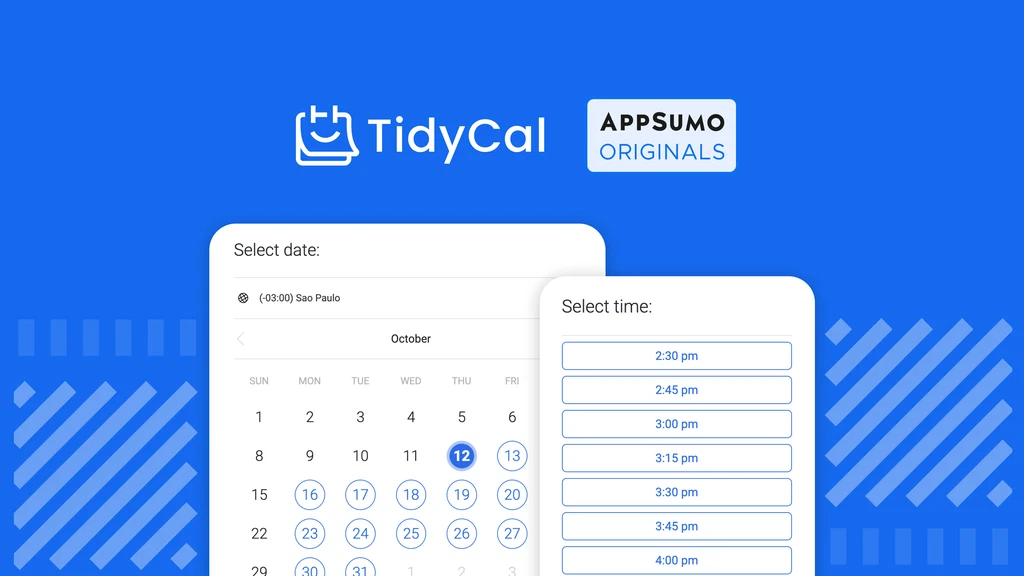
TidyCal
TidyCal is an affordable, streamlined scheduling tool for professionals and businesses.

Features:
- Customizable booking pages with your branding.
- Time zone detection for seamless scheduling across regions.
- One-time payment for lifetime access, making it a budget-friendly option.
- Integrations with popular calendars like Google Calendar and Outlook.
TidyCal’s simplicity and cost-effectiveness make it a great choice for solopreneurs and small businesses looking for a hassle-free scheduling solution.
Strategies for Effective Open Hour Scheduling

1. Understand Your Audience’s Needs
Tailor open hours to fit the preferences of your audience. For example:
Professionals might prefer early mornings or evenings.
Students might favor afternoons or evenings after classes.
Utilize tools like Calendly and Google Calendar to schedule office hours, ensuring the process is streamlined and availability is managed effectively.
2. Set Clear Boundaries
Define:
Frequency: Weekly, bi-weekly, or monthly sessions.
Duration: Fixed hours (e.g., 2 hours per session).
Scope: Focus on specific topics or areas to avoid overloading.
Communicate these boundaries clearly to ensure alignment.
3. Encourage Preparedness
Request attendees to:
Submit questions or topics in advance.
Review relevant materials beforehand.
This ensures productive and focused discussions. Additionally, scheduling and managing virtual office hour meetings can help streamline the setup process and ensure that both educators and students are well-prepared.
4. Leverage Analytics
Track attendance and engagement using scheduling tools to understand:
Peak demand times.
Common questions or issues.
Opportunities for format or scheduling improvements.
Additionally, managing and scheduling office hour appointments effectively can streamline interactions between educators and students, making the process more convenient and efficient for both parties.
Setting Up Office Hour Schedules

Setting up office hour schedules can be a daunting task, especially for educators with busy schedules. However, with the right tools and strategies, it can be a breeze. Here are some tips to help you set up an effective office hour schedule:
Determine Your Availability: Start by identifying the days and times you are available to hold office hours. Consider your teaching schedule, meetings, and other commitments to ensure you choose the most convenient times.
Choose a Scheduling Tool: Select a scheduling tool that works for you, such as Google Calendar, Doodle, or Calendly. These tools allow students to schedule appointments with you easily and help streamline the scheduling process.
Set Up Time Slots: Create time slots for your office hours, considering the length of each appointment and the number of students you can accommodate. This helps manage your time effectively and ensures each student gets the attention they need.
Specify the Office Location: Clearly indicate the location of your office hours, whether it’s in person or virtual. Providing detailed meeting details helps students know exactly where to go or how to join the session.
Establish a Minimum Notice: Set a minimum notice period for students to schedule appointments, ensuring you have enough time to prepare. This helps avoid last-minute bookings and allows you to manage your busy schedule better.
Consider Group Meetings: Offer group meetings for students who have similar questions or concerns. This not only saves time but also fosters collaborative learning among students.
Share Your Schedule: Share your office hour schedule with your students through your course website, email, or learning management system. Clear communication ensures that students are aware of your availability and can book appointments easily.
Creating a Productive Office Hour Environment

Creating a productive office hour environment is crucial for effective student-teacher interactions. Here are some tips to help you create a conducive environment:
Prepare in Advance: Review student requests and prepare any necessary materials before the office hour. This ensures that you are ready to address their questions and concerns efficiently.
Minimize Distractions: Choose a quiet and private space for in-person office hours, and consider using a virtual waiting room for online office hours. A distraction-free environment helps maintain focus and productivity during meetings.
Use Technology to Your Advantage: Utilize video conferencing tools, screen sharing, and recording capabilities to enhance the office hour experience. These tools can make virtual office hours as effective as in-person sessions.
Encourage Active Participation: Foster a collaborative environment by encouraging students to ask questions and engage in discussions. Active participation leads to more meaningful and productive interactions.
Take Notes: Take notes during the office hour to ensure you remember important details and follow up with students as needed. This helps in providing continuous support and addressing any unresolved issues.
Follow Up: Send a follow-up email or message to students after the office hour to provide additional support and resources. This reinforces the information discussed and shows your commitment to their success.
Continuously Evaluate and Improve: Regularly assess your office hour schedule and environment, making adjustments as needed to optimize the experience for your students. Gathering feedback from students can provide valuable insights for improvement.
By following these tips, you can create an effective office hour schedule and environment that supports student success and fosters a positive learning experience.
Promoting Your Open Hours
For Educators and Professionals
Announcements: Share details via email, newsletters, or platforms like Slack.
Social Media: Promote on LinkedIn, Twitter, or other relevant platforms.
Websites: Add a scheduling widget or dedicated page for bookings.
Frequently Asked Questions

What is open hour scheduling?

Open hour scheduling is a time mastery strategy where designated blocks of time are set aside for meetings, consultations, or discussions. It allows individuals to book appointments during predefined periods, ensuring accessibility and efficiency.
Who can benefit from open hour scheduling?
Anyone who needs to manage appointments or provide support can benefit from open hour scheduling. This includes educators, business professionals, team leaders, and service providers.
What tools are best for open hour scheduling?
Popular tools include Google Calendar, Calendly, Microsoft Bookings, and Microsoft Teams. These platforms help streamline the scheduling process, automate reminders, and integrate with other productivity tools. If you do not want to spend money on monthly subscriptions, check out TidyCal. It is a one off payment with a lifetime license!
How do I promote my open hours?
Promote open hours through email announcements, social media, and dedicated sections on your website. Clear communication and visibility ensure participants are aware of your availability.
What are the benefits of virtual open hours?
Virtual open hours provide flexibility, accessibility across locations and time zones, and the convenience of online collaboration tools. They are ideal for remote teams, online educators, and global clients.
Conclusion
Mastering open hour scheduling benefits individuals across professions and roles by improving accessibility, productivity, and engagement. By leveraging tools, setting clear boundaries, and promoting availability effectively, you can create meaningful and efficient interactions.
Start optimizing your open hour scheduling today to enhance productivity and connection in your professional or personal life!



